3D Bolt Master™

5M+
Installs
Joymaster Puzzle Game Studio
Developer
-
Casual
Category
-
Everyone
Content Rating
-
joymastercontact@gmail.com
Developer Email
-
https://www.joymaster-studio.com/privacy.html
Privacy Policy
Screenshots

editor reviews
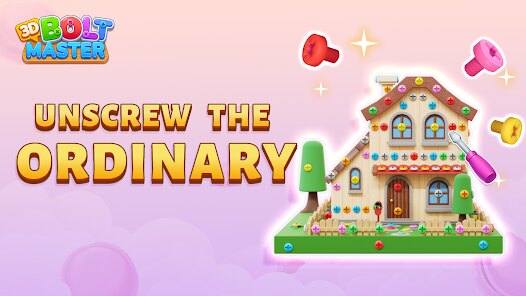
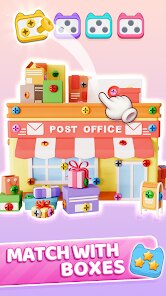
Alright, let's talk about 3D Bolt Master™. This is a physics-based puzzle game from Joymaster Puzzle Game Studio that honestly feels like a perfect pick-up-and-play time waster for Android. I first spotted it on Google Play, and after a few sessions, it's clear this is a pure mobile game—no Steam version, no Xbox or Switch port, just a straightforward app for your smartphone. It first launched back in 2023 on both the Google Play Store and the App Store, and it's racked up over 10 million installs, which is a solid number for a niche title like this. The best part? It's totally free to download and play. Yeah, there's in-app purchases, but they're mostly optional—like skipping tricky levels or unlocking cosmetics. The in-app costs are pretty reasonable, usually between $1.99 and $4.99 for a pack, and the ads are there but not intrusive. You get a short video ad after failing a level, but you can pay a small fee to remove them entirely if they bug you. For me, google play is where I grabbed it, and the install process was smooth as butter.
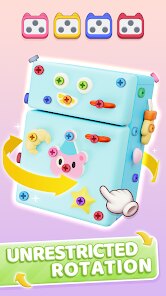
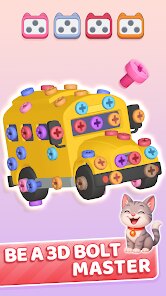
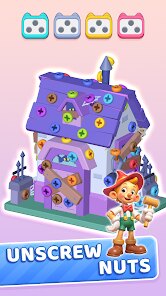
So, how do you actually play 3D Bolt Master™? The game drops you into a 3D space with mechanical puzzles where you have to rotate and align bolts, nuts, and other parts to match a target shape or trigger a sequence. It's like a digital version of those old-school dexterity toys, but with a crisp, modern look. The controls are simple—just swiping and tapping to twist parts into place—but the difficulty ramps up fast, especially in later levels where timing and precision matter. What's the best part? For me, it's the satisfaction of hearing that ‘click' when a bolt slides perfectly into position. It's oddly therapeutic, like fidgeting with a Rubik's cube but more tactile. My favorite aspect is the level variety; one minute you're lining up a simple screw, the next you're untangling a complex mechanical mess. It's great for short bursts on public transport or during a break, and since it's a mobile game, you can jump in and out without commitment. The physics engine feels spot-on, too—parts react realistically, which adds to the immersion. I've spent hours on certain levels, and it never feels unfair, just challenging.
Compared to other physics puzzlers like “Monument Valley” or “The Gardens Between,” 3D Bolt Master™ is a different beast. Those games focus on artwork and story, while this one is pure mechanical problem-solving. I'd say it's closer to something like “Physics Puzzle Game” or “Unblock Me,” but with a 3D twist that makes it stand out. Why do I recommend it? Simple: it's a straightforward app that respects your time. There's no grinding for loot boxes or endless ads—just clean puzzles that test your spatial reasoning. For a free Google Play download, you're getting a polished experience that doesn't demand a deep investment. If you're a fan of brain teasers and enjoy fiddling with stuff, this is a solid couch-quarter game. It's not groundbreaking, but for what it is—a mobile puzzle game with smart design—it's a winner. I've played a ton of similar apps, and this one nails the balance of being simple to pick up yet hard to master. Give it a try if you're bored with the usual fare.
features
- Interactive 3D Physics 🛠️: Unlike games like “Cut the Rope” which rely on 2D logic, this game lets you rotate and manipulate bolts in full 3D space. You twist, pull, and slide parts to solve puzzles, and the physics engine reacts realistically—like when a bolt threads into a nut, you feel the resistance. It's a fresh twist on the genre.
- Challenging Level Progression 📈: Each stage introduces new elements, like springs or gears, that build on previous skills. You start with simple alignment tasks and move to complex chain reactions. Compare it to “Brain It On!”—while that game is about drawing shapes, this one demands spatial awareness with actual mechanical parts, making it more engaging for engineering-minded players.
- Haptic Feedback for Immersion 📳: The game uses your phone's vibration to simulate the click of a bolt locking into place. It's a small touch, but it makes the puzzles feel more physical. Other puzzle apps like “Flow Free” lack this sensory feedback, so 3D Bolt Master™ stands out by making every successful turn feel satisfying. It's a subtle feature that hooks you during long sessions.
pros
- Clean and Minimalist Design 🎨: The 3D graphics are sharp but not cluttered—allows you to focus on the puzzle without distractions. Unlike “Puzzle Quest” which has busy visuals, this game's simple metal textures and neutral colors keep it easy on the eyes during long plays. It's a big plus for a mobile title.
- No Pay-to-Win Mechanics 💰: You can progress through all levels without spending a cent. Compare to “Candy Crush” where ads or boosters push you to buy, here the in-app purchases are purely cosmetic or optional skips. This makes it a fair experience for casual players who just want the core challenge.
- Regular Content Updates 🔄: The developer keeps adding new puzzle packs every few months, so the game stays fresh. In contrast, games like “Two Dots” sometimes go dormant. Here, you get new bolts, mechanisms, and mechanics regularly, which extends its replay value without feeling stale.
cons
- Limited Replay Value Once Mastered 🎯: After you've completed all levels, there's not much to do—no endless mode or user-generated puzzles. Games like “World of Goo” offer sandbox modes, but here you're done after the campaign. It can leave you wishing for more content, especially for a free app.
- Occasional Buggy Collisions 🤖: Sometimes, parts get stuck or clip through geometry when rotating quickly. For example, in tight puzzles, a bolt might bounce oddly, breaking immersion. While rare, this issue isn't present in polished competitors like “The Room,” which have more refined physics engines. It's a bummer during intense sessions.
- Ad Frequency After Failures 📺: You get a short ad after failing a level, which can be annoying if you're stuck on a tricky one. Other games like “Monument Valley” are ad-free, but here it's the trade-off for being free. A paid ad-removal option exists, but it still feels like a nudge to cough up cash.
Articles
![]()
Guide
How to Update Google Play Store on Android 2026
![]()
Guide
How to Download Older Versions of Android Apps
![]()
Guide
How to Download Apps Without Google Play Store
![]()
Guide
What Is an APK File for Android?
If you use an Android phone, you may have seen the term APK while searching for apps or games online. Some websites offer an APK download instead of a Google Play install button. Some users also mention APK files when talking about apps that are not available in their region, older app versions, or Android games downloaded outside the Play Store.
![]()
Guide
How to Install Games from Google Play for Beginners
Installing games on an Android phone is usually simple, but for beginners, the process can still feel confusing at first. You may not know where to search, which button to tap, whether the game is safe, or why Google Play sometimes asks for account settings, storage access, or payment information. If you are using an Android phone for the first time, learning how to install games from Google Play is one of the easiest ways to get started.
![]()
Guide
How Useful Gemini Is for Everyday Questions and Quick Tasks
emini feels different from many AI apps because it is not only trying to be a chatbot. After using it for everyday questions, quick writing, image understanding, and planning, I think its biggest strength is convenience.
![]()
Guide
What to Know Before Downloading APKs
For many Android users, downloading an APK is a common way to install apps and games. Sometimes an app is not available in a certain country.
![]()
Guide
ChatGPT Review: Is It Still the Best AI App in 2026?
![]()
Guide
Seedance 2.0 vs Sora: The Future of AI Video Generation
The AI video race has intensified dramatically over the past two years. Platforms like Sora from OpenAI and Luma Dream Machine pushed the boundaries of text-to-video realism. Yet, despite their impressive outputs, most tools still operate as probabilistic generators—you describe a scene, and the model interprets it. Control remains limited. With the February 2026 release of Seedance 2.0, developed by ByteDance, the paradigm shifted. Internally known as Jimeng 2.0, Seedance does not position itself as just another video model. It positions itself as an AI Director. Rather than guessing what you want, Seedance 2.0 allows you to direct what happens. This distinction defines everything that follows.









Recommended Apps
![]()
Tricky Relax Challenge Games
stick hunter4.1
![]()
Hair Salon : Halloween Stylish
Happy Run4.2![]()
Farming Simulator 23 Mobile
GIANTS Software4.3![]()
Sprint Master Sim: Athlete Run
Agro Smart0![]()
My Talking Angela 2
Outfit7 Limited4.4![]()
Score! Hero
First Touch Games Ltd.4.5
![]()
Kpop Tiles: Piano Rhythm Game
Rhythm Hero: Good Music Games4.8![]()
Gabbys Dollhouse: Games & Cats
Play Piknik4.1![]()
BitLife - Life Simulator
Candywriter, LLC4.4![]()
Dinosaur Universe
Supercent, Inc.4.4![]()
Snake Run Race・3D Running Game
Freeplay Inc4.7![]()
Halloween Chronicles: Family
Do Games Limited4.6![]()
Mega Truck Simulator Games 3D
GamePark4.4![]()
Cubes 2048.io
CrazyGames.com3.3![]()
Sandwich Runner
株式会社ドワンゴ4.1