Halloween Home

1M+
Installs
CASUAL AZUR GAMES
Developer
-
Casual
Category
-
Everyone
Content Rating
-
info@aigames.ae
Developer Email
-
http://tastypill.com/privacypolicy/
Privacy Policy
Screenshots
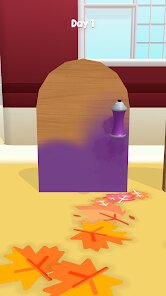
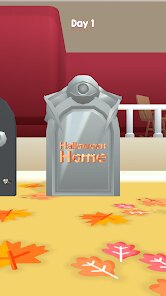
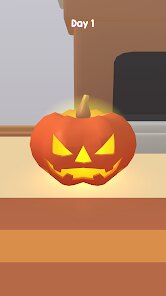
editor reviews
Alright, let me break down Halloween Home for you. This is a casual puzzle game from CASUAL AZUR GAMES that landed on Android via the Google Play Store. It's a pure mobile experience—no Steam version, no Xbox or Switch port, just something you tap into on your phone. The game first launched a while back, and based on the download numbers, it's sitting at over 5 million installs. That kind of traction tells you something about its appeal. Best part? It's totally free to download and play. However, like many mobile games, there are in-app purchases. You'll see ads pop up, but you can pay to remove them, and some optional items cost between $1 and $5. So, if you hate interruptions, dropping a couple bucks for an ad-free experience is a solid move. For a casual game, that pricing feels fair.
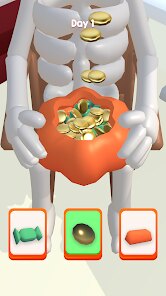
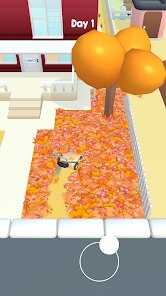
So how do you actually play Halloween Home? It's a home renovation and decoration game with a spooky twist. You're basically fixing up haunted houses—repairing broken furniture, cleaning up cobwebs, and adding Halloween-themed decor like jack-o'-lanterns and eerie wallpaper. The gameplay loop is simple: you get tasks, you complete them with a tap or drag, and you earn coins to unlock new items. The best part, hands down, is the room-by-room transformation. There's something satisfying about turning a decrepit, dusty mansion into a cozy Halloween hideout. My favorite aspect? The variety of ghosts and quirky characters that pop up as you work. They don't just sit there—they react, sometimes helping you, sometimes spooking you with a jump scare. It adds a layer of charm that keeps me coming back. Compared to other mobile renovation games, this one leans harder into that seasonal vibe, which gives it a fresh feel every October.
Now, let's compare it to similar games. If you've played something like Homescapes or Project Makeover, you'll recognize the core mechanic—match-three puzzles used to earn resources for renovation. But Halloween Home skips that entirely. It's more direct: you just tap to clean and decorate, no puzzle grind. That's a big plus if you hate spending hours matching candies just to paint a wall. Another similar game is My Home – Design & Decor, which focuses on interior design with no theme. Halloween Home keeps the experience light and festive, which I prefer for a quick session. I'd recommend this over those others because it feels less like a chore and more like a playful escape. The spooky atmosphere isn't overdone—it's fun, not scary. As a real user of this app, I appreciate how it doesn't pressure you into spending money. You can progress fine without dropping cash, which isn't always the case in this genre. If you're into casual games and want something with personality, give the download a go from the Google Play store.
features
- Direct Renovation Mechanics 🛠️: Unlike many games in this genre that force you through match-three puzzles or memory games to earn coins, Halloween Home lets you complete tasks with simple taps and drags. You fix broken items, clean up messes, and place decorations without any frustrating minigames. That's a huge time-saver for me—I can hop in for five minutes and actually feel like I accomplished something.
- Themed Progression System 🎃: As you move through different rooms, you unlock Halloween-specific items like haunted mirrors, pumpkin patches, and spooky sound effects. This isn't just a reskin of a generic renovation game—it's built entirely around that seasonal vibe. The unlock tree feels more fluid compared to games like Homescapes, which often gate new content behind strict level requirements.
- Interactive Ghost Characters 👻: The ghosts in Halloween Home aren't static decorations. They wander around, knock things over, or occasionally help you by moving small items. This adds a layer of unpredictability that similar games like Project Makeover don't offer. It turns a simple task into something more engaging, and it's rare to see in mobile renovation titles.
pros
- Accessible Gameplay 🎮: For a casual puzzle game on Android, it's super easy to get into. You don't need to watch long tutorials or grind through boring levels. Just install the app from Google Play, and you're fixing up haunted houses within seconds. It's perfect for quick sessions, unlike games like Design Home that require planning and resource management.
- Relaxing Atmosphere 🕯️: The spooky theme is more playful than intense, with warm colors and light jump scares that never feel cheap. The sound design—creaking doors and soft wind—makes it immersive without being stressful. This is a big win compared to My Home – Design & Decor, which feels flat and generic in its presentation.
- Fair Monetization 💰: You can play for hours without spending a cent. The ads are optional to remove, and in-app purchases for premium items are reasonable at $1–$5. Other games like Roomful of Puzzles often shove expensive packs in your face, but Halloween Home respects your time and wallet. If you're looking for a free download that doesn't pressure you, this is it.
cons
- Limited Content Depth 📉: After you finish all the rooms, there isn't much to go back to. Unlike Homescapes, which has hundreds of levels and events, Halloween Home wraps up pretty quickly. You can burn through the main renovation in a weekend if you play a lot. It feels more like a seasonal app than something you'll revisit year-round, so the longevity is lacking compared to similar games.
- Repetitive Task Flow 🔄: cleaning cobwebs and repairing the same types of furniture gets old fast. While the ghost interactions add variety, the core gameplay doesn't evolve much. Games like Project Makeover incorporate dressing up characters or solving puzzles to break up the monotony, but Halloween Home sticks to a one-note loop. After a few hours, you'll notice the lack of creativity in the tasks.
- No Offline Play Option 📶: The game requires an internet connection for most features, which is frustrating. If you're on a train or somewhere without good reception from the Google Play network, you can't even access your saved progress. Other mobile games like My Home – Design & Decor allow some offline functionality, so this is a noticeable drawback for a casual game that should be more flexible.
Articles
![]()
Guide
How to Update Google Play Store on Android 2026
![]()
Guide
How to Download Older Versions of Android Apps
![]()
Guide
How to Download Apps Without Google Play Store
![]()
Guide
What Is an APK File for Android?
If you use an Android phone, you may have seen the term APK while searching for apps or games online. Some websites offer an APK download instead of a Google Play install button. Some users also mention APK files when talking about apps that are not available in their region, older app versions, or Android games downloaded outside the Play Store.
![]()
Guide
How to Install Games from Google Play for Beginners
Installing games on an Android phone is usually simple, but for beginners, the process can still feel confusing at first. You may not know where to search, which button to tap, whether the game is safe, or why Google Play sometimes asks for account settings, storage access, or payment information. If you are using an Android phone for the first time, learning how to install games from Google Play is one of the easiest ways to get started.
![]()
Guide
How Useful Gemini Is for Everyday Questions and Quick Tasks
emini feels different from many AI apps because it is not only trying to be a chatbot. After using it for everyday questions, quick writing, image understanding, and planning, I think its biggest strength is convenience.
![]()
Guide
What to Know Before Downloading APKs
For many Android users, downloading an APK is a common way to install apps and games. Sometimes an app is not available in a certain country.
![]()
Guide
ChatGPT Review: Is It Still the Best AI App in 2026?
![]()
Guide
Seedance 2.0 vs Sora: The Future of AI Video Generation
The AI video race has intensified dramatically over the past two years. Platforms like Sora from OpenAI and Luma Dream Machine pushed the boundaries of text-to-video realism. Yet, despite their impressive outputs, most tools still operate as probabilistic generators—you describe a scene, and the model interprets it. Control remains limited. With the February 2026 release of Seedance 2.0, developed by ByteDance, the paradigm shifted. Internally known as Jimeng 2.0, Seedance does not position itself as just another video model. It positions itself as an AI Director. Rather than guessing what you want, Seedance 2.0 allows you to direct what happens. This distinction defines everything that follows.









Recommended Apps
![]()
Tricky Relax Challenge Games
stick hunter4.1
![]()
Hair Salon : Halloween Stylish
Happy Run4.2![]()
Farming Simulator 23 Mobile
GIANTS Software4.3![]()
Sprint Master Sim: Athlete Run
Agro Smart0![]()
My Talking Angela 2
Outfit7 Limited4.4![]()
Score! Hero
First Touch Games Ltd.4.5
![]()
Kpop Tiles: Piano Rhythm Game
Rhythm Hero: Good Music Games4.8![]()
Gabbys Dollhouse: Games & Cats
Play Piknik4.1![]()
BitLife - Life Simulator
Candywriter, LLC4.4![]()
Dinosaur Universe
Supercent, Inc.4.4![]()
Snake Run Race・3D Running Game
Freeplay Inc4.7![]()
Halloween Chronicles: Family
Do Games Limited4.6![]()
Mega Truck Simulator Games 3D
GamePark4.4![]()
Cubes 2048.io
CrazyGames.com3.3![]()
Sandwich Runner
株式会社ドワンゴ4.1