Color Pencil Run: Drawing Game

500K+
Installs
OSA Studio
Developer
-
Casual
Category
-
Everyone
Content Rating
-
theosastudio@gmail.com
Developer Email
-
http://osa.studio/privacy.html
Privacy Policy
Screenshots
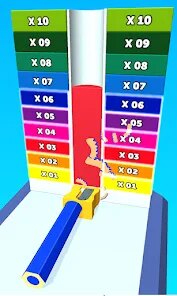
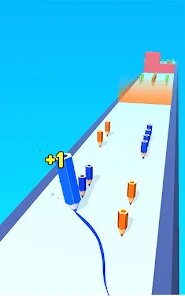
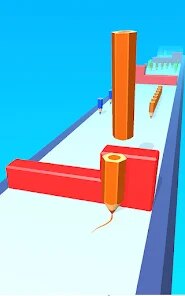
editor reviews
So, I've sunk a ridiculous amount of hours into endless runners over the years, from the classics on PC to countless time-wasters on my Google Pixel. When I stumbled upon "Color Pencil Run: Drawing Game" on the Google Play Store, I honestly thought it was just another generic runner with a paint-themed skin to grab a few downloads. I was wrong. It's a pure mobile game, first launched a while back, and it's specifically designed for touch screens, which makes sense because the core mechanic relies on your finger as a drawing tool. It's completely free to download and install, which is great, but like most free-to-play apps on Android, it does have in-app purchases. You can spend a few bucks here and there to remove the occasional ad or unlock some premium pencil styles, but I've been playing for weeks without spending a dime and haven't felt gimped. It sits comfortably at over a million installs, and the community is active, which is always a good sign for a game of this genre.
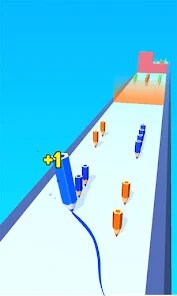
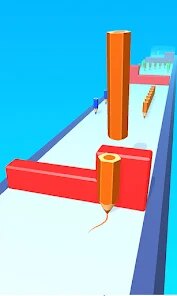
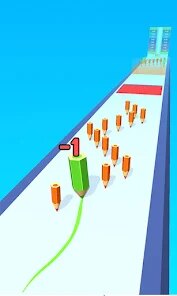
The best part of this game is how it fuses the reflex-based gameplay of a runner with a creative, almost therapeutic element. You don't just swipe left or right to dodge obstacles. Instead, you literally draw a line on the screen to guide your pencil character. It's like the game creates a track, and you have to sketch the path for your little pencil guy to roll on. You're not just avoiding hazards; you're building ramps to collect stars, drawing bridges over gaps, and shading in areas to activate switches. It sounds complicated, but it plays incredibly intuitively. My favorite moments are when you get into a flow state, where you're weaving the line through a series of obstacles, pulling your finger away just at the right moment to let the pencil drop and roll, and then catching it again on the other side. It feels less like playing a game and more like you're part of a living sketch. The visual style is deceptively simple, with a clean, white background that makes the vibrant pencil colors pop, which looks fantastic on any Android screen.
If you've played games like "Vector" or even "Alto's Adventure," you know the genre, but "Color Pencil Run" offers a different kind of challenge. It's less about physics and more about planning. Your finger is the architect of your run. I've tried similar drawing-based games, but they often feel clunky or unresponsive. Here, the line drawing is buttery smooth, and the game interprets your swipes perfectly, whether you're doing a fast, sharp line or a slow, curved one. Other runners just ask you to react; this game asks you to create. That is the biggest hook for me. It's a refreshing twist that makes you feel smart, and it's the main reason I keep coming back to this app over others sitting in my library. It's a smart, engaging game that respects your time and intelligence, and it's perfect for a quick session on the bus or a long, dedicated playthrough at home.
features
- Draw-to-Play Mechanic 🖊️: Unlike typical runners where you press a button, here you physically draw the path. This isn't just a gimmick; it's the whole game. Your finger creates the track, making every playthrough a unique, interactive art project.
- Creative Problem Solving 🧠: The levels are designed like puzzles. You aren't just dodging; you're figuring out how to use your drawn line to interact with the environment, like drawing a shield to block projectiles or a loop to gain speed, which is far more engaging than the simple swipe controls in games like Subway Surfers.
- Unlockable Pencil Skins ✏️: You can collect different pencil types, each with its own color palette. It's a small feature, but it adds a layer of customization. I personally love unlocking the neon colors because they look amazing against the stark white backgrounds and make the drawing action feel more rewarding.
pros
- Responsive Touch Controls 👆: The most critical aspect of a drawing game is how well it registers your input. This game nails it. The line appears exactly where you swipe with zero lag, which is something I can't say for other apps in this genre. It feels incredibly tight and precise.
- Perfect Difficulty Curve ⚖️: It starts off easy, letting you get a feel for the drawing mechanics, then gradually introduces new obstacles and physics rules. It never feels unfairly hard, unlike the steep difficulty spikes I've seen in games like "Race the Sun," which can be frustrating. The progression here is top-notch.
- No Punishing Pay-to-Win ⭐: The in-app purchases are subtle. You can earn new designs through regular gameplay, and the premium items are mostly cosmetic. I never felt forced to open my wallet, which is rare for a free-to-play game on the Google Play Store. It respects your time and your money.
cons
- Occasional Visual Clutter 🧩: When you are in the middle of a complex level and draw a long, looping line, the screen can get a bit messy. The white background usually helps, but sometimes you have to trace a line through a busy area, and it can be hard to see the obstacles behind your own drawing.
- Limited Replayability Soon 🔄: While the main campaign is fun, once you've completed all the levels and collected the main stars, there's not a ton of incentive to keep playing. Unlike endless runners with leaderboards or "Alto's Adventure" with its daily challenges, this feels more like a finite puzzle game that you'll eventually put down.
- Ad Frequency 📺: While not intrusive, there are forced ads between some level retries. It's not a dealbreaker, but after failing a hard challenge three times, being hit with a 30-second ad can break your flow. You can pay to remove them, but it's a small annoyance for free players.
Articles
![]()
Guide
How to Update Google Play Store on Android 2026
![]()
Guide
How to Download Older Versions of Android Apps
![]()
Guide
How to Download Apps Without Google Play Store
![]()
Guide
What Is an APK File for Android?
If you use an Android phone, you may have seen the term APK while searching for apps or games online. Some websites offer an APK download instead of a Google Play install button. Some users also mention APK files when talking about apps that are not available in their region, older app versions, or Android games downloaded outside the Play Store.
![]()
Guide
How to Install Games from Google Play for Beginners
Installing games on an Android phone is usually simple, but for beginners, the process can still feel confusing at first. You may not know where to search, which button to tap, whether the game is safe, or why Google Play sometimes asks for account settings, storage access, or payment information. If you are using an Android phone for the first time, learning how to install games from Google Play is one of the easiest ways to get started.
![]()
Guide
How Useful Gemini Is for Everyday Questions and Quick Tasks
emini feels different from many AI apps because it is not only trying to be a chatbot. After using it for everyday questions, quick writing, image understanding, and planning, I think its biggest strength is convenience.
![]()
Guide
What to Know Before Downloading APKs
For many Android users, downloading an APK is a common way to install apps and games. Sometimes an app is not available in a certain country.
![]()
Guide
ChatGPT Review: Is It Still the Best AI App in 2026?
![]()
Guide
Seedance 2.0 vs Sora: The Future of AI Video Generation
The AI video race has intensified dramatically over the past two years. Platforms like Sora from OpenAI and Luma Dream Machine pushed the boundaries of text-to-video realism. Yet, despite their impressive outputs, most tools still operate as probabilistic generators—you describe a scene, and the model interprets it. Control remains limited. With the February 2026 release of Seedance 2.0, developed by ByteDance, the paradigm shifted. Internally known as Jimeng 2.0, Seedance does not position itself as just another video model. It positions itself as an AI Director. Rather than guessing what you want, Seedance 2.0 allows you to direct what happens. This distinction defines everything that follows.









Recommended Apps
![]()
Tricky Relax Challenge Games
stick hunter4.1
![]()
Hair Salon : Halloween Stylish
Happy Run4.2![]()
Farming Simulator 23 Mobile
GIANTS Software4.3![]()
Sprint Master Sim: Athlete Run
Agro Smart0![]()
My Talking Angela 2
Outfit7 Limited4.4![]()
Score! Hero
First Touch Games Ltd.4.5
![]()
Kpop Tiles: Piano Rhythm Game
Rhythm Hero: Good Music Games4.8![]()
Gabbys Dollhouse: Games & Cats
Play Piknik4.1![]()
BitLife - Life Simulator
Candywriter, LLC4.4![]()
Dinosaur Universe
Supercent, Inc.4.4![]()
Snake Run Race・3D Running Game
Freeplay Inc4.7![]()
Halloween Chronicles: Family
Do Games Limited4.6![]()
Mega Truck Simulator Games 3D
GamePark4.4![]()
Cubes 2048.io
CrazyGames.com3.3![]()
Sandwich Runner
株式会社ドワンゴ4.1