FaceApp: Perfect Face Editor

500M+
Installs
FaceApp Technology Ltd
Developer
-
Video Players & Editors
Category
-
Rated for 3+
Content Rating
-
support.android@faceapp.com
Developer Email
-
http://www.faceapp.com/privacy
Privacy Policy
Screenshots


editor reviews
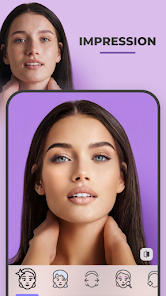
FaceApp is basically one of those photo editing apps that went viral a few years back, and it's still hanging around on both Google Play and the App Store. It's an AI-powered image editor, but unlike your standard Photoshop or Snapseed, it's laser-focused on modifying human faces. You download it, launch it, and the first thing you see is a simple camera roll picker where you select a selfie or any portrait. The initial impression is pretty slick, but also a bit unsettling because the app can do things like age you by decades or swap your gender with just one tap. It's free to download and install, and the install count is massive, but you quickly discover the really fun filters are locked behind a subscription. There are ads too, which can be annoying when you're just trying to preview a look.
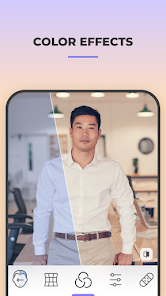
The actual hands-on experience is pretty smooth once you get past the paywall nagging. You pick a photo, and the app automatically detects the face. Then you swipe through the filters at the bottom. The onboarding doesn't really exist, you just start tapping and see what happens. A common usage flow goes something like this: you upload a photo, tap the Aging filter to see your future self, then maybe try the Smile filter to fix a closed-mouth grin. The interface is clean, with the editing tools organized into categories like Age, Hair, and Style. A small practical tip is to use the Face Swap feature with a friend's photo for hilarious results, but be warned, the free version limits your usage severely. One confusing moment is that some features, like removing glasses or changing hair color, can look a bit artificial if the lighting in your original photo is poor.
After using it for a while, I think FaceApp is a fun toy rather than a serious editing tool. Someone who enjoys novelty, like trying on different looks or sending funny aged photos to friends, will love it. But if you need precise, professional retouching, you're better off with something like Lightroom or even the free version of Snapseed. What makes it different from Remini or other enhancers is that it's built entirely around creative face filters, not just quality improvement. I kept it installed because it's hilarious for parties, but I could see uninstalling it after a week if the novelty wears off. The subscription price is steep for what you get, which is why many users just use the free filters and then delete the app.
features
- 😁 Auto Apply: The app instantly applies filters to all detected faces without manual masking, which is faster than Photoshop Express's manual face selection.
- 😁 Realistic Aging & Gender Swap: FaceApp's Age and Gender filters look surprisingly natural compared to similar apps like AgingBooth or YouCam Makeup, which often produce cartoonish results.
- 😁 One-Tap Retouches: Features like Smile, Hair Color, and Beard require just a single tap, unlike Snapseed where you'd need multiple adjustments to achieve a similar effect.
- 😁 Face Swap Function: This feature lets you swap faces between two people in separate photos, something that PicsArt struggles with because it often requires precise manual alignment.
pros
- 🧹 Fast Processing: FaceApp processes edits almost instantly on a standard phone, while Remini often takes longer to enhance a single photo due to its cloud-based processing.
- 🧹 Wide Filter Range: It offers over 50 face-specific filters, including vintage and makeup looks, far more than the basic edits in Meitu or YouCam Perfect.
- 🧹 No Manual Skill Needed: You don't need to learn layer masks or blending modes like in Adobe Photoshop; the AI handles everything automatically, which is perfect for casual users.
cons
- ✋ Aggressive Paywall: Many filters and the ability to remove watermarks are locked behind a yearly subscription, whereas Meitu offers more features for free with minimal ads.
- ✋ Privacy Concerns: The app sends photos to its servers for processing, which feels sketchy compared to on-device editors like Snapseed or Adobe Lightroom that keep everything local.
- ✋ Limited Output Resolution: Free exports are often lower resolution, and you can't save truly high-quality images without paying, while YouCam Perfect gives you full resolution for free.
- ✋ Repetitive Results: After using the app for a while, the filters feel gimmicky and repetitive, unlike FaceTune which offers more nuanced retouching tools like facial sculpting.
Articles
![]()
Guide
How to Update Google Play Store on Android 2026
![]()
Guide
How to Download Older Versions of Android Apps
![]()
Guide
How to Download Apps Without Google Play Store
![]()
Guide
What Is an APK File for Android?
If you use an Android phone, you may have seen the term APK while searching for apps or games online. Some websites offer an APK download instead of a Google Play install button. Some users also mention APK files when talking about apps that are not available in their region, older app versions, or Android games downloaded outside the Play Store.
![]()
Guide
How to Install Games from Google Play for Beginners
Installing games on an Android phone is usually simple, but for beginners, the process can still feel confusing at first. You may not know where to search, which button to tap, whether the game is safe, or why Google Play sometimes asks for account settings, storage access, or payment information. If you are using an Android phone for the first time, learning how to install games from Google Play is one of the easiest ways to get started.
![]()
Guide
How Useful Gemini Is for Everyday Questions and Quick Tasks
emini feels different from many AI apps because it is not only trying to be a chatbot. After using it for everyday questions, quick writing, image understanding, and planning, I think its biggest strength is convenience.
![]()
Guide
What to Know Before Downloading APKs
For many Android users, downloading an APK is a common way to install apps and games. Sometimes an app is not available in a certain country.
![]()
Guide
ChatGPT Review: Is It Still the Best AI App in 2026?
![]()
Guide
Seedance 2.0 vs Sora: The Future of AI Video Generation
The AI video race has intensified dramatically over the past two years. Platforms like Sora from OpenAI and Luma Dream Machine pushed the boundaries of text-to-video realism. Yet, despite their impressive outputs, most tools still operate as probabilistic generators—you describe a scene, and the model interprets it. Control remains limited. With the February 2026 release of Seedance 2.0, developed by ByteDance, the paradigm shifted. Internally known as Jimeng 2.0, Seedance does not position itself as just another video model. It positions itself as an AI Director. Rather than guessing what you want, Seedance 2.0 allows you to direct what happens. This distinction defines everything that follows.









Recommended Apps
![]()
ANIME Live Wallpapers
Live Wallpapers Expert4.3
![]()
SHEIN-Shopping Online
Roadget Business PTE. LTD.4.6
![]()
Japevox - Funny Prank Sound
SecureTool4.3![]()
Transit: Bus & Subway Times
Transit, Inc.4.5![]()
Easy Clean Pro
Limtech Developers3.6![]()
PayByPhone
PayByPhone Technologies Inc .4.9![]()
Daily Horoscope & Astrology
TELEMAQUE4.2![]()
TickTock-TikTok Live Wallpaper
TikTok Pte. Ltd.4.5![]()
TIME WARP SCAN: Face Scanner
ZipoApps4.3![]()
Fulldive VR - Virtual Reality
Browser by Fulldive Co.3.9![]()
Beauty Camera -Selfie, Sticker
Leopard V74.7![]()
Version AI: AI Photo Generator
Apptribe Dijital4.5![]()
Domino's Pizza USA
Domino's Pizza LLC4.7![]()
Astrolink: Birth Chart
Astrolink Orbe4.2![]()
How Old Is Your Brain?
KDR Games4.1