Easy Clean Pro

5M+
Installs
Limtech Developers
Developer
-
Productivity
Category
-
Everyone
Content Rating
-
theyoungeng@gmail.com
Developer Email
-
https://sites.google.com/view/ecpprivacy
Privacy Policy
Screenshots
editor reviews
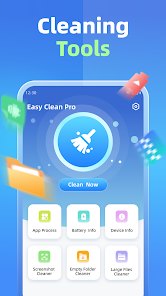
Easy Clean Pro is a phone storage cleaning tool from Limtech Developers, available on Google Play. It is free to download and install, and it has been installed more than a million times. Ads are part of the experience, and there are in-app purchases for those who want extra options. The app targets junk files, cache build-up, and leftover data, offering a way to reclaim space without digging through system settings.
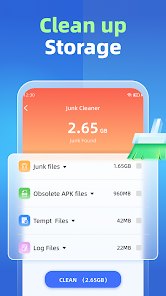
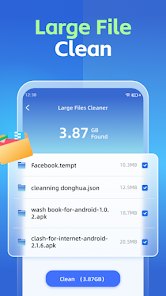
Scanning is the core action here. Once you open the app, it examines storage and returns a list of items it considers removable, sorted into categories like cache, residual files, and large downloads. Tapping a category expands the list, and you can uncheck anything you want to keep before confirming the clean. A file manager section sits alongside the cleaner, which lets you browse folders directly rather than relying only on automated suggestions. My usual routine is a quick scan once a week, and it typically surfaces a few hundred megabytes of cache from social apps that I never clear manually. The results screen is simple to read, with sizes shown next to each item, so deciding what to remove does not take much thought.
Storage cleaners are a crowded category, and the big names tend to lead with aggressive features like antivirus scans or phone boosters. Easy Clean Pro stays closer to pure housekeeping. Its layout is plainer than most competitors, with fewer flashy animations and no score dial at the top. That restraint is something I actually appreciate, since the app opens quickly and does not try to sell me a booster I never asked for. Compared with apps that bundle every utility imaginable, the focus here is narrower, and the interface reflects that.
features
- The junk scan separates cache, residual files, and large files, and each group can be reviewed before deletion, which makes the process feel controlled rather than automatic.
- A built-in file browser gives direct access to folders, and it handles basic tasks like deleting or moving files without switching to a separate manager.
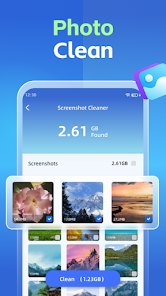
- Large file detection is handy for spotting forgotten videos and downloads. In my case it turned up two old screen recordings I had completely forgotten about.
- Notification cleanup is lighter than in similar apps. Where some cleaners push daily reminders, this one stays quiet unless you open it, which suits people who dislike clutter in the status bar.
pros
- Regular scans keep cache from piling up, which matters on phones with limited storage.
- The review step before cleaning prevents accidental deletion of files you still need.
- Having a file manager in the same app saves a trip to another tool for simple tasks.
- It runs fast on older devices, so even budget phones can handle a scan without lag.
cons
- Ads appear between screens and can interrupt the flow, especially during longer browsing sessions.
- Some categories overlap, so the same file may show up in more than one list.
- Deep cleaning options are limited compared with heavier utility suites.
- In-app purchases sit behind features that some users may expect for free.
Articles
![]()
Guide
How to Update Google Play Store on Android 2026
![]()
Guide
How to Download Older Versions of Android Apps
![]()
Guide
How to Download Apps Without Google Play Store
![]()
Guide
What Is an APK File for Android?
If you use an Android phone, you may have seen the term APK while searching for apps or games online. Some websites offer an APK download instead of a Google Play install button. Some users also mention APK files when talking about apps that are not available in their region, older app versions, or Android games downloaded outside the Play Store.
![]()
Guide
How to Install Games from Google Play for Beginners
Installing games on an Android phone is usually simple, but for beginners, the process can still feel confusing at first. You may not know where to search, which button to tap, whether the game is safe, or why Google Play sometimes asks for account settings, storage access, or payment information. If you are using an Android phone for the first time, learning how to install games from Google Play is one of the easiest ways to get started.
![]()
Guide
How Useful Gemini Is for Everyday Questions and Quick Tasks
emini feels different from many AI apps because it is not only trying to be a chatbot. After using it for everyday questions, quick writing, image understanding, and planning, I think its biggest strength is convenience.
![]()
Guide
What to Know Before Downloading APKs
For many Android users, downloading an APK is a common way to install apps and games. Sometimes an app is not available in a certain country.
![]()
Guide
ChatGPT Review: Is It Still the Best AI App in 2026?
![]()
Guide
Seedance 2.0 vs Sora: The Future of AI Video Generation
The AI video race has intensified dramatically over the past two years. Platforms like Sora from OpenAI and Luma Dream Machine pushed the boundaries of text-to-video realism. Yet, despite their impressive outputs, most tools still operate as probabilistic generators—you describe a scene, and the model interprets it. Control remains limited. With the February 2026 release of Seedance 2.0, developed by ByteDance, the paradigm shifted. Internally known as Jimeng 2.0, Seedance does not position itself as just another video model. It positions itself as an AI Director. Rather than guessing what you want, Seedance 2.0 allows you to direct what happens. This distinction defines everything that follows.









Recommended Apps
![]()
ANIME Live Wallpapers
Live Wallpapers Expert4.3
![]()
SHEIN-Shopping Online
Roadget Business PTE. LTD.4.6
![]()
Japevox - Funny Prank Sound
SecureTool4.3![]()
Transit: Bus & Subway Times
Transit, Inc.4.5![]()
Easy Clean Pro
Limtech Developers3.6![]()
PayByPhone
PayByPhone Technologies Inc .4.9![]()
Daily Horoscope & Astrology
TELEMAQUE4.2![]()
TickTock-TikTok Live Wallpaper
TikTok Pte. Ltd.4.5![]()
TIME WARP SCAN: Face Scanner
ZipoApps4.3![]()
Fulldive VR - Virtual Reality
Browser by Fulldive Co.3.9![]()
Beauty Camera -Selfie, Sticker
Leopard V74.7![]()
Version AI: AI Photo Generator
Apptribe Dijital4.5![]()
Domino's Pizza USA
Domino's Pizza LLC4.7![]()
Astrolink: Birth Chart
Astrolink Orbe4.2![]()
How Old Is Your Brain?
KDR Games4.1