
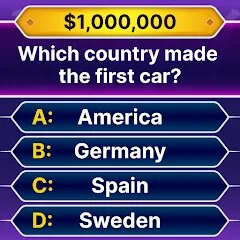
Millionaire Quiz: Trivia Games

10M+
Installs
wolfkig
Developer
-
Trivia
Category
-
Everyone
Content Rating
-
nguyenhuongdev@gmail.com
Developer Email
-
https://docs.google.com/document/d/1mbiIjX_O0BeULhSrYO-lpCv5uE1p_dTKfw2r292LFAI/edit#heading=h
Privacy Policy
Screenshots
editor reviews
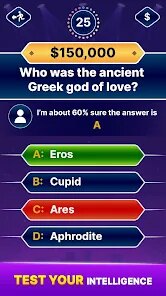
Alright, let's talk about Millionaire Quiz: Trivia Games. This is a mobile trivia game that's clearly inspired by the classic "Who Wants to Be a Millionaire?" format. You can grab it on the Google Play store right now. It's an Android exclusive as far as I can tell—I haven't seen it pop up on Steam or any console like the Switch or Xbox. It first launched a while back, and it's been sitting on Google Play for a good while now. The download count is decent, somewhere in the hundreds of thousands, but keep in mind it's not the massive hit some other trivia apps are. The best part? It's completely free to download and install. You can jump right in without spending a dime. However, like most free apps, there are in-app purchases. You'll see offers for coin packs and things like "Skip the Question" passes. These cost anywhere from a couple of bucks to maybe $10 for the bigger bundles. There are also those in-app ads that pop up between rounds, which is expected for a free game. It's a bit annoying, but you can usually watch a video ad to earn a little extra currency, so it's a trade-off.
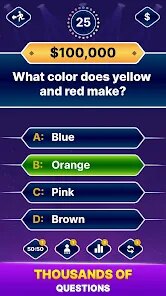
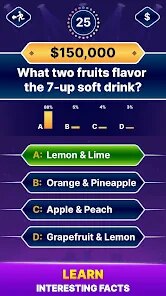
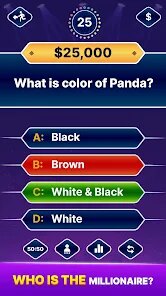
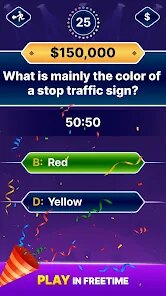
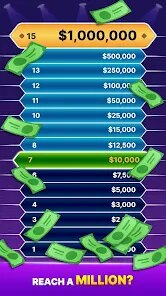
Playing Millionaire Quiz: Trivia Games is pretty straightforward. You get a question, choose from four answers, and try to climb the ladder from $100 to a million. The "lifelines" are there—50/50, Ask the Audience, and Phone a Friend—which are handled well for a mobile game. What really stands out to me is the "VS" mode. You can challenge other real players in a head-to-head trivia battle. That's my favorite part, honestly. It adds that competitive edge you just don't get from playing solo against the AI. The clock ticking down while you're frantically tapping answers on your Android phone—that's where the fun is. The best part of the core game is that it tests a wide range of general knowledge, from history to pop culture. It's not just the same recycled questions you see in every other quiz app.
So, how does it stack up against the competition? Well, if you've played Quizoid or Trivia Crack, you'll find some similarities. But Millionaire Quiz really nails the "pressure" of the original TV show. Other games like Trivia Crack feel a bit more casual, like you're just answering questions to level up a character. Here, it's about the thrill of the climb. I recommend this game over others because it doesn't overcomplicate things. It's pure trivia without a ton of extra fluff. The user interface is clean, and the questions are genuinely challenging sometimes. It's not perfect—some questions are poorly translated—but for a free download on Google Play, it's a solid time-killer. If you're a trivia fan and want that "Millionaire" vibe on your phone, this is the app to install.
features
- Authentic TV Show Feel 🎥: Unlike games like Trivia Crack which feel like a board game, Millionaire Quiz replicates the tension of the actual TV show. The countdown music, the dramatic pauses, and the "final answer" confirmation all make you feel like you're in the hot seat. It's a more immersive experience for fans of the original show.
- Real-Time PvP Battles ⚔️: Most Android trivia apps only offer solo play. This game has a live "VS" mode where you face off against another person. It's not just a pre-recorded bot—you see their progress in real time. This really pushes you to answer quickly and accurately, which is a big step up from the basic question sets in something like Quizoid.
- Balanced Question Difficulty 📊: The difficulty curve actually makes sense. The first few questions are easy to build your confidence, but by question 10, you're sweating over geography and science facts. Other games often throw random hard questions at you from the start, which kills the fun. Here, it feels like a proper progression, similar to the real "Millionaire" ladder.
pros
- Clean User Interface 🎨: One of the Millionaire Quiz real strengths is how simple the app looks. No cluttered menus, no flashing ads blocking your view. Compared to Trivia Crack, which can be visually noisy with all its character skins and animations, this game keeps the focus on the trivia itself. It's easy on the eyes and easy to navigate.
- Great Value for a Free Game 💰: The fact that you can download and install this for nothing is a huge plus. The in-app purchases are entirely optional. You can earn coins just by playing, even if you lose. In contrast, some similar games practically force you to spend money to keep playing after a few rounds. This feels generous by comparison.
- Strong Lifeline System 📞: The "Ask the Audience" lifeline actually uses real player data to show you how the community answered. That's a clever touch you don't see in every trivia game. It feels more interactive than just a random simulated response. It adds a layer of strategy that games like Quizoid don't offer.
cons
- Too Many Ads 📺: While it's free, the ads are pretty intrusive. After every round, you get a full-screen video ad. Sometimes they even pop up between questions. Other Android trivia games, like Trivia Crack, handle ad frequency better by giving you an option to watch them for rewards. Here, it's just forced on you, which can break the immersion.
- Limited Question Pool 🔄: After playing for a few days, I started noticing repeats. The same questions kept coming up. Quizoid has a much larger database and constantly updates it. Millionaire Quiz could really benefit from more variety. It feels like the app relies on a smaller set of trivia, which gets stale quickly for regular players.
- Clunky Translation Issues 🌐: Some of the questions have awkward phrasing or spelling mistakes, as if they were poorly translated. This is a big issue for an English-language game. Other popular apps on Google Play have cleaner localization. It's not a deal-breaker, but it can be confusing when a question doesn't make grammatical sense.
Articles
![]()
Guide
How to Update Google Play Store on Android 2026
![]()
Guide
How to Download Older Versions of Android Apps
![]()
Guide
How to Download Apps Without Google Play Store
![]()
Guide
What Is an APK File for Android?
If you use an Android phone, you may have seen the term APK while searching for apps or games online. Some websites offer an APK download instead of a Google Play install button. Some users also mention APK files when talking about apps that are not available in their region, older app versions, or Android games downloaded outside the Play Store.
![]()
Guide
How to Install Games from Google Play for Beginners
Installing games on an Android phone is usually simple, but for beginners, the process can still feel confusing at first. You may not know where to search, which button to tap, whether the game is safe, or why Google Play sometimes asks for account settings, storage access, or payment information. If you are using an Android phone for the first time, learning how to install games from Google Play is one of the easiest ways to get started.
![]()
Guide
How Useful Gemini Is for Everyday Questions and Quick Tasks
emini feels different from many AI apps because it is not only trying to be a chatbot. After using it for everyday questions, quick writing, image understanding, and planning, I think its biggest strength is convenience.
![]()
Guide
What to Know Before Downloading APKs
For many Android users, downloading an APK is a common way to install apps and games. Sometimes an app is not available in a certain country.
![]()
Guide
ChatGPT Review: Is It Still the Best AI App in 2026?
![]()
Guide
Seedance 2.0 vs Sora: The Future of AI Video Generation
The AI video race has intensified dramatically over the past two years. Platforms like Sora from OpenAI and Luma Dream Machine pushed the boundaries of text-to-video realism. Yet, despite their impressive outputs, most tools still operate as probabilistic generators—you describe a scene, and the model interprets it. Control remains limited. With the February 2026 release of Seedance 2.0, developed by ByteDance, the paradigm shifted. Internally known as Jimeng 2.0, Seedance does not position itself as just another video model. It positions itself as an AI Director. Rather than guessing what you want, Seedance 2.0 allows you to direct what happens. This distinction defines everything that follows.









Recommended Apps
![]()
My Supermarket Simulator 3D®
Game District LLC3.9

![]()
Fortnite
Epic Games, Inc4![]()
Poppy Playtime Chapter 3
Mob Entertainment4.2![]()
Diamond Painting ASMR Coloring
CrazyLabs LTD4.5![]()
Real Bus Simulator : Bus Games
Solo Studio Inc3.2![]()
Sprunki All Phases Beat Maker
Gotstar Studio0![]()
Looper!
Kwalee (Ltd)4.2![]()
Gugu Gaga Penguin: Mini Games
Kids Games LLC3![]()
KPop Demon Hunter Wallpaper
Highlights Devloper0![]()
Count Masters: Stickman Games
Freeplay Inc4.6![]()
Scary Teacher 3D
Z & K Games4.3![]()
Papa's Wingeria HD
Flipline Studios4.6![]()
Who's Your Daddy?!
Evil Tortilla Games Incorporated2.7![]()
AFK Arena
LilithGames4.6![]()
Hungry Balls
HYPERCELL4.6












































