

letgo: Buy & Sell Used Stuff

100,000,000+
Installs
letgo
Developer
-
Shopping
Category
-
Rated for 12+
Content Rating
-
info@letgo.com
Developer Email
-
https://help.letgo.com/hc/en-001/articles/5636223944210
Privacy Policy
Screenshots

editor reviews
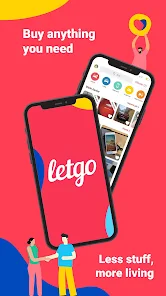
Letgo is a marketplace app for buying and selling used items locally, kind of like a digital garage sale that lives in your pocket. You can list everything from furniture and electronics to clothing and cars, snap a few photos, set a price, and chat with potential buyers right inside the app. I downloaded it from Google Play after moving to a new apartment and realizing I had way too many duplicate kitchen gadgets. The install was quick, and it's free to use with no upfront costs, though you'll see occasional ads and optional in-app purchase bumps to promote your listings. Opening it for the first time, the feed hit me with a flood of nearby listings sorted by distance, which felt a little overwhelming but also exciting—like walking into a giant thrift store where everything changes daily. I didn't need to register right away to browse, which was nice, but I had to create an account to message sellers, and the sign-up process took maybe two minutes with Google or Facebook.
Once I jumped in, the actual hands-on experience was pretty smooth for the most part. The interface is clean but a bit cluttered with thumbnails and location tags everywhere, so finding a specific item can take some scrolling. I listed an old bookshelf by tapping the green “sell” button, and the app walked me through taking photos with its AI that crops and brightens them automatically. Writing a description was straightforward, but the suggested price tool sometimes felt a bit off—it recommended $40 for a lamp I'd priced at $10, which made me wonder if I was undercharging. Daily use means checking messages constantly because buyers ghost pretty often, and the in-app chat is decent but lacks read receipts, so you're left guessing if someone saw your reply. A small practical tip: bumping your listing for a couple bucks during peak evening hours actually got me three serious offers within an hour, which surprised me.
After a few weeks of buying a couch and selling that bookshelf, I've got a pretty honest take on it compared to other apps. I think people who enjoy bargain hunting or decluttering without dealing with shipping will really like Letgo, especially if they live in a busy metro area where items move fast. But if you're looking for niche collectibles or want a super streamlined experience, you might prefer OfferUp's rating system or Facebook Marketplace's social trust factor. What sets Letgo apart for me is how effortless it is to post a listing—less than two minutes from start to finish—but the downside is dealing with flaky buyers and occasional spam messages from businesses. I kept it installed because it works well for big, heavy items like furniture that are a pain to ship, but I could see uninstalling it if I moved to a smaller town with fewer active users. It's not perfect, but it's a solid tool when you just want something gone.
features
- 📸 The built-in AI camera tool is a standout feature. It automatically crops, rotates, and enhances your photos to make listings look more polished, which I haven't seen work as well in OfferUp—Letgo's photos just pop better without extra effort.
- 💬 The smart price suggestion system uses real-time data from similar sold items, so you're not guessing wildly. It's faster than eBay's manual research, though I found it occasionally overestimates demand for niche stuff like vintage decor.
- 🧭 Location-based discovery is super granular, letting you sort items within a few miles versus a city-wide radius. Facebook Marketplace doesn't let you narrow it down as tightly, which makes Letgo better for quick, local in-person swaps.
- 🔔 Push notifications for favorites and price drops actually feel useful and not spammy. I got a ping when someone marked my shelf as a favorite, and it motivated me to respond faster compared to Craigslist's silent approach.
pros
- ✅ Letgo has a lower barrier to posting than OfferUp, with no mandatory approval delays. Listings go live almost instantly, letting you sell a bookcase in under five minutes without waiting for moderation.
- ✅ The user interface is more modern and visually appealing than Craigslist's bare-bones design, which feels stuck in the early 2000s. Letgo's card-based layout makes browsing less overwhelming.
- ✅ It integrates with Google Maps directly in the chat, so setting up a meetup spot is seamless. eBay's local pickup option doesn't offer that same convenience for location sharing.
- ✅ The app is generally ad-supported rather than fee-heavy, so you don't pay a percentage on sales like you do on Poshmark for clothes or eBay for electronics.
cons
- ❌ Letgo lacks a built-in rating system for buyers or sellers, unlike OfferUp, which uses reputation to build trust. I had five no-shows without any way to warn others, which was frustrating and feels risky.
- ❌ The chat interface doesn't support photo sharing within messages, unlike Facebook Marketplace. When a buyer wanted a clearer angle of a scratch, I had to re-post a new listing photo instead of just sending it directly.
- ❌ Spam listings are a real problem, with businesses flooding the feed for services like carpet cleaning. Craigslist does a better job through manual flagging, whereas Letgo's filter seemed to miss these for weeks.
- ❌ No shipping option exists—everything is local pickup only, which is limiting compared to eBay or Mercari. I had a buyer from the next state interested in my lamp, but there was no way to complete the sale without them traveling.
Articles
![]()
Guide
How to Update Google Play Store on Android 2026
![]()
Guide
How to Download Older Versions of Android Apps
![]()
Guide
How to Download Apps Without Google Play Store
![]()
Guide
What Is an APK File for Android?
If you use an Android phone, you may have seen the term APK while searching for apps or games online. Some websites offer an APK download instead of a Google Play install button. Some users also mention APK files when talking about apps that are not available in their region, older app versions, or Android games downloaded outside the Play Store.
![]()
Guide
How to Install Games from Google Play for Beginners
Installing games on an Android phone is usually simple, but for beginners, the process can still feel confusing at first. You may not know where to search, which button to tap, whether the game is safe, or why Google Play sometimes asks for account settings, storage access, or payment information. If you are using an Android phone for the first time, learning how to install games from Google Play is one of the easiest ways to get started.
![]()
Guide
How Useful Gemini Is for Everyday Questions and Quick Tasks
emini feels different from many AI apps because it is not only trying to be a chatbot. After using it for everyday questions, quick writing, image understanding, and planning, I think its biggest strength is convenience.
![]()
Guide
What to Know Before Downloading APKs
For many Android users, downloading an APK is a common way to install apps and games. Sometimes an app is not available in a certain country.
![]()
Guide
ChatGPT Review: Is It Still the Best AI App in 2026?
![]()
Guide
Seedance 2.0 vs Sora: The Future of AI Video Generation
The AI video race has intensified dramatically over the past two years. Platforms like Sora from OpenAI and Luma Dream Machine pushed the boundaries of text-to-video realism. Yet, despite their impressive outputs, most tools still operate as probabilistic generators—you describe a scene, and the model interprets it. Control remains limited. With the February 2026 release of Seedance 2.0, developed by ByteDance, the paradigm shifted. Internally known as Jimeng 2.0, Seedance does not position itself as just another video model. It positions itself as an AI Director. Rather than guessing what you want, Seedance 2.0 allows you to direct what happens. This distinction defines everything that follows.









Recommended Apps
![]()
Home Design 3D
Anuman4.2
![]()
Truth or Dare Game - Party App
Chouic4.8
![]()
Photo Collage Maker
Scoompa4.7![]()
Learn to Draw Flower
Creative APPS4.2![]()
FIFA World Cup 2026™
FIFA2.8![]()
Mirror Plus: Mirror with Light
Digitalchemy, LLC4.4![]()
Meitu- Photo Editor & AI Art
Meitu (China) Limited4.5![]()
Perplexity - Ask Anything
PerplexityAI4.7![]()
GhostTube SLS Camera Alternate
GhostTube4![]()
Boom Chip Blast: 2-Player
Black Pyramid 3D Games Studio0![]()
Healthy Benefits+
Solutran, Inc.4.5![]()
Deepcheck AI Search Assistant
rohe.ai4![]()
Idol Prank Video Call & Chat
LightCode Solutions4![]()
Face Shape - Pretty Scale
GlintTec Apps3.9![]()
Plant App - Plant Identifier
ScaleUp4.6











































