

Perplexity - Ask Anything

5M+
Installs
PerplexityAI
Developer
-
Generative AI
Category
-
Rated for 3+
Content Rating
-
+16284007772
Developer Email
-
https://www.perplexity.ai/privacy
Privacy Policy
Screenshots
editor reviews
Perplexity is an AI-powered search assistant that blends a chatbot interface with real-time web search. Instead of just returning a list of links like Google or Bing, it generates direct answers with inline citations pulled from sources like news articles, academic papers, and forums. People mainly use it for quick research, fact-checking, or deep dives into topics without sifting through multiple tabs. I downloaded it from Google Play because I was tired of opening ten results to find a single statistic. The install count shows it's already crossed 10 million, and it's free to start, though there are optional in-app purchases for a Pro tier. The first impression after launching is clean and minimal — a simple text bar at the bottom with a few suggested questions on the screen. No sign-up wall hits you immediately, which feels refreshing for a utility app.
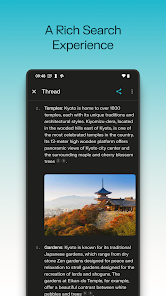
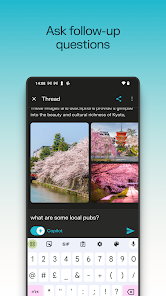
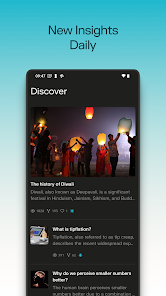
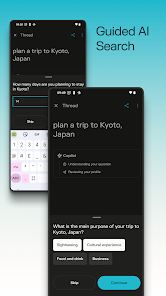
After signing up with Google, the interface feels straightforward. You type a query and get an answer that reads like a short article, with numbered footnotes linked to original sources. The main actions are asking follow-up questions or clicking these citations to verify details yourself. The home screen shows a "Discover" section with trending searches, which gives some inspiration if you're blanking on what to ask. I found the voice input handy for asking while cooking. One nice detail is that the app saves your thread history automatically, so you can revisit a past search without losing context. The settings let you choose between different AI models, which is neat but maybe confusing for casual users. The onboarding is short: a few swipes explaining the citation system, then you're turned loose.
After using it for a few weeks, I think Perplexity is a solid companion for students or anyone who does ongoing research. It saves time by skipping rerouted links and giving concise answers. It's not really for someone who just wants a simple "what's the weather" tool — Google Assistant handles that faster. Compared to ChatGPT with browsing, Perplexity feels more transparent about where info comes from, though it can be clunkier for creative writing. The free version includes enough for daily use, but the lack of file uploads in the free tier nudges you toward paying. I'll probably keep it installed because it's quicker than opening a browser and checking multiple tabs when I'm fact-checking a claim or exploring a new topic.
features
- 🔍 Real-time citations – Unlike ChatGPT which often generates answers without visible links, Perplexity pins source numbers directly on answers. You can tap each one to see the original page, so verifying info is immediate. 🔍 Thread organization – Each query starts a new thread that stays saved by default. Google Gemini loses conversation history unless you manually save it, but Perplexity holds everything, making it easy to revisit past searches. 🔍 AI model choice – In the settings, you can switch between GPT-4, Claude, or their own model. This isn't available in something like Bing Copilot, which locks you into one engine. It's useful if you prefer how one model handles technical questions over another. 🔍 Voice-first search – The mic button works well for longer queries, and the app returns spoken answers too. This stands out compared to You.com's search, which relies more on text input.
pros
- 🌟 Perfect for research-heavy tasks – When I needed to compare two economic policies, Perplexity pulled info from five different news sources in seconds. Google's search results required opening all links manually. 🌟 Cleaner interface – The main screen avoids the cluttered card layout of Bing. Just one input bar and answers—no newsfeed or ads flooding your view. 🌟Citation visibility – Seeing where info comes from builds trust. In ChatGPT, you often guess if a fact is real. Perplexity shows you the source, which feels more honest.
cons
- 👎 Slower for simple tasks – Asking "what time is it" takes longer than Google Assistant. For basic queries, the app feels overkill. 👎 Free tier limits– You can't upload PDFs or images without paying. Compared to Microsoft Copilot's free image analysis, this is a clear gap. 👎 Occasional citation errors – Sometimes the cited page doesn't actually support the claim. I found two cases where the text contradicted the source. Manual checking is still necessary. 👎 No offline mode – You need internet for every query. Google Lens can work offline for some tasks, but Perplexity is useless without a connection.
Articles
![]()
Guide
How to Update Google Play Store on Android 2026
![]()
Guide
How to Download Older Versions of Android Apps
![]()
Guide
How to Download Apps Without Google Play Store
![]()
Guide
What Is an APK File for Android?
If you use an Android phone, you may have seen the term APK while searching for apps or games online. Some websites offer an APK download instead of a Google Play install button. Some users also mention APK files when talking about apps that are not available in their region, older app versions, or Android games downloaded outside the Play Store.
![]()
Guide
How to Install Games from Google Play for Beginners
Installing games on an Android phone is usually simple, but for beginners, the process can still feel confusing at first. You may not know where to search, which button to tap, whether the game is safe, or why Google Play sometimes asks for account settings, storage access, or payment information. If you are using an Android phone for the first time, learning how to install games from Google Play is one of the easiest ways to get started.
![]()
Guide
How Useful Gemini Is for Everyday Questions and Quick Tasks
emini feels different from many AI apps because it is not only trying to be a chatbot. After using it for everyday questions, quick writing, image understanding, and planning, I think its biggest strength is convenience.
![]()
Guide
What to Know Before Downloading APKs
For many Android users, downloading an APK is a common way to install apps and games. Sometimes an app is not available in a certain country.
![]()
Guide
ChatGPT Review: Is It Still the Best AI App in 2026?
![]()
Guide
Seedance 2.0 vs Sora: The Future of AI Video Generation
The AI video race has intensified dramatically over the past two years. Platforms like Sora from OpenAI and Luma Dream Machine pushed the boundaries of text-to-video realism. Yet, despite their impressive outputs, most tools still operate as probabilistic generators—you describe a scene, and the model interprets it. Control remains limited. With the February 2026 release of Seedance 2.0, developed by ByteDance, the paradigm shifted. Internally known as Jimeng 2.0, Seedance does not position itself as just another video model. It positions itself as an AI Director. Rather than guessing what you want, Seedance 2.0 allows you to direct what happens. This distinction defines everything that follows.









Recommended Apps
![]()
Home Design 3D
Anuman4.2
![]()
Truth or Dare Game - Party App
Chouic4.8
![]()
Photo Collage Maker
Scoompa4.7![]()
Learn to Draw Flower
Creative APPS4.2![]()
FIFA World Cup 2026™
FIFA2.8![]()
Mirror Plus: Mirror with Light
Digitalchemy, LLC4.4![]()
Meitu- Photo Editor & AI Art
Meitu (China) Limited4.5![]()
Perplexity - Ask Anything
PerplexityAI4.7![]()
GhostTube SLS Camera Alternate
GhostTube4![]()
Boom Chip Blast: 2-Player
Black Pyramid 3D Games Studio0![]()
Healthy Benefits+
Solutran, Inc.4.5![]()
Deepcheck AI Search Assistant
rohe.ai4![]()
Idol Prank Video Call & Chat
LightCode Solutions4![]()
Face Shape - Pretty Scale
GlintTec Apps3.9![]()
Plant App - Plant Identifier
ScaleUp4.6











































