

Klarna | Shop now. Pay later.

10,000,000+
Installs
Klarna Bank AB (publ)
Developer
-
Shopping
Category
-
Rated for 3+
Content Rating
-
app@klarna.com
Developer Email
-
https://www.klarna.com/international/privacy-policy/
Privacy Policy
Screenshots
editor reviews
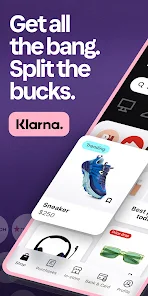
Klarna is a financial services app that lets you split purchases into installments when shopping online or in-store. It falls under the buy now, pay later category, which has become pretty popular among people who want more flexibility with their money. You can use Klarna to pay for things over time, sometimes with zero interest if you stick to the schedule. I first downloaded it from the Google Play store after seeing the option pop up during checkout on a few websites. The install process was quick, and the app had over 100 million downloads when I checked, which shows how many people are using it. The app is free to download and use, though you do need to sign up with an email or phone number. After launching it, the first thing I noticed was the clean, modern layout with a focus on your spending limits and payment plans. It felt straightforward, but there was a lot of information to take in at once.
Once I started using Klarna, the interface felt smooth but a bit busy. The onboarding walks you through linking a payment method, and then you can browse stores or check your existing purchases. A typical step would be picking an item on a retailer's site, choosing Klarna at checkout, and then coming back to the app to see the plan. I found the timeline view helpful for tracking upcoming payments, but the constant notifications about new offers got old after a while. One practical tip is to set up autopay early, because missing a payment can lead to late fees. Navigating between your balance and the shop tab felt natural, but sometimes I accidentally tapped on an ad for a store I wasn't interested in. It works well for quick transactions, though the app does lag a bit when loading your purchase history with multiple items.
After using Klarna for a few months, I think it's a solid choice for people who need short-term flexibility with purchases, especially for bigger items like electronics or clothing. It's not for everyone, though, because if you're not careful with due dates, the fees can add up fast. What sets Klarna apart from a service like Afterpay is how it integrates into the app itself, offering a dedicated shopping feed and virtual cards. I could see someone keeping it installed if they shop often at partner stores, but I would uninstall it if I wanted to avoid the temptation of splitting every purchase. The experience is convenient, but it requires discipline to stay on top of your payments and not overspend.
features
- 🛒 Klarna offers a virtual card feature that lets you use buy now, pay later at almost any online store, even ones not listed in the app. Compared to PayPal's Pay in 4, which is limited to specific merchants, Klarna's card gives you more freedom to shop wherever you want while still splitting payments.
- 🔍 The app includes a price drop alert tool that notifies you when an item you bought goes on sale at participating retailers. This is something Afterpay lacks completely, and it's a handy way to save a bit of cash on big purchases without manually checking prices again.
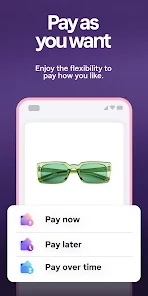
- ⏱️ Klarna provides a 30-day pay later option with zero interest for some purchases, which is longer than the typical two-week window from competitors like Affirm. This makes it easier to spread out costs without worrying about immediate payments, though it depends on the merchant's terms.
- 📊 The app has a built-in spending tracker that categorizes your purchases and shows upcoming payments with a clear calendar view. Sezzle offers something similar, but Klarna's visual design is more intuitive for seeing your total balance at a glance, helping you avoid missing deadlines.
pros
- ✅ Klarna's approval process is often faster than Affirm's, requiring only a soft credit check for most transactions. This means you can get a payment plan set up within minutes without hurting your credit score, which is a big plus for casual shoppers.
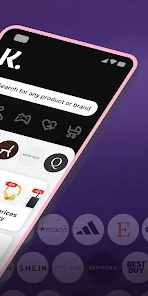
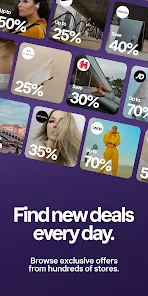
- ✅ The app has a wider merchant network than Afterpay, covering everything from fashion to electronics and even grocery delivery in some regions. You can use Klarna at big names like H&M and Nike, making it easy to stick with one app for multiple purchases.
- ✅ Refunds are processed quickly through Klarna, often within a few days, compared to Sezzle where it can take up to a week. Once a return goes through, your payment plan is adjusted automatically, so you don't have to chase down customer service.
cons
- ❌ Late fees in Klarna can stack up faster than in Afterpay, with charges reaching up to $35 per missed payment in some cases. Afterpay caps late fees at a lower amount, so Klarna is less forgiving if you slip up with your schedule.
- ❌ The app lacks a physical card option like Affirm's, which limits in-store usage to stores that accept virtual cards via Apple Pay or Google Pay. If you're at a small shop without digital wallet support, you're stuck using a regular card instead.
- ❌ Customer support is mostly chatbot-driven, unlike PayPal's live chat system, which can be frustrating if you have a complex issue like a disputed charge. Getting a human on the phone often takes hours, and the automated responses don't always solve the problem right away.
- ❌ Klarna's spending limits are lower than Sezzle's for new users, often starting around $100, while Sezzle may allow up to $300 initially. This can be a letdown if you want to finance a larger purchase right away without building up your history first.
Articles
![]()
Guide
How to Update Google Play Store on Android 2026
![]()
Guide
How to Download Older Versions of Android Apps
![]()
Guide
How to Download Apps Without Google Play Store
![]()
Guide
What Is an APK File for Android?
If you use an Android phone, you may have seen the term APK while searching for apps or games online. Some websites offer an APK download instead of a Google Play install button. Some users also mention APK files when talking about apps that are not available in their region, older app versions, or Android games downloaded outside the Play Store.
![]()
Guide
How to Install Games from Google Play for Beginners
Installing games on an Android phone is usually simple, but for beginners, the process can still feel confusing at first. You may not know where to search, which button to tap, whether the game is safe, or why Google Play sometimes asks for account settings, storage access, or payment information. If you are using an Android phone for the first time, learning how to install games from Google Play is one of the easiest ways to get started.
![]()
Guide
How Useful Gemini Is for Everyday Questions and Quick Tasks
emini feels different from many AI apps because it is not only trying to be a chatbot. After using it for everyday questions, quick writing, image understanding, and planning, I think its biggest strength is convenience.
![]()
Guide
What to Know Before Downloading APKs
For many Android users, downloading an APK is a common way to install apps and games. Sometimes an app is not available in a certain country.
![]()
Guide
ChatGPT Review: Is It Still the Best AI App in 2026?
![]()
Guide
Seedance 2.0 vs Sora: The Future of AI Video Generation
The AI video race has intensified dramatically over the past two years. Platforms like Sora from OpenAI and Luma Dream Machine pushed the boundaries of text-to-video realism. Yet, despite their impressive outputs, most tools still operate as probabilistic generators—you describe a scene, and the model interprets it. Control remains limited. With the February 2026 release of Seedance 2.0, developed by ByteDance, the paradigm shifted. Internally known as Jimeng 2.0, Seedance does not position itself as just another video model. It positions itself as an AI Director. Rather than guessing what you want, Seedance 2.0 allows you to direct what happens. This distinction defines everything that follows.









Recommended Apps
![]()
Home Design 3D
Anuman4.2
![]()
Truth or Dare Game - Party App
Chouic4.8
![]()
Photo Collage Maker
Scoompa4.7![]()
Learn to Draw Flower
Creative APPS4.2![]()
FIFA World Cup 2026™
FIFA2.8![]()
Mirror Plus: Mirror with Light
Digitalchemy, LLC4.4![]()
Meitu- Photo Editor & AI Art
Meitu (China) Limited4.5![]()
Perplexity - Ask Anything
PerplexityAI4.7![]()
GhostTube SLS Camera Alternate
GhostTube4![]()
Boom Chip Blast: 2-Player
Black Pyramid 3D Games Studio0![]()
Healthy Benefits+
Solutran, Inc.4.5![]()
Deepcheck AI Search Assistant
rohe.ai4![]()
Idol Prank Video Call & Chat
LightCode Solutions4![]()
Face Shape - Pretty Scale
GlintTec Apps3.9![]()
Plant App - Plant Identifier
ScaleUp4.6












































