

Microsoft Copilot

1M+
Installs
Microsoft Corporation
Developer
-
Generative AI
Category
-
Rated for 3+
Content Rating
-
sapphirefeedback@microsoft.com
Developer Email
-
https://aka.ms/Copilot/Protections
Privacy Policy
Screenshots
editor reviews
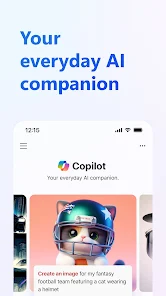
Microsoft Copilot is an AI assistant app that feels more like a digital companion than just another chatbot. It's developed by Microsoft Corporation and pulls from the same large language model behind ChatGPT, but it's specifically built to work across your devices and even inside apps like Word, Excel, and Edge. You can download it directly from Google Play or the App Store for free, and it already has millions of installs. The moment you launch the app, you're greeted with a clean, airy interface with a chat window and a few suggestion prompts. No clutter, no loud banners, just a simple place to start typing. What makes the first impression stand out is how quickly it offers something useful—it immediately suggests you try voice input or give it a task, so you don't have to guess what to do next.
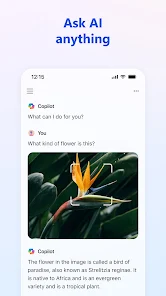
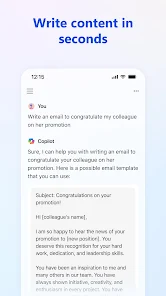
After you start using the app, the experience feels more like having a friend who also happens to read your emails. You can type or speak a question, but the real surprise is how naturally it picks up on context. For example, if you ask it to summarize a long PDF you have stored on your phone, it might actually dig into your files (with permission, of course) and come back with a clear summary. The onboarding walks you through linking your Microsoft account, but you don't need to be a heavy Microsoft user to get value from it. You can ask it to draft an email, rewrite a sentence, or even help you choose a gift based on personality traits. It also supports image generation through DALL-E integration, which works well for social media posts or quick visuals. One small thing I noticed: sometimes it asks for too many confirmations when accessing phone files, which slows down the flow a bit. But once you're in the groove, you'll find yourself throwing random requests at it without hesitation. It also remembers your past questions within a session, which means you can have long, multi-turn conversations without repeating yourself.
After spending a few weeks with Microsoft Copilot, I honestly see its main value coming from the convenience of staying inside one ecosystem. If you already use Microsoft 365 for work or school, this app will feel indispensable—you can ask it to pull up documents, suggest meeting topics, or even read your Teams chats. For someone who just wants a general AI helper for everyday questions, it works fine but might not feel dramatically better than other free options. Where it wins is the deep integration: you can't get this level of seamless file and document access with ChatGPT without paying for a premium plan. On the other hand, the app can feel a bit demanding in terms of permissions and account setup. I could see a casual user uninstalling it after a week if they just wanted quick answers without connecting their life to Microsoft. But if you're already deep in Office apps, this is the one AI tool you'll actually use without switching tabs.
features
- 🤖 Chat Interface – The main way you interact with Copilot is through a conversational chat, but unlike many assistants, it keeps your context across multiple turns. You can ask follow-ups without restating what you just said. Compared to ChatGPT, Copilot feels less scripted and more like someone who actually remembers what you're working on—especially in long sessions. It also offers multiple tone options (casual, professional, creative), which is missing from many alternatives.
- 📁 File and App Integration – This is where Copilot shines brightest. You can directly ask it to read a PDF, summarize an email thread, or pull data from a Word doc you have open. ChatGPT can do some of this, but only if you upload files manually each time. Copilot works more like a personal assistant that already lives in your digital life. It can even check your calendar or suggest actions based on your documents.
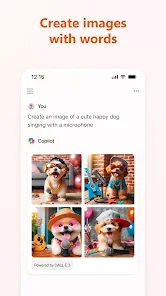
- 🎨 DALL-E Image Generation – You can generate images by describing what you want, and the app turns your description into something usable fairly quickly. The quality is similar to what you'd see in Bing Image Creator or ChatGPT's DALL-E integration. But here, it's one less subscription to worry about, since image generation is included without extra fees.
- 🔗 Microsoft 365 Sync – For anyone using Outlook, Teams, or OneDrive, the syncing is seamless. Your recent files show up automatically and you can reference them in conversation. This is something most standalone assistants can't do easily. It turns the app from a novelty into a daily productivity lever.
pros
- ⚡ Deep Office Integration – Unlike ChatGPT or Google Bard, Copilot actually reads your Word documents and Outlook emails without you manually uploading them. It feels like an extension of your desktop, not a separate app. This alone makes it better for people who spend hours inside Microsoft apps.
- ⚡ Free Image Generation – While ChatGPT charges for DALL-E access, Copilot gives it to you for free (with daily limits). You can create quick visuals for social posts or presentations without paying extra. The quality is solid for most uses.
- ⚡ Voice Input Works Well – The speech-to-text recognition is smooth and faster than typing, especially on mobile. It rarely misunderstands accents or long sentences, which is a pain point in many other free assistants like Google Assistant.
cons
- ⚠️ Permission Overload – Before Copilot can do anything useful, it asks for access to files, camera, microphone, and even your calendar. If you're privacy-conscious, this feels invasive. Apps like ChatGPT or Claude don't ask for this much upfront, which makes them feel more lightweight.
- ⚠️ Microsoft Account Required – You can't use the app without signing into a Microsoft account. That's fine if you already have one, but it locks out people who want to test it quickly. Most other assistants let you use basic features anonymously.
- ⚠️ Occasional Slowness – When generating images or processing long documents, the app sometimes hangs or takes an extra few seconds. It's not deal-breaking, but ChatGPT usually feels snappier on simple tasks.
- ⚠️ Limited Offline Use – Without an internet connection, the app becomes nearly useless. It doesn't cache any functionality for basic questions. Something like Google Assistant can still answer simple queries offline, which is better for travelers.
Articles
![]()
Guide
How to Update Google Play Store on Android 2026
![]()
Guide
How to Download Older Versions of Android Apps
![]()
Guide
How to Download Apps Without Google Play Store
![]()
Guide
What Is an APK File for Android?
If you use an Android phone, you may have seen the term APK while searching for apps or games online. Some websites offer an APK download instead of a Google Play install button. Some users also mention APK files when talking about apps that are not available in their region, older app versions, or Android games downloaded outside the Play Store.
![]()
Guide
How to Install Games from Google Play for Beginners
Installing games on an Android phone is usually simple, but for beginners, the process can still feel confusing at first. You may not know where to search, which button to tap, whether the game is safe, or why Google Play sometimes asks for account settings, storage access, or payment information. If you are using an Android phone for the first time, learning how to install games from Google Play is one of the easiest ways to get started.
![]()
Guide
How Useful Gemini Is for Everyday Questions and Quick Tasks
emini feels different from many AI apps because it is not only trying to be a chatbot. After using it for everyday questions, quick writing, image understanding, and planning, I think its biggest strength is convenience.
![]()
Guide
What to Know Before Downloading APKs
For many Android users, downloading an APK is a common way to install apps and games. Sometimes an app is not available in a certain country.
![]()
Guide
ChatGPT Review: Is It Still the Best AI App in 2026?
![]()
Guide
Seedance 2.0 vs Sora: The Future of AI Video Generation
The AI video race has intensified dramatically over the past two years. Platforms like Sora from OpenAI and Luma Dream Machine pushed the boundaries of text-to-video realism. Yet, despite their impressive outputs, most tools still operate as probabilistic generators—you describe a scene, and the model interprets it. Control remains limited. With the February 2026 release of Seedance 2.0, developed by ByteDance, the paradigm shifted. Internally known as Jimeng 2.0, Seedance does not position itself as just another video model. It positions itself as an AI Director. Rather than guessing what you want, Seedance 2.0 allows you to direct what happens. This distinction defines everything that follows.









Recommended Apps
![]()
Home Design 3D
Anuman4.2
![]()
Truth or Dare Game - Party App
Chouic4.8
![]()
Photo Collage Maker
Scoompa4.7![]()
Learn to Draw Flower
Creative APPS4.2![]()
FIFA World Cup 2026™
FIFA2.8![]()
Mirror Plus: Mirror with Light
Digitalchemy, LLC4.4![]()
Meitu- Photo Editor & AI Art
Meitu (China) Limited4.5![]()
Perplexity - Ask Anything
PerplexityAI4.7![]()
GhostTube SLS Camera Alternate
GhostTube4![]()
Boom Chip Blast: 2-Player
Black Pyramid 3D Games Studio0![]()
Healthy Benefits+
Solutran, Inc.4.5![]()
Deepcheck AI Search Assistant
rohe.ai4![]()
Idol Prank Video Call & Chat
LightCode Solutions4![]()
Face Shape - Pretty Scale
GlintTec Apps3.9![]()
Plant App - Plant Identifier
ScaleUp4.6











































