

Venmo

50,000,000+
Installs
PayPal, Inc.
Developer
-
Finance
Category
-
Rated for 3+
Content Rating
-
support+android@venmo.com
Developer Email
-
https://venmo.com/info/privacy-policy
Privacy Policy
Screenshots
editor reviews
Venmo is a mobile payment app developed by PayPal that turns splitting bills and sending money into something oddly social. You download it from Google Play or the App Store, install it, and after a quick registration—either linking a bank account or debit card—you are ready to send cash to friends without ever pulling out your wallet. The first impression is very clean and modern, with a simple home screen showing a feed of transactions. The app is free to download and has no upfront costs, though it makes money through instant transfer fees and optional credit card processing. With over 100 million installs, it feels like almost everyone you know already uses it.
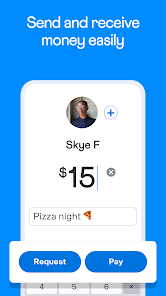
Using Venmo day-to-day is surprisingly straightforward. You open the app, tap the blue Pay or Request button, search for a contact, enter an amount, and add a quick note like "rent" or "pizza." The feed displays recent transactions among your friends, complete with emojis and funny captions, which is honestly more fun than checking your bank balance. The onboarding process walks you through linking your account, and after that, the main actions are just a couple of taps away. I did notice the social feed can be a little distracting if you are in a hurry, but it also makes the app feel less robotic than other payment tools. A small tip: you can make transactions private so your shared pizza purchase does not pop up for everyone to see.
After using Venmo for a few months, I can see why it sticks around. It works great for people who split costs often with friends, like roommates, group trip planners, or anyone who eats out regularly. People who just want to send money privately might prefer Cash App or Zelle for a simpler, no-frills experience. What sets Venmo apart is that social layer—I am more likely to keep it installed because it feels less like paying a bill and more like being part of a group chat. That said, I have uninstalled it before when no one I knew was using it, because the app loses its point without a network of friends to pay or request money from.
features
- 💳 Instant transfer to your bank account for a small fee, unlike PayPal which usually takes one to three business days for free transfers.
- 👥 Social feed with transaction notes and emojis, making payments feel like a conversation rather than a cold transaction.
- 🔒 Purchase protection for eligible transactions, giving you some safety if a seller does not deliver.
- 📱 Split bill feature that divides expenses among multiple people at once, saving time compared to PayPal requesting each person separately.
pros
- 👍 The social feed keeps you aware of who owes what, which is very practical for group expenses.
- 👍 Linking directly to a debit card is quick, while PayPal often requires more verification steps.
- 👍 The app is widely adopted among younger users, so you will rarely need to convince someone to download it.
cons
- 👎 The social feed can feel like an unnecessary public broadcast of your spending habits.
- 👎 Instant transfer fees add up fast if you move money frequently, unlike Zelle which is usually free.
- 👎 Customer support is slow and often automated, making dispute resolution frustrating compared to traditional bank apps.
Articles
![]()
Guide
How to Update Google Play Store on Android 2026
![]()
Guide
How to Download Older Versions of Android Apps
![]()
Guide
How to Download Apps Without Google Play Store
![]()
Guide
What Is an APK File for Android?
If you use an Android phone, you may have seen the term APK while searching for apps or games online. Some websites offer an APK download instead of a Google Play install button. Some users also mention APK files when talking about apps that are not available in their region, older app versions, or Android games downloaded outside the Play Store.
![]()
Guide
How to Install Games from Google Play for Beginners
Installing games on an Android phone is usually simple, but for beginners, the process can still feel confusing at first. You may not know where to search, which button to tap, whether the game is safe, or why Google Play sometimes asks for account settings, storage access, or payment information. If you are using an Android phone for the first time, learning how to install games from Google Play is one of the easiest ways to get started.
![]()
Guide
How Useful Gemini Is for Everyday Questions and Quick Tasks
emini feels different from many AI apps because it is not only trying to be a chatbot. After using it for everyday questions, quick writing, image understanding, and planning, I think its biggest strength is convenience.
![]()
Guide
What to Know Before Downloading APKs
For many Android users, downloading an APK is a common way to install apps and games. Sometimes an app is not available in a certain country.
![]()
Guide
ChatGPT Review: Is It Still the Best AI App in 2026?
![]()
Guide
Seedance 2.0 vs Sora: The Future of AI Video Generation
The AI video race has intensified dramatically over the past two years. Platforms like Sora from OpenAI and Luma Dream Machine pushed the boundaries of text-to-video realism. Yet, despite their impressive outputs, most tools still operate as probabilistic generators—you describe a scene, and the model interprets it. Control remains limited. With the February 2026 release of Seedance 2.0, developed by ByteDance, the paradigm shifted. Internally known as Jimeng 2.0, Seedance does not position itself as just another video model. It positions itself as an AI Director. Rather than guessing what you want, Seedance 2.0 allows you to direct what happens. This distinction defines everything that follows.









Recommended Apps
![]()
Home Design 3D
Anuman4.2
![]()
Truth or Dare Game - Party App
Chouic4.8
![]()
Photo Collage Maker
Scoompa4.7![]()
Learn to Draw Flower
Creative APPS4.2![]()
FIFA World Cup 2026™
FIFA2.8![]()
Mirror Plus: Mirror with Light
Digitalchemy, LLC4.4![]()
Meitu- Photo Editor & AI Art
Meitu (China) Limited4.5![]()
Perplexity - Ask Anything
PerplexityAI4.7![]()
GhostTube SLS Camera Alternate
GhostTube4![]()
Boom Chip Blast: 2-Player
Black Pyramid 3D Games Studio0![]()
Healthy Benefits+
Solutran, Inc.4.5![]()
Deepcheck AI Search Assistant
rohe.ai4![]()
Idol Prank Video Call & Chat
LightCode Solutions4![]()
Face Shape - Pretty Scale
GlintTec Apps3.9![]()
Plant App - Plant Identifier
ScaleUp4.6











































