

SiriusXM: Music, Sports & News

10,000,000+
Installs
Sirius XM Radio Inc
Developer
-
Entertainment
Category
-
Rated for 12+
Content Rating
-
listenercare@siriusxm.com
Developer Email
-
http://www.siriusxm.com/pdf/siriusxm_privacypolicy_eng.pdf
Privacy Policy
Screenshots


editor reviews
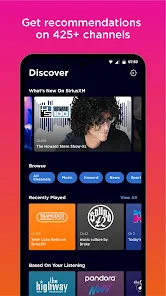
SiriusXM is a streaming app that brings together music, sports, talk radio, and news under one roof. It's not quite like Spotify or Apple Music, since it focuses on live and curated channels rather than building your own library of songs. People usually download it because they already have a satellite radio subscription in their car, or they're curious about exclusive shows from hosts like Howard Stern or live NFL games. When you first open it up, the layout feels busy but not overwhelming — a mix of category tiles at the top and a scrollable list of channels below. The app is free to download from both Google Play and the App Store, though you'll need to sign up for a subscription to actually listen to most content. There are over 150 channels to browse, and the initial setup nudges you to pick your favorite genres, which helps customize what shows up first.
After signing in and poking around, the experience is pretty straightforward. You tap a channel to start streaming, and the interface shows what's currently playing along with album art. One thing I noticed right away is how smooth switching between music, sports, and talk feels — you're not stuck in a single mood. For daily use, I found myself favoriting a handful of channels so I could jump between morning talk shows and afternoon music sessions without hunting. The search function is decent, but sometimes specific shows are buried under broader categories. A small tip: you can hit the "replay" button on some shows to catch segments you missed, which is handy for live sports highlights or interviews. The app occasionally buffers if your signal is weak, but that's more of a network issue than a design flaw.
After a couple of weeks, I can see why people keep this app around, but it's not for everyone. If you're into discovering new music on your own terms or building playlists, you'll probably get more out of something like Spotify. But if you commute a lot or like having a live DJ and sports commentary in the background, SiriusXM fills a gap that on-demand streaming services just can't match. What really stands out is the variety — you get everything from comedy channels to deep cuts in jazz and classical, all in one place. I can imagine uninstalling it if I stopped driving or if my favorite shows ended, but for now, it's earned a spot on my home screen for lazy weekend mornings and long drives.
features
- 🎧 Live radio streaming: You get real-time access to hundreds of channels, from music to sports to talk. Unlike Spotify, which relies on on-demand playlists, SiriusXM feels more like flipping through a real radio dial but with way more options. What stands out is the live aspect — you're hearing the same broadcast as everyone else, which creates a shared experience during big games or breaking news.
- 🎧 Exclusive content from big names: Howard Stern, Jason Ellis, and other personalities only appear here. That's a big deal if you're a fan, because you can't get their shows on Apple Music or YouTube Music. This app banks on exclusive deals to keep subscribers hooked.
- 🎧 Multi-platform sync: Start listening in your car, then pick up on your phone or smart speaker. The app remembers your spot, so you don't miss a beat. Rival services like TuneIn also offer cross-device listening, but SiriusXM integrates deeper with car systems.
- 🎧 Commercial-free music channels: Most music channels skip ads entirely. Compare that to free Pandora or iHeartRadio, where interruptions are frequent. It's a clean listening experience if you hate waiting through promos.
pros
- ✚ Channel variety beats competitors: Compared to TuneIn or iHeartRadio, SiriusXM has a wider range of niche channels — think 80s hair metal, deep house, or comedy archives. Pandora feels shallow in comparison when you want something specific.
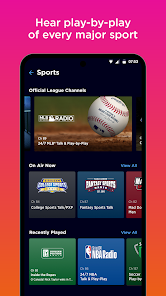
- ✚ Live sports coverage is top-notch: You get NFL, MLB, NHL, and more, all streaming live. ESPN Radio is included too. That's hard to find in one app without paying for separate sports packages.
- ✚ No algorithm fatigue: Unlike Spotify's endless playlists that feel same-y after a while, SiriusXM offers human-curated channels with DJs. It breaks the monotony of recommendation engines.
cons
- ❌ Subscription cost is high: At around $10-$15 a month, it's pricier than Apple Music or Amazon Music. For casual listeners, that's a tough sell when free alternatives exist.
- ❌ No offline downloads for all content: While you can save some shows, most music channels require an internet connection. Spotify lets you download entire playlists for offline use, which is more flexible.
- ❌ On-demand features are limited: You can't rewind a live show always, and search results for specific songs feel lacking. Pandora's station creation tools give you more control over what plays.
- ❌ Interface feels dated at times: The app can be slow to load channels, and the navigation isn't as sleek as newer streaming services. TuneIn's design is cleaner and faster for browsing.
Articles
![]()
Guide
How to Update Google Play Store on Android 2026
![]()
Guide
How to Download Older Versions of Android Apps
![]()
Guide
How to Download Apps Without Google Play Store
![]()
Guide
What Is an APK File for Android?
If you use an Android phone, you may have seen the term APK while searching for apps or games online. Some websites offer an APK download instead of a Google Play install button. Some users also mention APK files when talking about apps that are not available in their region, older app versions, or Android games downloaded outside the Play Store.
![]()
Guide
How to Install Games from Google Play for Beginners
Installing games on an Android phone is usually simple, but for beginners, the process can still feel confusing at first. You may not know where to search, which button to tap, whether the game is safe, or why Google Play sometimes asks for account settings, storage access, or payment information. If you are using an Android phone for the first time, learning how to install games from Google Play is one of the easiest ways to get started.
![]()
Guide
How Useful Gemini Is for Everyday Questions and Quick Tasks
emini feels different from many AI apps because it is not only trying to be a chatbot. After using it for everyday questions, quick writing, image understanding, and planning, I think its biggest strength is convenience.
![]()
Guide
What to Know Before Downloading APKs
For many Android users, downloading an APK is a common way to install apps and games. Sometimes an app is not available in a certain country.
![]()
Guide
ChatGPT Review: Is It Still the Best AI App in 2026?
![]()
Guide
Seedance 2.0 vs Sora: The Future of AI Video Generation
The AI video race has intensified dramatically over the past two years. Platforms like Sora from OpenAI and Luma Dream Machine pushed the boundaries of text-to-video realism. Yet, despite their impressive outputs, most tools still operate as probabilistic generators—you describe a scene, and the model interprets it. Control remains limited. With the February 2026 release of Seedance 2.0, developed by ByteDance, the paradigm shifted. Internally known as Jimeng 2.0, Seedance does not position itself as just another video model. It positions itself as an AI Director. Rather than guessing what you want, Seedance 2.0 allows you to direct what happens. This distinction defines everything that follows.









Recommended Apps
![]()
Home Design 3D
Anuman4.2
![]()
Truth or Dare Game - Party App
Chouic4.8
![]()
Photo Collage Maker
Scoompa4.7![]()
Learn to Draw Flower
Creative APPS4.2![]()
FIFA World Cup 2026™
FIFA2.8![]()
Mirror Plus: Mirror with Light
Digitalchemy, LLC4.4![]()
Meitu- Photo Editor & AI Art
Meitu (China) Limited4.5![]()
Perplexity - Ask Anything
PerplexityAI4.7![]()
GhostTube SLS Camera Alternate
GhostTube4![]()
Boom Chip Blast: 2-Player
Black Pyramid 3D Games Studio0![]()
Healthy Benefits+
Solutran, Inc.4.5![]()
Deepcheck AI Search Assistant
rohe.ai4![]()
Idol Prank Video Call & Chat
LightCode Solutions4![]()
Face Shape - Pretty Scale
GlintTec Apps3.9![]()
Plant App - Plant Identifier
ScaleUp4.6












































