

PayByPhone

10M+
Installs
PayByPhone Technologies Inc .
Developer
-
Productivity
Category
-
Everyone
Content Rating
-
support@paybyphone.com
Developer Email
-
https://www.paybyphone.com/about/terms-privacy
Privacy Policy
Screenshots


editor reviews
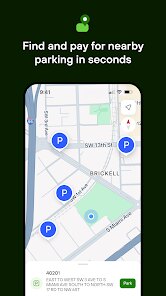
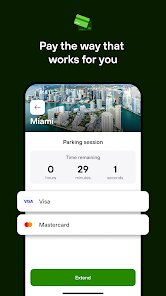
For anyone who regularly deals with parking meters and the need for spare change, a mobile payment solution can be a real time-saver. PayByPhone, developed by PayByPhone Technologies Inc., is a widely used application available on Google Play for download and installation. It focuses purely on streamlining the process of paying for parking sessions and managing them remotely. The app itself is free to install, though standard parking fees and a small convenience fee from the provider usually apply to each transaction. It functions in many cities, handling payments for both on-street spots and off-street parking garages that have partnered with the service.
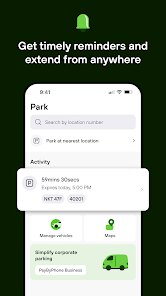
The core interaction is straightforward once you register and link a payment method. To start a parking session, you enter the zone number posted on signs near your spot, select the duration you need, and confirm. The app handles the rest. In practice, this felt quicker than fumbling with coins or cards at a meter, especially in bad weather. The GPS feature can locate your current zone automatically, which reduces manual entry errors. Users can also extend their parking time remotely from the app, which is a convenience I did not expect to rely on as much as I do. Notifications remind you when your session is about to end, which is helpful if you are in a meeting or running an errand.
Compared with other parking apps like ParkMobile or Passport Parking, PayByPhone holds its own in terms of a clean and functional user interface. ParkMobile has a slightly more modern visual design, but PayByPhone tends to process payments and load session history a bit faster in my experience. Where PayByPhone truly stands apart is its receipt management and expense tracking features. It keeps a detailed log of every transaction, and they provide an email receipt instantly. This is particularly useful for anyone who needs to submit parking expenses. The trade-off is that its map for finding available parking is less sophisticated than what some competitors offer, so it is best for locations where you already know where to park.
features
- The app's session extension feature is well executed. If you are away from your car and realize you need more time, opening the app and tapping extend takes only a few seconds. This works even if the physical meter has a maximum time limit, which is a clear upgrade over traditional payment methods. Other parking apps offer this, but PayByPhone makes the process feel particularly seamless.
- Receipts are emailed instantly after each transaction and include all the necessary details like zone, duration, and fee breakdown. For someone tracking business expenses, this eliminates the need to save paper meter receipts or manually log costs. The history inside the app is also searchable, which is a small detail that becomes very useful over time.
- The notification system is straightforward. You get a reminder ten minutes before your session expires. You can set your own reminder times, and the alert is a simple push notification that stops you from forgetting and possibly getting a ticket. It does what it promises without being intrusive or overly chatty.
pros
- Paying without coins or cards is convenient and faster, especially during rain or cold weather.
- Extending your session remotely means you avoid rushing back to your car to feed the meter.
- Email receipts organized by date and location simplify monthly expense reconciliation for drivers.
cons
- A small convenience fee is added to each transaction, which can accumulate if you park frequently in short intervals.
- Setting up an account requires entering payment details upfront, which might feel unnecessary for occasional users.
- The app sometimes fails to load the parking zone map when cell reception is weak, making the GPS location feature less reliable in some underground lots.
Articles
![]()
Guide
How to Update Google Play Store on Android 2026
![]()
Guide
How to Download Older Versions of Android Apps
![]()
Guide
How to Download Apps Without Google Play Store
![]()
Guide
What Is an APK File for Android?
If you use an Android phone, you may have seen the term APK while searching for apps or games online. Some websites offer an APK download instead of a Google Play install button. Some users also mention APK files when talking about apps that are not available in their region, older app versions, or Android games downloaded outside the Play Store.
![]()
Guide
How to Install Games from Google Play for Beginners
Installing games on an Android phone is usually simple, but for beginners, the process can still feel confusing at first. You may not know where to search, which button to tap, whether the game is safe, or why Google Play sometimes asks for account settings, storage access, or payment information. If you are using an Android phone for the first time, learning how to install games from Google Play is one of the easiest ways to get started.
![]()
Guide
How Useful Gemini Is for Everyday Questions and Quick Tasks
emini feels different from many AI apps because it is not only trying to be a chatbot. After using it for everyday questions, quick writing, image understanding, and planning, I think its biggest strength is convenience.
![]()
Guide
What to Know Before Downloading APKs
For many Android users, downloading an APK is a common way to install apps and games. Sometimes an app is not available in a certain country.
![]()
Guide
ChatGPT Review: Is It Still the Best AI App in 2026?
![]()
Guide
Seedance 2.0 vs Sora: The Future of AI Video Generation
The AI video race has intensified dramatically over the past two years. Platforms like Sora from OpenAI and Luma Dream Machine pushed the boundaries of text-to-video realism. Yet, despite their impressive outputs, most tools still operate as probabilistic generators—you describe a scene, and the model interprets it. Control remains limited. With the February 2026 release of Seedance 2.0, developed by ByteDance, the paradigm shifted. Internally known as Jimeng 2.0, Seedance does not position itself as just another video model. It positions itself as an AI Director. Rather than guessing what you want, Seedance 2.0 allows you to direct what happens. This distinction defines everything that follows.









Recommended Apps
![]()
Home Design 3D
Anuman4.2
![]()
Truth or Dare Game - Party App
Chouic4.8
![]()
Photo Collage Maker
Scoompa4.7![]()
Learn to Draw Flower
Creative APPS4.2![]()
FIFA World Cup 2026™
FIFA2.8![]()
Mirror Plus: Mirror with Light
Digitalchemy, LLC4.4![]()
Meitu- Photo Editor & AI Art
Meitu (China) Limited4.5![]()
Perplexity - Ask Anything
PerplexityAI4.7![]()
GhostTube SLS Camera Alternate
GhostTube4![]()
Boom Chip Blast: 2-Player
Black Pyramid 3D Games Studio0![]()
Healthy Benefits+
Solutran, Inc.4.5![]()
Deepcheck AI Search Assistant
rohe.ai4![]()
Idol Prank Video Call & Chat
LightCode Solutions4![]()
Face Shape - Pretty Scale
GlintTec Apps3.9![]()
Plant App - Plant Identifier
ScaleUp4.6












































