

Sprunki All Phases Beat Maker

5M+
Installs
Gotstar Studio
Developer
-
Simulation
Category
-
Everyone
Content Rating
-
publish@gotstarstudio.com
Developer Email
-
https://www.gotstarstudio.com/privacy
Privacy Policy
Screenshots
editor reviews
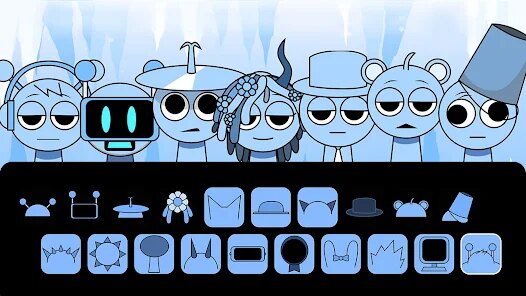
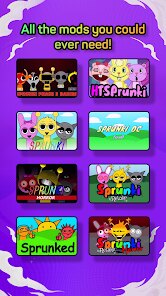
Alright, let's talk about Sprunki All Phases Beat Maker. So, this is a rhythm and music creation game that blends beats with a sort of quirky character-driven mechanic. It's a pure mobile experience, available for download on both the Google Play Store and the Apple App Store. There's no PC version on Steam, nor a console release for Xbox or Switch, so this is strictly a mobile app. As far as I can tell, it first launched a little while back and has quietly been building a community. On Android, it's sitting somewhere in the hundreds of thousands of installs, which is respectable for a niche title. The big selling point is that it's completely free to download and play. Yes, there are in-app purchases, but they're mostly for cosmetic items and unlocking additional sound packs. The base experience is fully playable without spending a dime, and ads are present but not overly intrusive—you get a short ad between sessions if you want to skip a wait, but you can easily play for 10-15 minutes without seeing one. Spending like $2-5 can get you some extra loops or character skins, but it's not pay-to-win by any stretch.
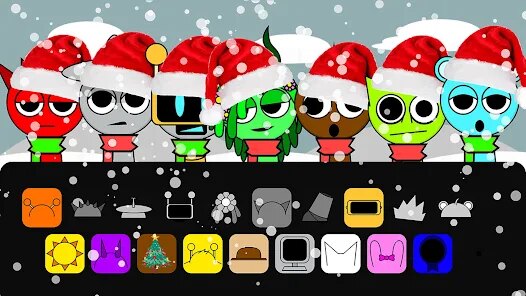
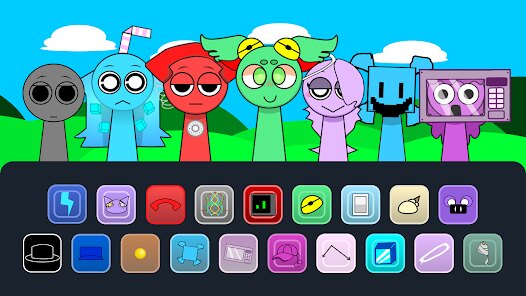
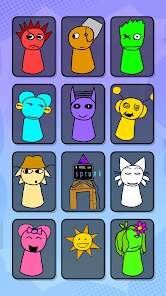
Playing the game is surprisingly intuitive. You drag and drop small, colorful characters onto a stage. Each character represents a specific sound—a drum beat, a synth melody, a bass line, or a vocal sample. Once placed, they start looping their sound in time with a set tempo. The best part is the layering system; you can have up to six characters active at once, and the way their sounds sync up feels genuinely satisfying. My favorite part is probably the "free build" mode, where there's no objective other than to create a cool loop. You can swap characters in and out, adjust their volume levels, and even change the pitch of certain sounds. It reminds me of old-school music sequencers but way more accessible. The audio quality is impressive for a mobile app—the samples are crisp and the bass doesn't sound muddy, even on phone speakers.
Compared to other music games on Android like BandLab or even the classic Incredibox, Sprunki All Phases Beat Maker feels more like a toy than a full suite. BandLab is a full-fledged digital audio workstation, which can be intimidating. Incredibox is closer in spirit, but Sprunki's "all phases" approach means you get access to a huge variety of sounds across different themes—think jungle beats, lo-fi hip-hop, electronic, and even some retro 8-bit vibes. The character art is simple but charming, and seeing them animate while the music plays adds a nice visual layer. If you just want to mess around and make something that sounds good without any pressure, this app nails it. It's not trying to be a professional tool; it's a stress-free creative outlet, and that's why I keep coming back to it.
features
- Character-Based Sound Engine 🎵: Unlike apps where you just tap pads, here you assign sounds to unique characters. Each one has its own animation and personality, making the process of building a track feel like you're assembling a little band. It's way more engaging than a standard beat pad app.
- Phase System for Variety 🌟: The "All Phases" in the title isn't just marketing. You get access to multiple themed sound packs called phases—from "Neon" synths to "Nature" organic percussions. This alone gives it more depth than simpler rhythm games that offer only one or two sound themes.
- Intuitive Drag-and-Drop Interface 🚀: No steep learning curve here. You literally drag characters onto a stage to add sounds. Removing them is just as easy. It takes about 30 seconds to figure out the controls, which is a huge plus over more complex apps like FL Studio Mobile, which require a manual to operate.
pros
- Completely Free Core Experience 💰: You can access the majority of sounds and all core modes without paying a cent. Other similar apps like Groovebox often lock essential mixer functions behind a paywall, but here the full creative loop is open from the start. The ads are non-intrusive, too.
- Superb Sound Library for a Mobile Game 🎧: The quality of the samples surprised me. Compared to some free beat-making apps that use generic, crackling loops, Sprunki's sounds are well-mixed and genre-specific. The "Dark Electro" phase and "Lofi Chill" phase sound like they were produced by someone who actually cares about audio engineering.
- Stress-Free Creative Mode 🧘: There are no scores, no failing, no timers. You just create loops. This is a breath of fresh air compared to rhythm-action games like Cytus or Beat Saber where the goal is to tap precisely. Sprunki is pure creation for creation's sake, which is rare on mobile.
cons
- Limited Export Options 📤: The biggest letdown is that you can't easily export your beats as a high-quality MP3 or WAV file. You can share a link to a cloud recording, but the quality is compressed and you don't get a local file. Competitors like BandLab let you export directly to your device, which is a must for serious creators.
- Lack of Deep Mixing Control ⚙️: You can't adjust individual track EQ, add effects like reverb, or even fine-tune the volume per character beyond a basic slider. For a more advanced beat maker like Caustic 3, you get full mixer controls. Sprunki is a toy, not a tool, so if you want to master a track, you'll need to look elsewhere.
- Repetitive Sound Sets After a While 🔁: While the initial phase themes are fun, each phase only offers about 6-8 sounds per category. After you've made a few tracks, you start hearing the same loops. I'd love to see a community upload feature or more frequent updates with new character sound packs.
Articles
![]()
Guide
How to Update Google Play Store on Android 2026
![]()
Guide
How to Download Older Versions of Android Apps
![]()
Guide
How to Download Apps Without Google Play Store
![]()
Guide
What Is an APK File for Android?
If you use an Android phone, you may have seen the term APK while searching for apps or games online. Some websites offer an APK download instead of a Google Play install button. Some users also mention APK files when talking about apps that are not available in their region, older app versions, or Android games downloaded outside the Play Store.
![]()
Guide
How to Install Games from Google Play for Beginners
Installing games on an Android phone is usually simple, but for beginners, the process can still feel confusing at first. You may not know where to search, which button to tap, whether the game is safe, or why Google Play sometimes asks for account settings, storage access, or payment information. If you are using an Android phone for the first time, learning how to install games from Google Play is one of the easiest ways to get started.
![]()
Guide
How Useful Gemini Is for Everyday Questions and Quick Tasks
emini feels different from many AI apps because it is not only trying to be a chatbot. After using it for everyday questions, quick writing, image understanding, and planning, I think its biggest strength is convenience.
![]()
Guide
What to Know Before Downloading APKs
For many Android users, downloading an APK is a common way to install apps and games. Sometimes an app is not available in a certain country.
![]()
Guide
ChatGPT Review: Is It Still the Best AI App in 2026?
![]()
Guide
Seedance 2.0 vs Sora: The Future of AI Video Generation
The AI video race has intensified dramatically over the past two years. Platforms like Sora from OpenAI and Luma Dream Machine pushed the boundaries of text-to-video realism. Yet, despite their impressive outputs, most tools still operate as probabilistic generators—you describe a scene, and the model interprets it. Control remains limited. With the February 2026 release of Seedance 2.0, developed by ByteDance, the paradigm shifted. Internally known as Jimeng 2.0, Seedance does not position itself as just another video model. It positions itself as an AI Director. Rather than guessing what you want, Seedance 2.0 allows you to direct what happens. This distinction defines everything that follows.









Recommended Apps
![]()
My Supermarket Simulator 3D®
Game District LLC3.9

![]()
Fortnite
Epic Games, Inc4![]()
Poppy Playtime Chapter 3
Mob Entertainment4.2![]()
Diamond Painting ASMR Coloring
CrazyLabs LTD4.5![]()
Real Bus Simulator : Bus Games
Solo Studio Inc3.2![]()
Sprunki All Phases Beat Maker
Gotstar Studio0![]()
Looper!
Kwalee (Ltd)4.2![]()
Gugu Gaga Penguin: Mini Games
Kids Games LLC3![]()
KPop Demon Hunter Wallpaper
Highlights Devloper0![]()
Count Masters: Stickman Games
Freeplay Inc4.6![]()
Scary Teacher 3D
Z & K Games4.3![]()
Papa's Wingeria HD
Flipline Studios4.6![]()
Who's Your Daddy?!
Evil Tortilla Games Incorporated2.7![]()
AFK Arena
LilithGames4.6![]()
Hungry Balls
HYPERCELL4.6











































