

Cash App

100M+
Installs
Block, Inc.
Developer
-
Finance
Category
-
Everyone
Content Rating
-
support@squareup.com
Developer Email
-
https://cash.app/legal/us/en-us/privacy
Privacy Policy
Screenshots
editor reviews
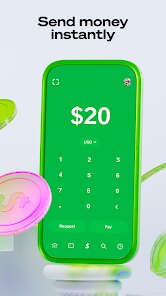
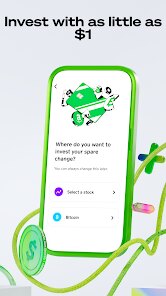
Cash App, developed by Block, Inc., is a mobile payment service that lets you send, receive, and request money from friends and family almost instantly. It's not just a basic transfer tool, though. You can also buy and sell Bitcoin, invest in stocks with as little as one dollar, and even get a free Visa debit card that links directly to your account balance. Most people download it because they want a quick way to split a dinner bill, pay rent to a roommate, or accept payment for a side gig without waiting for bank transfers. Once you open it for the first time, the whole thing feels surprisingly clean and minimal — a simple green and white interface with no clutter. You set up an account by entering your email or phone number, and that's basically it. No long forms or verification waits unless you want to unlock higher sending limits.
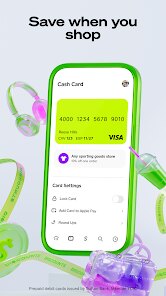
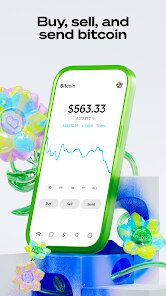
After you start using it, the actual flow makes a lot of sense. The home screen shows your balance right at the top, with big buttons below for “Pay” or “Request.” Tapping “Pay” pulls up your contacts, and you just type an amount, add a note like “groceries,” and hit send. The money shows up on the other end in seconds if both users are on Cash App. If you're sending to someone new, you use their $Cashtag — that username-style identifier — which feels way more private than sharing a bank account number. For Bitcoin, there's a separate tab where you can buy or sell, and it explains the price clearly, though the fees do add up if you're not paying attention. The stock investing part works similarly, but it doesn't give you much research or charting, so it's more for casual buying. A small tip: you can order the free Visa card straight from the app, and when it arrives, it works at any ATM or store that takes Visa, with a small fee for ATM withdrawals.
I've been using Cash App for about six months now, and honestly, it sticks around because it's just easy. For someone who splits bills often, sells stuff online, or needs to pay a babysitter quickly, it's hard to beat. But if you're a heavy investor or need detailed financial tracking, you'd probably prefer something like Venmo for social payments or Robinhood for trading. Cash App feels more like a pocket wallet than a full banking app — it's fast and simple, but it doesn't do everything. I think people who just want one app for casual money moves will keep it installed. Others might uninstall it once they realize the Bitcoin and stock features are fairly basic compared to dedicated apps. It's not perfect, but for what it does, it works well enough.
features
- 📱 Instant peer-to-peer payments — Unlike PayPal, which can take a day or two for bank transfers, Cash App sends money between users in seconds. You don't even need to wait for a notification; the balance updates right away.
- 🪙 Built-in Bitcoin buying — While apps like Coinbase focus purely on crypto, Cash App lets you buy and sell Bitcoin directly inside the same interface you use for sending money. It's a lot simpler for someone who just wants to dabble without managing a separate account.
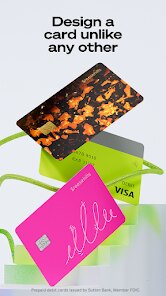
- 💳 Free Cash Card — This is a standout compared to Venmo. You get a customizable Visa debit card that works anywhere Visa is accepted, and you can instantly add it to Apple Pay or Google Pay. Venmo's card is similar, but Cash App's app makes it easier to track spending and lock the card if you lose it.
- 📈 Fractional stock investing — You can buy a piece of a stock like Apple or Tesla for as little as one dollar. Robinhood offers fractional shares too, but Cash App keeps it more beginner-friendly with no charts or jargon to overwhelm you.
pros
- ⚡ Speed above all — Cash App processes payments almost instantly, which beats Zelle or traditional bank transfers that can take hours or days.
- 🔒 Simple privacy — Using a $Cashtag instead of a phone number or email makes it feel safer than Venmo, where your friends list is public by default.
- 🎨 Clean, minimal design — The app is not cluttered with ads or promotions, unlike PayPal, which often pushes credit offers or loans in your face.
- 📊 All-in-one money hub — You get payments, Bitcoin, stocks, and a debit card in a single app, which is more convenient than juggling separate apps for each task.
cons
- 📉 Limited customer support — If something goes wrong, like a failed payment or a locked account, getting help is tough. Unlike PayPal, which has a phone line and live chat, Cash App mostly relies on email and in-app tickets, which can take days.
- 💸 High Bitcoin fees — Buying or selling Bitcoin on Cash App comes with fees that are noticeably higher than Coinbase or Kraken, especially for small purchases.
- 🏦 No joint accounts or bill pay — Compared to traditional banking apps like Chase or even Venmo, Cash App doesn't let you pay bills directly or have a shared account with a partner.
- 🔄 Transfer limits feel restrictive — Without verifying your identity, you can only send $250 per week. Even after verification, limits are lower than Zelle or PayPal, which can be annoying if you need to move larger amounts.
Articles
![]()
Guide
How to Update Google Play Store on Android 2026
![]()
Guide
How to Download Older Versions of Android Apps
![]()
Guide
How to Download Apps Without Google Play Store
![]()
Guide
What Is an APK File for Android?
If you use an Android phone, you may have seen the term APK while searching for apps or games online. Some websites offer an APK download instead of a Google Play install button. Some users also mention APK files when talking about apps that are not available in their region, older app versions, or Android games downloaded outside the Play Store.
![]()
Guide
How to Install Games from Google Play for Beginners
Installing games on an Android phone is usually simple, but for beginners, the process can still feel confusing at first. You may not know where to search, which button to tap, whether the game is safe, or why Google Play sometimes asks for account settings, storage access, or payment information. If you are using an Android phone for the first time, learning how to install games from Google Play is one of the easiest ways to get started.
![]()
Guide
How Useful Gemini Is for Everyday Questions and Quick Tasks
emini feels different from many AI apps because it is not only trying to be a chatbot. After using it for everyday questions, quick writing, image understanding, and planning, I think its biggest strength is convenience.
![]()
Guide
What to Know Before Downloading APKs
For many Android users, downloading an APK is a common way to install apps and games. Sometimes an app is not available in a certain country.
![]()
Guide
ChatGPT Review: Is It Still the Best AI App in 2026?
![]()
Guide
Seedance 2.0 vs Sora: The Future of AI Video Generation
The AI video race has intensified dramatically over the past two years. Platforms like Sora from OpenAI and Luma Dream Machine pushed the boundaries of text-to-video realism. Yet, despite their impressive outputs, most tools still operate as probabilistic generators—you describe a scene, and the model interprets it. Control remains limited. With the February 2026 release of Seedance 2.0, developed by ByteDance, the paradigm shifted. Internally known as Jimeng 2.0, Seedance does not position itself as just another video model. It positions itself as an AI Director. Rather than guessing what you want, Seedance 2.0 allows you to direct what happens. This distinction defines everything that follows.









Recommended Apps
![]()
Home Design 3D
Anuman4.2
![]()
Truth or Dare Game - Party App
Chouic4.8
![]()
Photo Collage Maker
Scoompa4.7![]()
Learn to Draw Flower
Creative APPS4.2![]()
FIFA World Cup 2026™
FIFA2.8![]()
Mirror Plus: Mirror with Light
Digitalchemy, LLC4.4![]()
Meitu- Photo Editor & AI Art
Meitu (China) Limited4.5![]()
Perplexity - Ask Anything
PerplexityAI4.7![]()
GhostTube SLS Camera Alternate
GhostTube4![]()
Boom Chip Blast: 2-Player
Black Pyramid 3D Games Studio0![]()
Healthy Benefits+
Solutran, Inc.4.5![]()
Deepcheck AI Search Assistant
rohe.ai4![]()
Idol Prank Video Call & Chat
LightCode Solutions4![]()
Face Shape - Pretty Scale
GlintTec Apps3.9![]()
Plant App - Plant Identifier
ScaleUp4.6












































