

MyFitnessPal: Calorie Counter

100,000,000+
Installs
MyFitnessPal, Inc.
Developer
-
Health & Fitness
Category
-
Rated for 3+
Content Rating
-
androidfeedback@myfitnesspal.com
Developer Email
-
https://www.myfitnesspal.com/privacy-policy
Privacy Policy
Screenshots

editor reviews
MyFitnessPal is essentially a food and fitness tracker, sitting at the intersection of health and lifestyle apps. People mainly use it to log everything they eat, scan barcodes for quick calorie entry, and sync up with step trackers or gym apps to see a rough calories-in vs. calories-out picture. I first downloaded it from the Google Play store just to get a better idea of what I was eating daily, since I kept guessing wrong. The install count is massive, so it felt like a safe bet, and grabbing it was free with no registration wall. Opening the app for the first time gave me a clean, simple dashboard with a big calorie target number front and center, which honestly made me curious rather than overwhelmed. There are premium upgrades and some ads in the free version, but the core stuff is completely usable without paying.
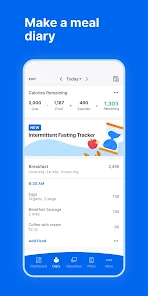
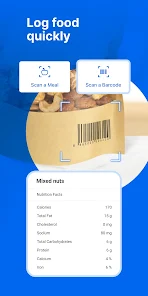
Once I actually started using it, the hands-on experience felt fairly straightforward. The interface puts a food diary on the main screen, so I tapped 'Add Food' and either searched for what I ate or scanned the barcode. Scans were fast and correct most times, but sometimes I had to type a name manually because the database has a lot of user-submitted entries. The onboarding asks your weight and goal, so your daily calorie target pops up automatically. In daily use, I found myself opening the app right after meals to log breakfast, then later adding lunch, and it became a small ritual. The only confusing moment was when I tried to add a recipe; the 'Create a Recipe' option is buried a bit, so the first time I just entered ingredients separately. A practical tip: use the 'Meals' feature to save a typical breakfast you eat often, so you don't have to search every day. The step sync with Google Fit was smooth, and that extra calorie adjustment felt motivating, even if it's just an estimate.
After a few weeks, my personal take is that MyFitnessPal works best for people who enjoy tracking details or are trying to lose weight with a data-driven approach. It's not for someone who gets anxious about precise numbers or wants meal photos over calorie counts. What makes it stand out from apps like Lose It! is the enormous food database, which makes barcode scanning rarely miss, and the community recipes section is surprisingly helpful. On the flip side, the free version has a lot of ads that pop up after logging food, which gets annoying after a while, and the premium features feel a bit pricey for what you get. I kept it installed because the habit stuck, but I can see someone uninstalling when the daily log becomes a chore or if they switch to a simpler app like Cronometer for deeper nutrition detail. All in all, it's a solid tool if you are ready to commit to logging, but not a magic fix for anyone.
features
- 📊 MyFitnessPal's standout feature is its huge food database with over 18 million foods, making barcode scanning lightning fast and usually correct, unlike Lose It! which occasionally misses less common items or has smaller entries for international foods. This alone saves a ton of time during logging.
- ⚡ The app syncs effortlessly with over 50 devices and apps, like Fitbit or Apple Health, to pull step data automatically. In comparison, Cronometer requires more manual adjustment for activity tracking, so MyFitnessPal feels smoother if you rely on wearables for your daily movement estimates.
- 🍴 The restaurant-logging feature is surprisingly handy, as it lists exact menu items from popular chains like McDonald's or Chipotle, complete with calorie counts. Lose It! has this too, but MyFitnessPal's database seems more complete for smaller local chains that I have tried to find.
- 📈 The barcode scanner is a major time-saver, since it instantly pulls up detailed nutrition facts for packaged foods, while apps like Lifesum sometimes need manual typing for the same items, especially if the product barcode is from a less popular brand.
pros
- 🔧 MyFitnessPal excels in its smooth integration with other health apps, such as Strava and Apple Health, which makes tracking steps and workouts a hands-free process. Lose It! has similar functionality, but MyFitnessPal's setup feels more intuitive and less glitchy with fewer sync errors in my experience.
- 🍲 The community recipe feature is a rare strength, letting users browse thousands of shared meals with verified calorie counts. This is something Cronometer lacks entirely, as it focuses on individual ingredient logging rather than pre-made community contributions.
- 📱 The app interface is light and responsive even on older phones, unlike FatSecret that can feel sluggish when loading the database. This reliability makes daily logging less frustrating, especially when you are in a hurry.
cons
- 📢 The free version has way too many ads, which pop up after every few food entries. This slows down the logging process compared to Lose It!, where ads are less intrusive or can be dismissed quickly without interrupting the flow as much.
- 🔑 Some basic features, like setting custom macro goals beyond calories, are locked behind a premium paywall. Cronometer offers these for free, so MyFitnessPal feels stingy if you only want to track protein or carbs without committing to a subscription.
- 💾 The food database is user-submitted, so you occasionally run into incorrect entries with wild calorie numbers. This can mess up your diary if you do not double-check, and it happens more often than in the more curated database of Lifesum, which has verified nutrition info for most items.
- 🔄 The app can be slow to load the diary screen right after logging a meal, and occasionally it crashes during barcode scans on older Android devices. This is not a problem in apps like FatSecret, which runs more smoothly even with multiple entries.
Articles
![]()
Guide
How to Update Google Play Store on Android 2026
![]()
Guide
How to Download Older Versions of Android Apps
![]()
Guide
How to Download Apps Without Google Play Store
![]()
Guide
What Is an APK File for Android?
If you use an Android phone, you may have seen the term APK while searching for apps or games online. Some websites offer an APK download instead of a Google Play install button. Some users also mention APK files when talking about apps that are not available in their region, older app versions, or Android games downloaded outside the Play Store.
![]()
Guide
How to Install Games from Google Play for Beginners
Installing games on an Android phone is usually simple, but for beginners, the process can still feel confusing at first. You may not know where to search, which button to tap, whether the game is safe, or why Google Play sometimes asks for account settings, storage access, or payment information. If you are using an Android phone for the first time, learning how to install games from Google Play is one of the easiest ways to get started.
![]()
Guide
How Useful Gemini Is for Everyday Questions and Quick Tasks
emini feels different from many AI apps because it is not only trying to be a chatbot. After using it for everyday questions, quick writing, image understanding, and planning, I think its biggest strength is convenience.
![]()
Guide
What to Know Before Downloading APKs
For many Android users, downloading an APK is a common way to install apps and games. Sometimes an app is not available in a certain country.
![]()
Guide
ChatGPT Review: Is It Still the Best AI App in 2026?
![]()
Guide
Seedance 2.0 vs Sora: The Future of AI Video Generation
The AI video race has intensified dramatically over the past two years. Platforms like Sora from OpenAI and Luma Dream Machine pushed the boundaries of text-to-video realism. Yet, despite their impressive outputs, most tools still operate as probabilistic generators—you describe a scene, and the model interprets it. Control remains limited. With the February 2026 release of Seedance 2.0, developed by ByteDance, the paradigm shifted. Internally known as Jimeng 2.0, Seedance does not position itself as just another video model. It positions itself as an AI Director. Rather than guessing what you want, Seedance 2.0 allows you to direct what happens. This distinction defines everything that follows.









Recommended Apps
![]()
Home Design 3D
Anuman4.2
![]()
Truth or Dare Game - Party App
Chouic4.8
![]()
Photo Collage Maker
Scoompa4.7![]()
Learn to Draw Flower
Creative APPS4.2![]()
FIFA World Cup 2026™
FIFA2.8![]()
Mirror Plus: Mirror with Light
Digitalchemy, LLC4.4![]()
Meitu- Photo Editor & AI Art
Meitu (China) Limited4.5![]()
Perplexity - Ask Anything
PerplexityAI4.7![]()
GhostTube SLS Camera Alternate
GhostTube4![]()
Boom Chip Blast: 2-Player
Black Pyramid 3D Games Studio0![]()
Healthy Benefits+
Solutran, Inc.4.5![]()
Deepcheck AI Search Assistant
rohe.ai4![]()
Idol Prank Video Call & Chat
LightCode Solutions4![]()
Face Shape - Pretty Scale
GlintTec Apps3.9![]()
Plant App - Plant Identifier
ScaleUp4.6











































