

Google Gemini

100M+
Installs
Google LLC
Developer
-
Generative AI
Category
-
Teen
Content Rating
-
apps-help@google.com
Developer Email
-
https://support.google.com/bard/answer/13594961
Privacy Policy
Screenshots
editor reviews
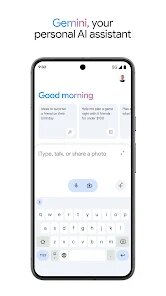
Google Gemini is an AI-powered assistant app that Google quietly rolled out to replace the older Google Assistant on many devices. You can download it for free from both Google Play and the App Store, and it already has over 100 million installs on Android alone. After installing and launching it, my first impression was that it feels a lot more like a conversation partner than a simple command taker. Instead of just setting timers or checking the weather, you can ask it to brainstorm ideas, analyze a document, or even walk you through a recipe step-by-step. The initial setup is simple — just agree to the terms and grant a few permissions — and you're dropped into a clean chat interface that looks a lot like WhatsApp or iMessage.
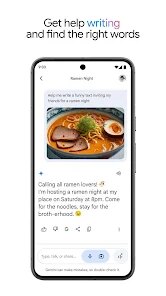
Once you start using Gemini, the experience is surprisingly smooth. The main screen is just a text input box and a microphone button, so you can type or speak naturally. I found myself using it mostly for writing help and quick research. For example, I asked it to draft a polite email to my landlord about a leaky faucet, and it gave me a decent starting point. You can also upload images or PDFs and ask questions about them, which is something the old Google Assistant couldn't do. One small tip: if you want it to remember something across chats, you have to explicitly enable the “Gemini Extensions” for Gmail, Docs, and Maps in the settings. If you don't do that, it treats every conversation as a fresh start, which can get a bit annoying when you're in the middle of a multi-step task.
After using Gemini for a couple of weeks, I think it's best for people who want a smart writing partner or a tool to quickly make sense of documents and long web pages. Students and office workers will probably get the most out of it. On the other hand, if you just need quick answers like “What's the capital of France?” or “Set an alarm for 7 AM,” you might find Gemini a bit overly chatty and slower than the old Google Assistant or even Siri. What sets Gemini apart is how well it handles messy, real-world questions — like asking for a summary of a 10-page rental agreement. It's not perfect, and sometimes it gives oddly formal answers, but it's genuinely useful enough that I haven't uninstalled it. I still use Google Assistant for quick commands, but for anything that requires thinking, Gemini stays.
features
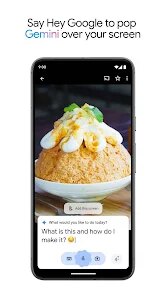
- ✍️ Google Gemini lets you upload a photo of your handwritten notes or a restaurant menu and ask questions about it. The app will extract the text from the image and answer in context. ChatGPT, for comparison, can also process images, but Gemini seems faster at pulling out specific details from documents like receipts or IDs.
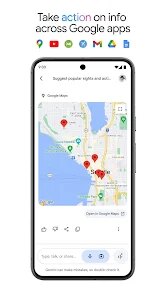
- ✍️ It connects directly to your Google apps like Gmail, Google Maps, and YouTube through what Google calls extensions. You can ask it “Find the email from John about the concert last week” and it will dig through your inbox. ChatGPT has no native link to your personal Google data unless you use third-party plugins.
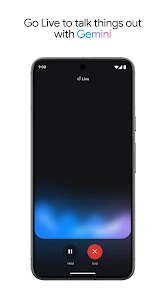
- ✍️ The voice input is genuinely conversational. You can speak naturally with pauses and corrections, like “Book a table at that Italian place — no, the one near the park — for two people tomorrow night.” It understands context without you having to restate everything. Siri and Alexa still struggle with this kind of complex back-and-forth.
pros
- ✅ Because it's from Google, Gemini is completely free with no hard paywall. ChatGPT's free tier limits you to the GPT-3.5 model, while Gemini gives you access to its latest model without asking for a subscription.
- ✅ It handles very long inputs really well. You can paste an entire research paper or a long news article, and it will summarize or analyze it without hitting a character limit as quickly as Claude or ChatGPT do on their free plans.
- ✅ The integration with Google's ecosystem means it can actually do things like add events to your calendar or set reminders, which most standalone AI assistants like Perplexity or Copilot still can't do directly.
cons
- ❌ Gemini sometimes gives overly cautious, “safe” answers that feel like the app is scared to take a stance. Compared to ChatGPT or Claude, it's noticeably more rigid when you ask for opinions or creative writing that involves any risk.
- ❌ The app doesn't work well offline at all. Even simple tasks like pulling up a saved note require internet. Google Assistant was much better at handling basic phone functions without a connection.
- ❌ It can be slow to start sometimes. When you open the app after a few hours, there's often a 3-5 second loading screen before you can type. ChatGPT and Copilot both feel snappier to launch on mobile.
Articles
![]()
Guide
How to Update Google Play Store on Android 2026
![]()
Guide
How to Download Older Versions of Android Apps
![]()
Guide
How to Download Apps Without Google Play Store
![]()
Guide
What Is an APK File for Android?
If you use an Android phone, you may have seen the term APK while searching for apps or games online. Some websites offer an APK download instead of a Google Play install button. Some users also mention APK files when talking about apps that are not available in their region, older app versions, or Android games downloaded outside the Play Store.
![]()
Guide
How to Install Games from Google Play for Beginners
Installing games on an Android phone is usually simple, but for beginners, the process can still feel confusing at first. You may not know where to search, which button to tap, whether the game is safe, or why Google Play sometimes asks for account settings, storage access, or payment information. If you are using an Android phone for the first time, learning how to install games from Google Play is one of the easiest ways to get started.
![]()
Guide
How Useful Gemini Is for Everyday Questions and Quick Tasks
emini feels different from many AI apps because it is not only trying to be a chatbot. After using it for everyday questions, quick writing, image understanding, and planning, I think its biggest strength is convenience.
![]()
Guide
What to Know Before Downloading APKs
For many Android users, downloading an APK is a common way to install apps and games. Sometimes an app is not available in a certain country.
![]()
Guide
ChatGPT Review: Is It Still the Best AI App in 2026?
![]()
Guide
Seedance 2.0 vs Sora: The Future of AI Video Generation
The AI video race has intensified dramatically over the past two years. Platforms like Sora from OpenAI and Luma Dream Machine pushed the boundaries of text-to-video realism. Yet, despite their impressive outputs, most tools still operate as probabilistic generators—you describe a scene, and the model interprets it. Control remains limited. With the February 2026 release of Seedance 2.0, developed by ByteDance, the paradigm shifted. Internally known as Jimeng 2.0, Seedance does not position itself as just another video model. It positions itself as an AI Director. Rather than guessing what you want, Seedance 2.0 allows you to direct what happens. This distinction defines everything that follows.









Recommended Apps
![]()
Home Design 3D
Anuman4.2
![]()
Truth or Dare Game - Party App
Chouic4.8
![]()
Photo Collage Maker
Scoompa4.7![]()
Learn to Draw Flower
Creative APPS4.2![]()
FIFA World Cup 2026™
FIFA2.8![]()
Mirror Plus: Mirror with Light
Digitalchemy, LLC4.4![]()
Meitu- Photo Editor & AI Art
Meitu (China) Limited4.5![]()
Perplexity - Ask Anything
PerplexityAI4.7![]()
GhostTube SLS Camera Alternate
GhostTube4![]()
Boom Chip Blast: 2-Player
Black Pyramid 3D Games Studio0![]()
Healthy Benefits+
Solutran, Inc.4.5![]()
Deepcheck AI Search Assistant
rohe.ai4![]()
Idol Prank Video Call & Chat
LightCode Solutions4![]()
Face Shape - Pretty Scale
GlintTec Apps3.9![]()
Plant App - Plant Identifier
ScaleUp4.6












































