

Affirm: Buy now, pay over time

5,000,000+
Installs
Affirm, Inc
Developer
-
Shopping
Category
-
Rated for 3+
Content Rating
-
help@affirm.com
Developer Email
-
https://www.affirm.com/privacy/
Privacy Policy
Screenshots

editor reviews
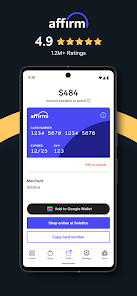
Affirm is a financial app that's become a go-to for people who want to split up their purchases rather than paying the full amount upfront. It fits into the growing buy now, pay later category, but really it's more of a flexible credit tool for online shopping. When you download it from the App Store or Google Play—and it's totally free to install—you're signing up for a service that lets you pay for items in installments. After launching it for the first time, the design is simple and clean, almost too simple. It asks for your phone number to get started, and then it links to your bank account or debit card. That first launch feels like stepping into a very minimalist space, no clutter, just a few prompts. You can already tell it's not trying to sell you anything fancy; it's just ready to help you manage payments.
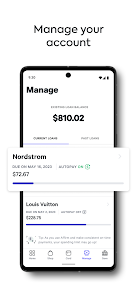
Using Affirm in daily life is pretty straightforward. Once you connect it to an online store that supports it—places like Amazon, Walmart, or smaller boutique shops—you'll see the option to pay with Affirm at checkout. You choose how many payments you want, usually three or six months, sometimes longer, and then confirm. The app itself shows your current loans, upcoming payments, and how much you've already paid off. The onboarding was a breeze, but I did notice that if you're not careful, you can get carried away with the convenience. A small practical tip: check the interest rate before confirming, because some plans are interest-free and others aren't, and it's not always obvious at first glance. The interface is smooth overall, though I found myself wishing for a clearer breakdown of fees during checkout, because sometimes the terms feel like they're hiding under a small link.
After using it for a few weeks, my take is that Affirm works best if you're the type who buys occasional big-ticket items—say, a new laptop or furniture—and you want to avoid a credit card. It's different from a traditional credit card because there's no revolving debt, but that also means you can't just keep spending on it. For someone who wants strict limits, that's a plus. For someone who loves cashback rewards, they'll stick with a card. I'd keep it installed for those moments when a surprise expense pops up, like a couch that's on sale but ends in two hours. Where it stands out among similar apps like Afterpay or Klarna is that Affirm feels more like a loan service—transparent about the terms—while others feel more like a quick payment toggle. But I've also thought about deleting it because if you don't shop often, it just sits there.
features
- 💳 True Cost Display: Unlike some competitors that only show your next payment, Affirm breaks down the total cost including interest upfront. Before you even hit confirm, you see exactly how much you'll pay back over time. It's a clearer picture than what Afterpay offers, where charges can feel hidden in the small print.
- 🔄 No Auto-Renewal Debt Cycle: When you use Affirm, each purchase is separate—no revolving line of credit. This keeps you from accidentally building up debt like you might with a traditional credit card. It's a healthier approach for someone trying to stay organized and not overspend.
- 🧾 Flexible Payment Schedules: You can usually pick between three, six, or twelve months, and sometimes even longer. That flexibility is more generous than Klarna's typical four-installment fixed plan or Afterpay's biweekly schedule, letting you tailor payments to your own cash flow.
pros
- 🔒 No Late Fees Surprises: Many BNPL apps slap you with heavy late fees, but Affirm is more forgiving. It doesn't pile on hidden penalty charges, which is rare compared to Klarna or Afterpay that can add fees quickly if you're late.
- 🎯 Wide Merchant Support: Affirm is accepted at a huge range of stores, from big-box retailers to niche websites. It's easier to find a place to use it than with similar apps like Sezzle, which has a narrower network of partners.
- 📱 Clean User Dashboard: The app's dashboard is straightforward and shows your active plans clearly. You don't need to hunt for payment dates or balances, unlike some apps where the layout feels cluttered or unintuitive.
cons
- 💸 Interest Rates Can Sneak Up: Not all plans are interest-free. If you choose a longer term, the APR can be high, making the total cost surprisingly large. Competitors like Klarna offer more zero-interest options, so Affirm feels pricier for smaller purchases.
- 📉 Not Great for Small Items: The minimum purchase requirement is usually around $50, which means you can't use it for everyday tiny expenses like a $15 meal. That's a downside compared to a credit card that has no floor.
- 🔄 Slower Checkout Process: On some merchant sites, the checkout flow with Affirm takes extra few seconds compared to PayPal's instant button. It can feel awkward if you're in a hurry or trying to finish a quick purchase.
Articles
![]()
Guide
How to Update Google Play Store on Android 2026
![]()
Guide
How to Download Older Versions of Android Apps
![]()
Guide
How to Download Apps Without Google Play Store
![]()
Guide
What Is an APK File for Android?
If you use an Android phone, you may have seen the term APK while searching for apps or games online. Some websites offer an APK download instead of a Google Play install button. Some users also mention APK files when talking about apps that are not available in their region, older app versions, or Android games downloaded outside the Play Store.
![]()
Guide
How to Install Games from Google Play for Beginners
Installing games on an Android phone is usually simple, but for beginners, the process can still feel confusing at first. You may not know where to search, which button to tap, whether the game is safe, or why Google Play sometimes asks for account settings, storage access, or payment information. If you are using an Android phone for the first time, learning how to install games from Google Play is one of the easiest ways to get started.
![]()
Guide
How Useful Gemini Is for Everyday Questions and Quick Tasks
emini feels different from many AI apps because it is not only trying to be a chatbot. After using it for everyday questions, quick writing, image understanding, and planning, I think its biggest strength is convenience.
![]()
Guide
What to Know Before Downloading APKs
For many Android users, downloading an APK is a common way to install apps and games. Sometimes an app is not available in a certain country.
![]()
Guide
ChatGPT Review: Is It Still the Best AI App in 2026?
![]()
Guide
Seedance 2.0 vs Sora: The Future of AI Video Generation
The AI video race has intensified dramatically over the past two years. Platforms like Sora from OpenAI and Luma Dream Machine pushed the boundaries of text-to-video realism. Yet, despite their impressive outputs, most tools still operate as probabilistic generators—you describe a scene, and the model interprets it. Control remains limited. With the February 2026 release of Seedance 2.0, developed by ByteDance, the paradigm shifted. Internally known as Jimeng 2.0, Seedance does not position itself as just another video model. It positions itself as an AI Director. Rather than guessing what you want, Seedance 2.0 allows you to direct what happens. This distinction defines everything that follows.









Recommended Apps
![]()
Home Design 3D
Anuman4.2
![]()
Truth or Dare Game - Party App
Chouic4.8
![]()
Photo Collage Maker
Scoompa4.7![]()
Learn to Draw Flower
Creative APPS4.2![]()
FIFA World Cup 2026™
FIFA2.8![]()
Mirror Plus: Mirror with Light
Digitalchemy, LLC4.4![]()
Meitu- Photo Editor & AI Art
Meitu (China) Limited4.5![]()
Perplexity - Ask Anything
PerplexityAI4.7![]()
GhostTube SLS Camera Alternate
GhostTube4![]()
Boom Chip Blast: 2-Player
Black Pyramid 3D Games Studio0![]()
Healthy Benefits+
Solutran, Inc.4.5![]()
Deepcheck AI Search Assistant
rohe.ai4![]()
Idol Prank Video Call & Chat
LightCode Solutions4![]()
Face Shape - Pretty Scale
GlintTec Apps3.9![]()
Plant App - Plant Identifier
ScaleUp4.6












































