

Yuka - Food & cosmetic scan

10,000,000+
Installs
Yuka App
Developer
-
Health & Fitness
Category
-
Rated for 3+
Content Rating
-
hello@yuka.io
Developer Email
-
https://yuka-app.helpdocs.io/l/en/article/2a12869y56
Privacy Policy
Screenshots
editor reviews
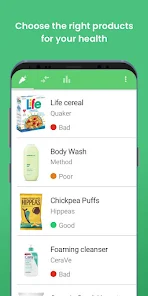
Yuka is a mobile app that lets you scan barcodes on food products and cosmetics to get a quick health rating. It falls squarely into the health and lifestyle category, and the main thing people use it for is checking whether that yogurt or shampoo they're holding is actually decent or packed with questionable ingredients. I first downloaded it from the App Store after a friend mentioned it had around 10 million downloads and was free to install. You don't need to create an account to start scanning, which I liked right away. My first impression after launching it was that the interface is clean and not cluttered, and there's no aggressive push to sign up or pay for a premium version. There are in-app purchases if you want extra features, but I didn't feel forced into them.
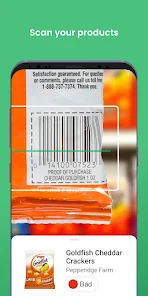
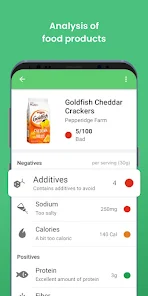
After opening the app and granting camera access, scanning is straightforward. You just point the camera at a barcode, and within a second or two, the app pulls up a score out of 100, color-coded from red to green. I tried it on a box of cereal and a bottle of sunscreen. For each product, the app breaks down the rating into categories like nutritional quality or ingredient risks, and it tells you why it gave that score. There's also a bar that shows how the product compares to others in the same category, which I found helpful but occasionally confusing because the comparisons aren't always obvious. The onboarding doesn't throw too much at you, but if you want to log your daily meals or track your history, you'll need to create an account. I didn't do that, so I just used it as a quick reference tool. One small tip: if the scan doesn't work, try moving the camera closer or adjusting the angle, because the app sometimes struggles with shiny packaging.
After using Yuka for a couple of weeks, I can see why people like it, but I also get why some might uninstall it. If you're someone who shops at big supermarkets and wants a fast way to avoid overly processed foods or irritating skincare chemicals, it's genuinely useful. But if you mostly buy fresh ingredients or already know your brands, the app feels redundant. Compared to something like the EWG Healthy Living app, Yuka is more focused on simplicity and visual scoring, while EWG dives deeper into specific chemical datasheets. Yuka's main draw is how fast it is and how easy it is to share results. I kept it installed because it's handy for random checks, but I can see someone deleting it if they find the scoring too rigid or if they don't want to support a subscription model for detailed breakdowns.
features
- 📊 One standout feature is the detailed breakdown of each product's score. Instead of just giving a number, Yuka explains why a product scored the way it did, listing specific nutritional issues like high saturated fat or additives flagged as risky. This makes it more educational than something like Open Food Facts, which focuses on crowdsourced data without the same level of interpretation.
- 📊 The scanning is nearly instant. You don't have to wait for a page to load or search manually. In contrast, apps like ShopWell require more manual input and searching, which slows down the process when you're standing in a store aisle.
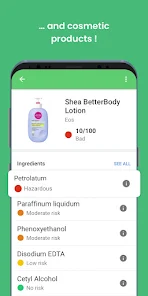
- 📊 Yuka includes both food and cosmetics in one app. Many competitors, like Think Dirty for cosmetics or Fooducate for food, only cover one category. Having both in one place saves space and makes it easier to switch between checking a snack and a moisturizer.
pros
- ✅ The app's strength lies in its simple, color-coded system that even a non-expert can understand at a glance. Compared to EWG, which uses a similar numeric scale but buries the explanation, Yuka keeps it front and center.
- ✅ Yuka also has a decent database for European and US products, so it covers many common brands. Competitors like Fooducate have a smaller library, especially for cosmetics.
- ✅ The app doesn't flood you with ads or constant upsells. The free version works well, and the premium is more about extra history and personalized tips. That's rarer than you'd think in this category.
cons
- ❌ One downside is that Yuka's scoring can feel overly strict. A product with a single flagged additive, even in trace amounts, gets dropped from green to yellow. Compared to EWG, which sometimes gives a more nuanced range, Yuka can make you avoid items unnecessarily.
- ❌ The database isn't complete. I scanned a few local or imported brands, and the app just said “product not found” with no way to add it manually. Competing apps like Open Food Facts let users submit missing products, which helps build a larger library.
- ❌ The app's recommendations for healthier alternatives can be hit or miss. Sometimes it suggests a product that's only available online or in specialty stores, which isn't practical if you're just at a standard grocery store.
Articles
![]()
Guide
How to Update Google Play Store on Android 2026
![]()
Guide
How to Download Older Versions of Android Apps
![]()
Guide
How to Download Apps Without Google Play Store
![]()
Guide
What Is an APK File for Android?
If you use an Android phone, you may have seen the term APK while searching for apps or games online. Some websites offer an APK download instead of a Google Play install button. Some users also mention APK files when talking about apps that are not available in their region, older app versions, or Android games downloaded outside the Play Store.
![]()
Guide
How to Install Games from Google Play for Beginners
Installing games on an Android phone is usually simple, but for beginners, the process can still feel confusing at first. You may not know where to search, which button to tap, whether the game is safe, or why Google Play sometimes asks for account settings, storage access, or payment information. If you are using an Android phone for the first time, learning how to install games from Google Play is one of the easiest ways to get started.
![]()
Guide
How Useful Gemini Is for Everyday Questions and Quick Tasks
emini feels different from many AI apps because it is not only trying to be a chatbot. After using it for everyday questions, quick writing, image understanding, and planning, I think its biggest strength is convenience.
![]()
Guide
What to Know Before Downloading APKs
For many Android users, downloading an APK is a common way to install apps and games. Sometimes an app is not available in a certain country.
![]()
Guide
ChatGPT Review: Is It Still the Best AI App in 2026?
![]()
Guide
Seedance 2.0 vs Sora: The Future of AI Video Generation
The AI video race has intensified dramatically over the past two years. Platforms like Sora from OpenAI and Luma Dream Machine pushed the boundaries of text-to-video realism. Yet, despite their impressive outputs, most tools still operate as probabilistic generators—you describe a scene, and the model interprets it. Control remains limited. With the February 2026 release of Seedance 2.0, developed by ByteDance, the paradigm shifted. Internally known as Jimeng 2.0, Seedance does not position itself as just another video model. It positions itself as an AI Director. Rather than guessing what you want, Seedance 2.0 allows you to direct what happens. This distinction defines everything that follows.









Recommended Apps
![]()
Home Design 3D
Anuman4.2
![]()
Truth or Dare Game - Party App
Chouic4.8
![]()
Photo Collage Maker
Scoompa4.7![]()
Learn to Draw Flower
Creative APPS4.2![]()
FIFA World Cup 2026™
FIFA2.8![]()
Mirror Plus: Mirror with Light
Digitalchemy, LLC4.4![]()
Meitu- Photo Editor & AI Art
Meitu (China) Limited4.5![]()
Perplexity - Ask Anything
PerplexityAI4.7![]()
GhostTube SLS Camera Alternate
GhostTube4![]()
Boom Chip Blast: 2-Player
Black Pyramid 3D Games Studio0![]()
Healthy Benefits+
Solutran, Inc.4.5![]()
Deepcheck AI Search Assistant
rohe.ai4![]()
Idol Prank Video Call & Chat
LightCode Solutions4![]()
Face Shape - Pretty Scale
GlintTec Apps3.9![]()
Plant App - Plant Identifier
ScaleUp4.6












































