

Blink Home Monitor

5,000,000+
Installs
Immedia Semiconductor
Developer
-
Productivity
Category
-
Rated for 3+
Content Rating
-
android@blinkforhome.com
Developer Email
-
https://apphelp.immedia-semi.com/en/privacy_policy.html
Privacy Policy
Screenshots

editor reviews
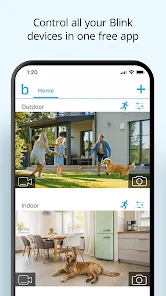
Blink Home Monitor is a security camera app from Immedia Semiconductor that turns your phone into a remote surveillance hub. It's designed for people who want a simple, wireless setup to check on their home, pets, or deliveries without dealing with complicated wiring or monthly contracts. After downloading it from Google Play or the App Store, the first thing you notice is how lightweight it feels—there's no heavy registration wall, just a quick account creation and a device sync. The app has been installed over 10 million times, and it's free to download, though you'll need to buy the physical cameras separately. No subscriptions or ads pop up during initial use, which makes the setup feel refreshingly straightforward compared to other home security apps that push paid plans right away.
Once you launch the app and pair a Blink camera, the interface is clean but a bit bare. The main screen shows a live feed thumbnail, and you tap it to see a full view. Onboarding walks you through connecting the sync module to Wi-Fi, which can be finicky if your router's signal is weak. After that, daily use involves opening the app to check motion alerts, arm or disarm the system, or review short video clips stored in the cloud. The arm/disarm toggle is right on the home screen, which is handy, but navigating to saved clips takes an extra tap into a separate tab. One practical tip: you can adjust motion sensitivity in the settings to avoid endless alerts from passing cars. The live view loads fast over a decent connection, but there's a slight delay between motion detection and the notification, so don't expect real-time doorbell-style response.
After using Blink for a few weeks, it feels like a solid choice for casual home monitoring but not for hardcore security enthusiasts. People who just want to peek at their front door or check if the dog is on the couch will appreciate the simplicity and battery life. But if you need continuous recording, two-way audio (only XT2 models support it), or advanced features like facial recognition, you'll hit limits fast. What sets it apart from Ring or Wyze is the lack of subscription fees for basic cloud storage—though you only get a few seconds of clips. I kept it installed because it's low-maintenance and the batteries last over a year, but I can see someone uninstalling it if they expect a more robust, interactive experience.
features
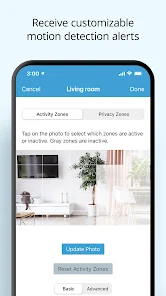
- 💡 Motion-Triggered Clips, Not Continuous Recording: Unlike Ring's always-on recording option, Blink only captures short clips when motion is detected. This saves battery and storage space, but you might miss moments if the camera doesn't trigger in time. It's ideal for catching brief events like a package drop, not for monitoring a busy street.💡 Free Cloud Storage with No Subscription: Most competitors like Arlo or Nest require a monthly fee to store clips longer than a day. Blink gives you free cloud storage for up to two hours of clips—enough for casual users who don't want another recurring bill. The trade-off is limited clip duration (usually 5-60 seconds) and no event history beyond a few days unless you pay.💡 Battery Life That Lasts Over a Year: Blink cameras run on two AA lithium batteries and sip power by only waking up when motion is detected. Wyze and Ring often need recharging every few months, especially with frequent activity. This makes Blink perfect for hard-to-reach spots like a fence post or garage ceiling.💡 Customizable Motion Zones and Sensitivity: You can draw specific areas in the camera's view to ignore or monitor, reducing false alerts from trees or sidewalks. While Ring offers similar features, Blink's interface is simpler to adjust on the fly without diving into deep menus.
pros
- 🔋 Extremely Low Power Draw: The cameras run for 1-2 years on a pair of AA lithium batteries, which beats Wyze's rechargeable battery cams that need top-ups every 3-6 months. For a detached garage or a barn, this is a game-changer—no climbing ladders to swap batteries weekly.🔋 Truly Subscription-Free Basics: Unlike Ring's 30-day free trial that nags you to pay, Blink never asks for money to keep your clips rolling. You get local storage via a sync module USB port too, so you're never locked into a cloud plan. Arlo's base model starts charging for storage after a week.🔋 Miniature and Discreet Design: The cameras are small enough to sit on a bookshelf or mount under an eave without sticking out like a sore thumb. Nest's larger outdoor camera looks more obvious, while Blink blends into the background for covert monitoring.
cons
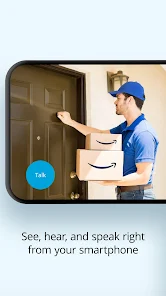
- ⚠️ Short Clip Length and Delayed Notifications: Clips cap at 60 seconds, and motion alerts can lag by 10-30 seconds—so you'll see a door slamming shut, not the person walking through it. Ring's alerts arrive almost instantly with longer recording windows, making Blink feel sluggish for real-time awareness.⚠️ No Two-Way Audio on Basic Models: Only the XT2 supports talking through the camera. Older Blink cams are one-way only, while Wyze and Ring include two-way audio in their cheapest offerings. If you want to yell at a delivery driver, you'll need to upgrade hardware.⚠️ Limited Integration with Smart Home Ecosystems: Blink works with Alexa but barely touches Google Home or Apple HomeKit. Arlo and Ring have broader smart home support, so if you're building a fully connected house, Blink feels isolated unless you're all-in on Amazon devices.
Articles
![]()
Guide
How to Update Google Play Store on Android 2026
![]()
Guide
How to Download Older Versions of Android Apps
![]()
Guide
How to Download Apps Without Google Play Store
![]()
Guide
What Is an APK File for Android?
If you use an Android phone, you may have seen the term APK while searching for apps or games online. Some websites offer an APK download instead of a Google Play install button. Some users also mention APK files when talking about apps that are not available in their region, older app versions, or Android games downloaded outside the Play Store.
![]()
Guide
How to Install Games from Google Play for Beginners
Installing games on an Android phone is usually simple, but for beginners, the process can still feel confusing at first. You may not know where to search, which button to tap, whether the game is safe, or why Google Play sometimes asks for account settings, storage access, or payment information. If you are using an Android phone for the first time, learning how to install games from Google Play is one of the easiest ways to get started.
![]()
Guide
How Useful Gemini Is for Everyday Questions and Quick Tasks
emini feels different from many AI apps because it is not only trying to be a chatbot. After using it for everyday questions, quick writing, image understanding, and planning, I think its biggest strength is convenience.
![]()
Guide
What to Know Before Downloading APKs
For many Android users, downloading an APK is a common way to install apps and games. Sometimes an app is not available in a certain country.
![]()
Guide
ChatGPT Review: Is It Still the Best AI App in 2026?
![]()
Guide
Seedance 2.0 vs Sora: The Future of AI Video Generation
The AI video race has intensified dramatically over the past two years. Platforms like Sora from OpenAI and Luma Dream Machine pushed the boundaries of text-to-video realism. Yet, despite their impressive outputs, most tools still operate as probabilistic generators—you describe a scene, and the model interprets it. Control remains limited. With the February 2026 release of Seedance 2.0, developed by ByteDance, the paradigm shifted. Internally known as Jimeng 2.0, Seedance does not position itself as just another video model. It positions itself as an AI Director. Rather than guessing what you want, Seedance 2.0 allows you to direct what happens. This distinction defines everything that follows.









Recommended Apps
![]()
Home Design 3D
Anuman4.2
![]()
Truth or Dare Game - Party App
Chouic4.8
![]()
Photo Collage Maker
Scoompa4.7![]()
Learn to Draw Flower
Creative APPS4.2![]()
FIFA World Cup 2026™
FIFA2.8![]()
Mirror Plus: Mirror with Light
Digitalchemy, LLC4.4![]()
Meitu- Photo Editor & AI Art
Meitu (China) Limited4.5![]()
Perplexity - Ask Anything
PerplexityAI4.7![]()
GhostTube SLS Camera Alternate
GhostTube4![]()
Boom Chip Blast: 2-Player
Black Pyramid 3D Games Studio0![]()
Healthy Benefits+
Solutran, Inc.4.5![]()
Deepcheck AI Search Assistant
rohe.ai4![]()
Idol Prank Video Call & Chat
LightCode Solutions4![]()
Face Shape - Pretty Scale
GlintTec Apps3.9![]()
Plant App - Plant Identifier
ScaleUp4.6












































