

Zoom - One Platform to Connect

1,000,000,000+
Installs
zoom.us
Developer
-
Business
Category
-
Rated for 12+
Content Rating
-
info@zoom.us
Developer Email
-
http://zoom.us/privacy/
Privacy Policy
Screenshots
editor reviews
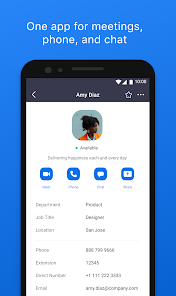
Zoom is a video communication app that lets you hold virtual meetings, webinars, and even casual catch-ups, and it's basically become the go-to tool for remote work and online classes. You download it from Google Play or the App Store, install it in under a minute, and the first time you open it, you're greeted with a clean, simple screen that asks you to start or join a meeting. It's free to download, and you can use it without registering right away—though signing up with an email or Google account unlocks more features like scheduling. The app has over a billion installs, and while there are in-app purchases for premium plans, you can do a lot without paying a cent. My first impression was that it felt professional but not stuffy, and the lack of clutter made me feel like I could jump into a call immediately, which is refreshing.
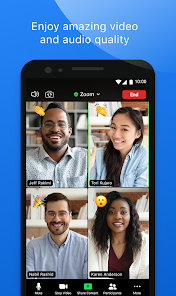
Once you start using Zoom, the experience is pretty straightforward. The home screen has a big “New Meeting” button and a “Join” option, so you're never more than two taps away from talking to someone. During a call, the main video feed is front and center, with controls for mute, video, and screen sharing at the bottom—very intuitive. Some hiccups are that the free version limits group calls to 40 minutes, which can be annoying if you're deep in a discussion and suddenly get booted. I found that the gallery view, which shows everyone in a grid, works best for team meetings, while speaker view focuses on the person talking, and that's perfect for presentations. A practical tip is to use the chat feature during calls to share links without interrupting the speaker.
After using Zoom for a while, I think it's great for anyone who needs reliable video calls—like remote workers, teachers, or families staying connected. It stands out because it just works across devices and has that breakout room feature, which is awesome for workshops but missing in simpler apps like Google Meet. That said, if you're just having quick one-on-one chats, you might prefer WhatsApp or FaceTime since they're less formal. I keep Zoom installed because its scheduling and recording features are solid, and when I need to host a webinar or a large meeting, nothing else feels as polished for free. I'd uninstall it if I only used video calls casually and wanted something lighter, but for serious remote collaboration, it's hard to beat.
features
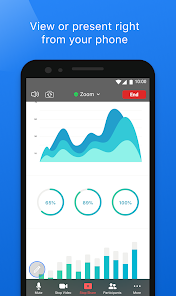
- :computer: Video and Audio Quality – Zoom delivers crisp video and clear audio even on slower internet connections, and it automatically adjusts quality to prevent lag. In contrast, Skype often struggles with bandwidth dips, making Zoom more reliable for professional calls without dropouts.:calendar: Scheduling and Breakout Rooms – You can schedule meetings from the app with calendar integration, and the breakout room feature lets you split a large group into smaller sessions for focused discussions. Microsoft Teams also offers breakout rooms, but Zoom's implementation is simpler and quicker to set up, which saves time during workshops.:film_strip: Screen Sharing and Recording – Zoom's screen sharing is fluid, allowing you to share your full screen, a window, or just a specific app, and you can record locally or to the cloud. Google Meet limits recording to Google Workspace users, while Zoom gives free users local recording, making it more accessible for personal use or small teams.
pros
- :star2: Ease of Use – Zoom's interface is minimal and intuitive, so you don't need a tutorial to start a meeting, whereas apps like Cisco Webex have more complex menus that can confuse new users.:star2: Cross-Platform Compatibility – It works smoothly on phones, tablets, desktops, and even browsers, without requiring downloads in many cases, beating Skype by supporting more devices out of the box.:star2: Free Tier Generosity – The free plan offers unlimited one-on-one meetings and robust group calls for 40 minutes, which is more generous than Google Meet's 60-minute limit for personal accounts.
cons
- :warning: 40-Minute Time Limit – Group calls on the free plan are capped at 40 minutes, which can be frustrating compared to Google Meet's longer limit for personal accounts or Skype's unlimited group calls.:warning: Security Concerns – Past issues like “Zoombombing” have raised privacy alarms, and while updates have improved encryption, apps like FaceTime feel more secure for sensitive chats due to built-in system protections.:warning: Heavy Resource Usage – Zoom can drain battery and heat up devices during long meetings, especially on older phones, while WhatsApp calls are lighter and less taxing on hardware.:warning: No End-to-End Encryption by Default – Unlike Signal or WhatsApp, Zoom's end-to-end encryption is optional and must be enabled manually, which may put off privacy-focused users.
Articles
![]()
Guide
How to Update Google Play Store on Android 2026
![]()
Guide
How to Download Older Versions of Android Apps
![]()
Guide
How to Download Apps Without Google Play Store
![]()
Guide
What Is an APK File for Android?
If you use an Android phone, you may have seen the term APK while searching for apps or games online. Some websites offer an APK download instead of a Google Play install button. Some users also mention APK files when talking about apps that are not available in their region, older app versions, or Android games downloaded outside the Play Store.
![]()
Guide
How to Install Games from Google Play for Beginners
Installing games on an Android phone is usually simple, but for beginners, the process can still feel confusing at first. You may not know where to search, which button to tap, whether the game is safe, or why Google Play sometimes asks for account settings, storage access, or payment information. If you are using an Android phone for the first time, learning how to install games from Google Play is one of the easiest ways to get started.
![]()
Guide
How Useful Gemini Is for Everyday Questions and Quick Tasks
emini feels different from many AI apps because it is not only trying to be a chatbot. After using it for everyday questions, quick writing, image understanding, and planning, I think its biggest strength is convenience.
![]()
Guide
What to Know Before Downloading APKs
For many Android users, downloading an APK is a common way to install apps and games. Sometimes an app is not available in a certain country.
![]()
Guide
ChatGPT Review: Is It Still the Best AI App in 2026?
![]()
Guide
Seedance 2.0 vs Sora: The Future of AI Video Generation
The AI video race has intensified dramatically over the past two years. Platforms like Sora from OpenAI and Luma Dream Machine pushed the boundaries of text-to-video realism. Yet, despite their impressive outputs, most tools still operate as probabilistic generators—you describe a scene, and the model interprets it. Control remains limited. With the February 2026 release of Seedance 2.0, developed by ByteDance, the paradigm shifted. Internally known as Jimeng 2.0, Seedance does not position itself as just another video model. It positions itself as an AI Director. Rather than guessing what you want, Seedance 2.0 allows you to direct what happens. This distinction defines everything that follows.









Recommended Apps
![]()
Home Design 3D
Anuman4.2
![]()
Truth or Dare Game - Party App
Chouic4.8
![]()
Photo Collage Maker
Scoompa4.7![]()
Learn to Draw Flower
Creative APPS4.2![]()
FIFA World Cup 2026™
FIFA2.8![]()
Mirror Plus: Mirror with Light
Digitalchemy, LLC4.4![]()
Meitu- Photo Editor & AI Art
Meitu (China) Limited4.5![]()
Perplexity - Ask Anything
PerplexityAI4.7![]()
GhostTube SLS Camera Alternate
GhostTube4![]()
Boom Chip Blast: 2-Player
Black Pyramid 3D Games Studio0![]()
Healthy Benefits+
Solutran, Inc.4.5![]()
Deepcheck AI Search Assistant
rohe.ai4![]()
Idol Prank Video Call & Chat
LightCode Solutions4![]()
Face Shape - Pretty Scale
GlintTec Apps3.9![]()
Plant App - Plant Identifier
ScaleUp4.6












































