

Netflix

1,000,000,000+
Installs
Netflix, Inc.
Developer
-
Entertainment
Category
-
Rated for 12+
Content Rating
-
playstore@netflix.com
Developer Email
-
http://www.netflix.com/privacy
Privacy Policy
Screenshots
editor reviews
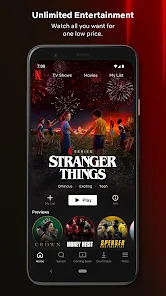
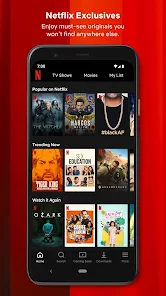
Netflix is a streaming service that brings movies, TV shows, documentaries, and original content straight to your screen, fitting squarely into the entertainment and media category. People download it because they want a massive library they can browse anytime without waiting for scheduled broadcasts. The first impression after launching the app is immediate access to rows of thumbnails organized by genre, trending picks, and personalized recommendations, though signing up requires a paid subscription after a free trial period. You also need to create an account with an email and payment method, but there are no ads interrupting the experience once you're in.
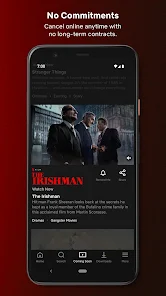
When I started using it, the interface felt clean but a bit overwhelming with all the categories. The onboarding walks you through picking a few shows you like to train the recommendations. In daily use, I search for something specific or scroll through the “Top 10” row. Tapping a title shows a preview, a synopsis, and related suggestions, then I hit play and it starts within seconds on a decent connection. Downloading episodes for offline viewing is straightforward, but switching between profiles can get confusing if you share an account. I noticed the app remembers where I stopped, which helps when I'm halfway through a series. One small annoyance is that the autoplay previews start too fast when I'm just browsing.
After using it for a while, I'd say it's great for binge-watchers who enjoy a mix of old favorites and new originals, but it might not suit someone who prefers live TV or doesn't watch much. What sets it apart from services like Hulu or Amazon Prime Video is the sheer volume of exclusive content and the intuitive recommendation algorithm that actually learns your taste. I keep it installed because I like having something to unwind with after work, though I could see someone uninstalling it if they don't use it for a few months or prefer a free ad-supported option like Tubi. It's reliable, but the constant price hikes make me wonder if it's still worth it.
features
- 🎬 Extensive library of originals and classics – Netflix invests heavily in exclusive series like “Stranger Things” and “The Crown,” plus a rotating collection of films. Compared to Disney+, which focuses on Marvel and Star Wars, Netflix offers a wider variety of genres for all ages.
- 📱 User profiles and offline downloads – You can create up to five profiles per account, each with separate watch histories and recommendations. Unlike Hulu, which has limited offline support, Netflix lets you download most content for viewing without internet, perfect for long flights or commutes.
- 🤖 Smart recommendation engine – The algorithm analyzes your viewing habits to suggest new titles, often surprising me with hidden gems. Amazon Prime Video also recommends based on history, but Netflix's system feels more accurate because it updates quickly after you finish a show.
- 🎞️ No ads across all plans – Even the basic tier is commercial-free, which is a big win over services like Peacock or Hulu that still show ads unless you pay more. This uninterrupted playback keeps the experience smooth.
pros
- 🌟 User experience is smooth and intuitive – The app loads fast, searches are responsive, and the interface is consistent across devices like phones, tablets, and smart TVs. On Android, swipe gestures to skip or rate feel natural compared to the clunkier navigation on Amazon Prime Video.
- 📶 Strong social features – Profiles allow separate watch lists, and the “Continue Watching” row syncs across devices seamlessly. This is more straightforward than Apple TV+, which ties everything to one Apple ID and doesn't support multiple user profiles as easily.
- 🎯 Consistent content refresh rate – New episodes drop weekly for ongoing series, and the library updates monthly with licensed titles. Tubi or Pluto TV focus on older content with unpredictable rotations, while Netflix keeps a reliable schedule.
cons
- 💸 Constant price increases – The subscription cost has gone up several times, making it pricier than Disney+ or Hulu's ad-supported plan. This can push budget-conscious users to cancel after a price hike.
- 📺 Content removal issues – Licenses expire without much notice, so a show you started might disappear halfway. Services like HBO Max used to keep content longer, but Netflix rotates titles frequently, which feels frustrating.
- 🔒 Offline download limits – Downloaded titles expire after 30 days or 48 hours after you start watching, unlike Apple TV+ where offline access is unrestricted. This limits flexibility for long trips.
- 📶 No ad-free basic tier for lower price – To avoid ads, you must pay for the cheapest plan, while competitors like Peacock offer a free tier with limited commercials. Netflix lacks a truly budget-friendly option.
Articles
![]()
Guide
How to Update Google Play Store on Android 2026
![]()
Guide
How to Download Older Versions of Android Apps
![]()
Guide
How to Download Apps Without Google Play Store
![]()
Guide
What Is an APK File for Android?
If you use an Android phone, you may have seen the term APK while searching for apps or games online. Some websites offer an APK download instead of a Google Play install button. Some users also mention APK files when talking about apps that are not available in their region, older app versions, or Android games downloaded outside the Play Store.
![]()
Guide
How to Install Games from Google Play for Beginners
Installing games on an Android phone is usually simple, but for beginners, the process can still feel confusing at first. You may not know where to search, which button to tap, whether the game is safe, or why Google Play sometimes asks for account settings, storage access, or payment information. If you are using an Android phone for the first time, learning how to install games from Google Play is one of the easiest ways to get started.
![]()
Guide
How Useful Gemini Is for Everyday Questions and Quick Tasks
emini feels different from many AI apps because it is not only trying to be a chatbot. After using it for everyday questions, quick writing, image understanding, and planning, I think its biggest strength is convenience.
![]()
Guide
What to Know Before Downloading APKs
For many Android users, downloading an APK is a common way to install apps and games. Sometimes an app is not available in a certain country.
![]()
Guide
ChatGPT Review: Is It Still the Best AI App in 2026?
![]()
Guide
Seedance 2.0 vs Sora: The Future of AI Video Generation
The AI video race has intensified dramatically over the past two years. Platforms like Sora from OpenAI and Luma Dream Machine pushed the boundaries of text-to-video realism. Yet, despite their impressive outputs, most tools still operate as probabilistic generators—you describe a scene, and the model interprets it. Control remains limited. With the February 2026 release of Seedance 2.0, developed by ByteDance, the paradigm shifted. Internally known as Jimeng 2.0, Seedance does not position itself as just another video model. It positions itself as an AI Director. Rather than guessing what you want, Seedance 2.0 allows you to direct what happens. This distinction defines everything that follows.









Recommended Apps
![]()
Home Design 3D
Anuman4.2
![]()
Truth or Dare Game - Party App
Chouic4.8
![]()
Photo Collage Maker
Scoompa4.7![]()
Learn to Draw Flower
Creative APPS4.2![]()
FIFA World Cup 2026™
FIFA2.8![]()
Mirror Plus: Mirror with Light
Digitalchemy, LLC4.4![]()
Meitu- Photo Editor & AI Art
Meitu (China) Limited4.5![]()
Perplexity - Ask Anything
PerplexityAI4.7![]()
GhostTube SLS Camera Alternate
GhostTube4![]()
Boom Chip Blast: 2-Player
Black Pyramid 3D Games Studio0![]()
Healthy Benefits+
Solutran, Inc.4.5![]()
Deepcheck AI Search Assistant
rohe.ai4![]()
Idol Prank Video Call & Chat
LightCode Solutions4![]()
Face Shape - Pretty Scale
GlintTec Apps3.9![]()
Plant App - Plant Identifier
ScaleUp4.6












































