
Skins Master for Roblox Shirts

5M+
Installs
Nin Nguyen
Developer
-
Adventure
Category
-
Everyone
Content Rating
-
ninnguyenqn@gmail.com
Developer Email
-
https://ninnstudio.com/privacy.html
Privacy Policy
Screenshots
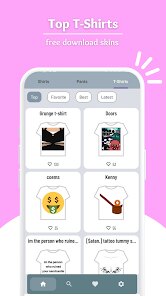
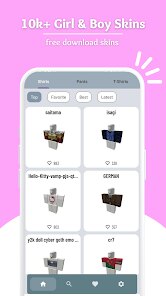
editor reviews
Alright, let me talk about Skins Master for Roblox Shirts. If you're deep into the Roblox customization scene on Android, you've probably seen this app floating around on the Google Play Store. It's a utility tool, not a game in the traditional sense, but it's essential for anyone who wants to create and manage custom shirt designs for their Roblox avatar. The app is purely mobile; there's no PC or console version, and you won't find it on Steam or the Microsoft Store. It's an Android-exclusive tool designed to streamline the process of making Roblox clothing. According to the Play Store listing, it's been downloaded and installed over 10,000 times, which is a decent niche community. The app itself is free to download and install, which is a big plus. However, like most free tools on Android, you'll encounter in-app purchases and ads. The ads are the typical banner and video interstitials, which can be a bit annoying, but you can purchase an ad-free version. The in-app purchases usually range from $1.99 to $4.99, which is pretty standard for removing ads and unlocking a few extra templates. It's been on the Play Store for a couple of years now, and the developer, Nin Nguyen, has been updating it occasionally to keep up with Roblox's changes.
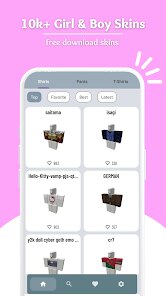
The core gameplay loop here isn't about playing, but about creating. You launch the app, and you're given a grid-based interface where you can draw pixel by pixel to design a Roblox shirt. The best part is that it directly supports the Roblox shirt template layout, so you don't have to guess where the arms, torso, and legs go. You can import images from your Android gallery, use a color picker, and even apply basic filters. My favorite part is the "layers" system. You can stack multiple designs on top of each other, adjust transparency, and merge them down. This makes it super easy to create complex patterns or overlay logos. Once you're done, you can export the design as a PNG file and upload it to Roblox directly through the app's built-in browser. It saves a ton of time compared to using a desktop app and then transferring files. The interface is straightforward, though it took me a few minutes to get used to the touch controls for pixel art. It's not as precise as a mouse, but for quick designs on the go, it's perfect.
Compared to other Roblox clothing apps available on the Play Store, like "Roblox Shirt Maker" or "Pixly," Skins Master for Roblox Shirts stands out for its focus on the official template. A lot of other apps just give you a blank canvas and expect you to know the sizing coordinates, which is a nightmare. This app automates that completely. While Pixly is better for high-end pixel art due to its advanced tools, Skins Master makes the export-to-upload pipeline much smoother. If you're just starting out and want to quickly make custom shirts for your avatar without dealing with a complex desktop tool like GIMP, this is the app I'd recommend. It's not perfect, but it does exactly what it says on the tin. The ads can be a drag, but the low price for the pro version is worth it if you plan on making a lot of designs. As a real user, I appreciate that it's a focused tool that doesn't try to do too much. It's a solid choice for casual Roblox shirt creators who are mostly on their phones.
features
- ✅ Template Accuracy – This app uses the exact Roblox shirt template layout. You don't need to guess where each part goes; the grid is pre-mapped to the avatar's body. That was a huge time-saver for me compared to apps like "Roblox Shirt Maker," where I had to manually align everything.
- 🛠️ Layers and Blending – Unlike basic pixel art editors, this app supports layers, opacity adjustments, and merging. You can layer a logo on top of a gradient and tweak the transparency without ruining the base design. This feature alone puts it ahead of simpler tools.
- 📱 Direct Export and Upload – After designing, you can export the PNG and upload it to Roblox without leaving the app. It has a built-in browser that logs you into your Roblox account to create the shirt asset. No messy file transfers needed.
pros
- 🎨 Easy Onboarding for Newbies – If you've never made a Roblox shirt before, this app holds your hand. It shows you the exact template and offers quick tutorials. Compared to "Pixly," which throws advanced filters at you, Skins Master feels way more accessible if you just want a simple design.
- 💰 Free to Start, Cheap to Unlock – The app is free to download and install, with a small one-time purchase to remove ads. Other apps like "Shirt Designer Pro" require a subscription to export without watermarks, which is a ripoff. This is a better deal for casual creators.
- 📲 Lightweight Performance – On my mid-range Android phone, the app runs smoothly even with multiple layers. It doesn't lag during drawing, and the grid snapping is responsive. That's a big win against "Roblox Studio," which can be sluggish on mobile.
cons
- ⚙️ Limited Brush Tools – The brush options are pretty basic: you only get a single pixel brush and a fill tool. For detailed shading or patterns, you'll miss the variety of brushes in "Pixly" or "Ibis Paint X." It's fine for simple designs, but any complex line art becomes a chore.
- 📺 Intrusive Ads – While you can pay to remove them, the free version throws full-screen video ads at you after every export. It breaks your flow. In contrast, "Roblox Shirt Maker" only has small banner ads that aren't as disruptive.
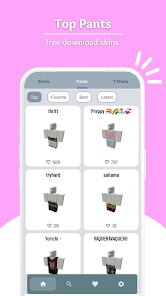
- 📉 No Template for Pants or Accessories – This app only handles shirts. If you want to design pants, hats, or other clothing items, you'll have to use a different app or the desktop Roblox Studio. It's a glaring omission considering some competitors offer full body templates.
Articles
![]()
Guide
How to Update Google Play Store on Android 2026
![]()
Guide
How to Download Older Versions of Android Apps
![]()
Guide
How to Download Apps Without Google Play Store
![]()
Guide
What Is an APK File for Android?
If you use an Android phone, you may have seen the term APK while searching for apps or games online. Some websites offer an APK download instead of a Google Play install button. Some users also mention APK files when talking about apps that are not available in their region, older app versions, or Android games downloaded outside the Play Store.
![]()
Guide
How to Install Games from Google Play for Beginners
Installing games on an Android phone is usually simple, but for beginners, the process can still feel confusing at first. You may not know where to search, which button to tap, whether the game is safe, or why Google Play sometimes asks for account settings, storage access, or payment information. If you are using an Android phone for the first time, learning how to install games from Google Play is one of the easiest ways to get started.
![]()
Guide
How Useful Gemini Is for Everyday Questions and Quick Tasks
emini feels different from many AI apps because it is not only trying to be a chatbot. After using it for everyday questions, quick writing, image understanding, and planning, I think its biggest strength is convenience.
![]()
Guide
What to Know Before Downloading APKs
For many Android users, downloading an APK is a common way to install apps and games. Sometimes an app is not available in a certain country.
![]()
Guide
ChatGPT Review: Is It Still the Best AI App in 2026?
![]()
Guide
Seedance 2.0 vs Sora: The Future of AI Video Generation
The AI video race has intensified dramatically over the past two years. Platforms like Sora from OpenAI and Luma Dream Machine pushed the boundaries of text-to-video realism. Yet, despite their impressive outputs, most tools still operate as probabilistic generators—you describe a scene, and the model interprets it. Control remains limited. With the February 2026 release of Seedance 2.0, developed by ByteDance, the paradigm shifted. Internally known as Jimeng 2.0, Seedance does not position itself as just another video model. It positions itself as an AI Director. Rather than guessing what you want, Seedance 2.0 allows you to direct what happens. This distinction defines everything that follows.









Recommended Apps
![]()
My Supermarket Simulator 3D®
Game District LLC3.9

![]()
Fortnite
Epic Games, Inc4![]()
Poppy Playtime Chapter 3
Mob Entertainment4.2![]()
Diamond Painting ASMR Coloring
CrazyLabs LTD4.5![]()
Real Bus Simulator : Bus Games
Solo Studio Inc3.2![]()
Sprunki All Phases Beat Maker
Gotstar Studio0![]()
Looper!
Kwalee (Ltd)4.2![]()
Gugu Gaga Penguin: Mini Games
Kids Games LLC3![]()
KPop Demon Hunter Wallpaper
Highlights Devloper0![]()
Count Masters: Stickman Games
Freeplay Inc4.6![]()
Scary Teacher 3D
Z & K Games4.3![]()
Papa's Wingeria HD
Flipline Studios4.6![]()
Who's Your Daddy?!
Evil Tortilla Games Incorporated2.7![]()
AFK Arena
LilithGames4.6![]()
Hungry Balls
HYPERCELL4.6












































