

Google Pay

1,000,000,000+
Installs
Google LLC
Developer
-
Finance
Category
-
Rated for 3+
Content Rating
-
apps-help@google.com
Developer Email
-
http://www.google.com/policies/privacy
Privacy Policy
Screenshots
editor reviews
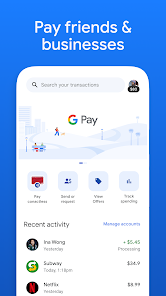
Google Pay is a digital wallet and contactless payment system from Google that bundles together tap-to-pay transactions, online checkouts, and peer-to-peer money transfers into one app. It's the kind of tool you toss onto your phone without thinking much about it—mostly because it works quietly in the background. After downloading from Google Play, it took maybe two minutes to set up: add a debit or credit card, verify through your bank, and that's it. The app itself has been installed over a billion times, and there's no charge for using it. The first screen you see is clean, with your recent transactions and a big "Pay" button right at the bottom. It feels less like a full banking app and more like a utility, which is exactly what a busy person wants when they're rushing through a checkout line. No ads pop up, no nagging to upgrade, just a simple interface that gets out of your way.
After a week of using Google Pay, the flow becomes almost invisible. The home screen lists your cards like a stack, and you just tap the one you want. For in-store payments, you unlock your phone and hold it near the terminal—Google Pay handles the rest, even defaulting to your transit card when you're near a subway gate. The onboarding walks you through one or two quick tutorials, but the app is intuitive enough that you can skip them. I found the transaction history surprisingly useful; it shows not just the amount but the exact location on a map, which saved me from arguing with a coffee shop over a double charge. One small tip: if you're sending money to a friend, the app now supports a split bill feature where you snap a photo of the receipt and it calculates shares. That moment felt slick, but the overall experience is still barebones compared to dedicated finance apps.
After a while, I started noticing where Google Pay shines and where it falls flat. It's perfect for people who just want tap-to-pay without managing a full banking interface—think students, commuters, or anyone who hates fumbling for a wallet. But if you're expecting robust budgeting tools or investment tracking, you'll be disappointed; apps like Cash App or PayPal offer more social features and crypto options. What keeps Google Pay on my phone is the speed and the fact that it's preinstalled on many Android devices, so there's no extra clutter. I've kept it because it handles the basics without any friction, but I've uninstalled it from tablets where I never use mobile payments. It's a tool, not a lifestyle—and for a tool, it works exactly as advertised.
features
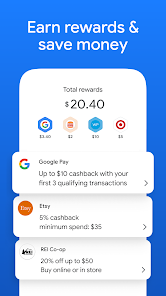
- 💳 NFC Tap-to-Pay: Google Pay's most polished feature is the contactless payment flow. Unlike Samsung Wallet (which sometimes requires extra verification steps), Google Pay just wakes up your phone and lets you tap. It works at over 90% of terminals globally, and the app stores loyalty cards alongside payment cards, so you can scan a grocery store card without digging through your bag.
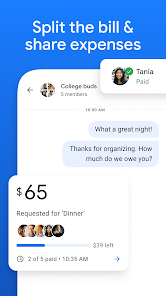
- 📸 Split Bill with Receipt Scan: This one surprised me. You take a photo of a restaurant receipt, the app reads the items, and you can assign each dish to different people. It's quicker than Venmo's manual math method, though Venmo still has better social feed integration for group trips.
- 🌍 International Transit Support: Google Pay supports transit cards in over 80 cities, from London's Oyster to New York's OMNY. With Apple Wallet, you're stuck mostly big cities; Google's coverage is wider but setup can be clunky for smaller transit agencies.
pros
- ⚡ Lightning-fast checkout: The app processes payments in under a second, even with your phone locked. Cash App requires unlocking and opening the app, which feels slow in a rush.
- 🔒 No unnecessary features: Unlike PayPal, which pushes ads and loan offers, Google Pay stays quiet. You pay, you leave—no upselling.
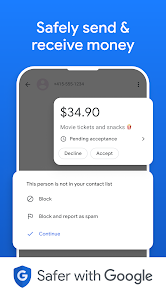
- 🛡️ Tokenized security: Each transaction uses a virtual card number, so your real card data never reaches the terminal. This is standard for Apple Pay too, but Google makes it extra smooth by automatically updating expired cards.
cons
- 🚫 Weak peer-to-peer features: Venmo allows emoji comments, group chats, and instant transfers via debit card. Google Pay only offers basic money requests with no social layer, which feels outdated.
- ⚠️ Inconsistent push notification: Sometimes I don't get notified when a payment goes through, unlike Cash App which vibrates and chimes loudly. This causes confusion if you're at a store without visible terminal feedback.
- 🔋 Battery drain with NFC: Running Google Pay with NFC active on some Android phones, like the Pixel 7, can noticeably drain battery over a day. Samsung Wallet handles this better with per-app NFC management.
- ❓ Limited customer support: If a payment fails or you lose a card, Google routes you to automated help pages instead of live chat. Apple Pay has slightly faster resolution through Apple Support.
Articles
![]()
Guide
How to Update Google Play Store on Android 2026
![]()
Guide
How to Download Older Versions of Android Apps
![]()
Guide
How to Download Apps Without Google Play Store
![]()
Guide
What Is an APK File for Android?
If you use an Android phone, you may have seen the term APK while searching for apps or games online. Some websites offer an APK download instead of a Google Play install button. Some users also mention APK files when talking about apps that are not available in their region, older app versions, or Android games downloaded outside the Play Store.
![]()
Guide
How to Install Games from Google Play for Beginners
Installing games on an Android phone is usually simple, but for beginners, the process can still feel confusing at first. You may not know where to search, which button to tap, whether the game is safe, or why Google Play sometimes asks for account settings, storage access, or payment information. If you are using an Android phone for the first time, learning how to install games from Google Play is one of the easiest ways to get started.
![]()
Guide
How Useful Gemini Is for Everyday Questions and Quick Tasks
emini feels different from many AI apps because it is not only trying to be a chatbot. After using it for everyday questions, quick writing, image understanding, and planning, I think its biggest strength is convenience.
![]()
Guide
What to Know Before Downloading APKs
For many Android users, downloading an APK is a common way to install apps and games. Sometimes an app is not available in a certain country.
![]()
Guide
ChatGPT Review: Is It Still the Best AI App in 2026?
![]()
Guide
Seedance 2.0 vs Sora: The Future of AI Video Generation
The AI video race has intensified dramatically over the past two years. Platforms like Sora from OpenAI and Luma Dream Machine pushed the boundaries of text-to-video realism. Yet, despite their impressive outputs, most tools still operate as probabilistic generators—you describe a scene, and the model interprets it. Control remains limited. With the February 2026 release of Seedance 2.0, developed by ByteDance, the paradigm shifted. Internally known as Jimeng 2.0, Seedance does not position itself as just another video model. It positions itself as an AI Director. Rather than guessing what you want, Seedance 2.0 allows you to direct what happens. This distinction defines everything that follows.









Recommended Apps
![]()
Home Design 3D
Anuman4.2
![]()
Truth or Dare Game - Party App
Chouic4.8
![]()
Photo Collage Maker
Scoompa4.7![]()
Learn to Draw Flower
Creative APPS4.2![]()
FIFA World Cup 2026™
FIFA2.8![]()
Mirror Plus: Mirror with Light
Digitalchemy, LLC4.4![]()
Meitu- Photo Editor & AI Art
Meitu (China) Limited4.5![]()
Perplexity - Ask Anything
PerplexityAI4.7![]()
GhostTube SLS Camera Alternate
GhostTube4![]()
Boom Chip Blast: 2-Player
Black Pyramid 3D Games Studio0![]()
Healthy Benefits+
Solutran, Inc.4.5![]()
Deepcheck AI Search Assistant
rohe.ai4![]()
Idol Prank Video Call & Chat
LightCode Solutions4![]()
Face Shape - Pretty Scale
GlintTec Apps3.9![]()
Plant App - Plant Identifier
ScaleUp4.6











































