

WhatsApp Messenger

10B+
Installs
WhatsApp LLC
Developer
-
Social
Category
-
Everyone
Content Rating
-
android@support.whatsapp.com
Developer Email
-
https://www.whatsapp.com/legal/privacy-policy
Privacy Policy
Screenshots
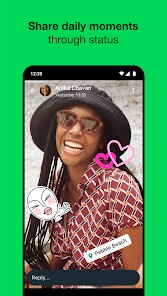
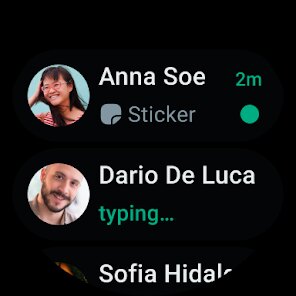
editor reviews
WhatsApp Messenger is a cross-platform messaging app that pretty much everyone with a smartphone has heard of. It's owned by Meta and falls squarely into the instant messaging and VoIP category. People use it for everything – from daily chats with friends and family to coordinating group projects at work or school. Over two billion people have downloaded it globally, and you'll find it on both Google Play and the App Store. The download is free, and you don't need to pay a cent to register or send messages. After installing it and opening it for the first time, you're asked to verify your phone number via SMS, which is straightforward and feels secure. The first impression is simple and clean – no flashy animations or unnecessary clutter, just a plain interface that focuses on your conversations.
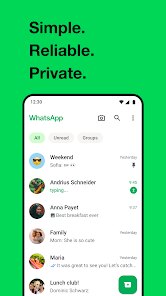
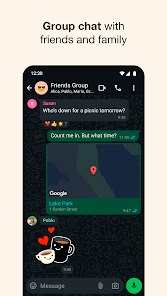
Once you start using it, the experience is mostly smooth. The onboarding process only takes a couple of minutes: enter your number, confirm the code, set a profile photo, and you're ready. The main screen shows your chat list, and there's a pencil icon to start a new message. You tap on a contact, type your message, hit send – it's that easy. What stands out is the end-to-end encryption, which is applied automatically to every message; you don't have to turn anything on. Group chats are handled well, allowing you to name them, add descriptions, and mute notifications for noisy groups. Voice and video calls work decently over Wi-Fi or mobile data, though they sometimes buffer a bit on slower connections. A small tip: you can pin up to three chats at the top to quickly access your most important conversations. The interface feels intuitive, though after a recent update, some menus like settings and privacy options feel slightly deeper than they used to be, which can be a minor annoyance if you're trying to quickly adjust something.
After using WhatsApp for a while, I've formed a pretty clear opinion. It's perfect for people who want a reliable, no-fuss messaging app that their entire contact list is likely already using. That reach alone makes it hard to ditch. But if you care a lot about advanced features like complex stickers, deep customization, or polished desktop apps, you might find it a bit basic compared to Telegram or Signal. WhatsApp does have its own desktop client and web version, but they require your phone to stay connected, which can be inconvenient. What really sets it apart is its sheer network effect – almost everyone you know is probably on it, so switching feels impractical. I keep it installed because I have to, not necessarily because I love it. The privacy policy changes a couple of years ago made some people uneasy, but for day-to-day communication, it still does the job without major issues.
features
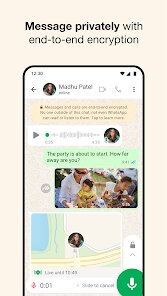
- 💬 End-to-end encryption is arguably WhatsApp's standout feature, making it one of the most secure messaging apps out there. Unlike Telegram, which only uses end-to-end encryption in secret chats by default, WhatsApp encrypts all messages, calls, photos, and videos automatically for every conversation. This means even WhatsApp itself cannot read your messages, which is a huge plus for privacy-conscious users.
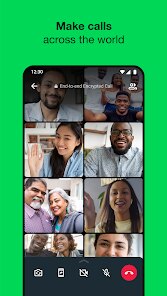
- 🎥 Voice and video calls are integrated directly into the app and support up to 32 participants in group calls. Compared to Signal, which also offers encrypted calls but tends to be less polished overall, WhatsApp's call quality is more consistent and easier to set up on the fly.
- 📱 Cross-platform accessibility is another area where WhatsApp shines. You can use it on Android, iOS, and even through a web browser or desktop app. However, Telegram outperforms it here because Telegram's desktop version works independently without needing your phone connected, while WhatsApp's still relies on your phone's connection.
- 🗂️ File sharing supports documents up to 2GB, which is convenient for sending large PDFs or videos. Signal's file sharing limit is much smaller, making WhatsApp the better choice if you regularly share hefty files with contacts.
pros
- 👍 Massive user base – almost everyone you know is already on WhatsApp, so you rarely need to convince someone to download it. Telegram has better groups and channels, but WhatsApp's sheer network coverage makes it the default choice for general messaging.
- 🔐 Built-in backup to Google Drive or iCloud makes switching phones less painful. Signal lacks this seamless backup integration, which can be frustrating when you change devices.
- 🌍 Multilingual support – the app is available in many languages, making it accessible globally. This broadens its appeal compared to region-specific apps like WeChat.
cons
- 👎 Cloud backup encryption is optional, not default – unlike Signal where everything is encrypted by default, WhatsApp backups to Google Drive or iCloud can be unencrypted unless you manually enable the feature. This creates a potential security gap that privacy-minded users dislike.
- 📲 Desktop dependency on phone – you cannot use WhatsApp Desktop independently; your phone must be online and connected. Telegram's desktop app works fully on its own, which is far more convenient for heavy computer users.
- 🔁 Message editing is missing – once you send a message, you cannot edit it if you made a typo or mistake, unlike Telegram which allows editing for days. This is a common annoyance in fast-paced chats.
Articles
![]()
Guide
How to Update Google Play Store on Android 2026
![]()
Guide
How to Download Older Versions of Android Apps
![]()
Guide
How to Download Apps Without Google Play Store
![]()
Guide
What Is an APK File for Android?
If you use an Android phone, you may have seen the term APK while searching for apps or games online. Some websites offer an APK download instead of a Google Play install button. Some users also mention APK files when talking about apps that are not available in their region, older app versions, or Android games downloaded outside the Play Store.
![]()
Guide
How to Install Games from Google Play for Beginners
Installing games on an Android phone is usually simple, but for beginners, the process can still feel confusing at first. You may not know where to search, which button to tap, whether the game is safe, or why Google Play sometimes asks for account settings, storage access, or payment information. If you are using an Android phone for the first time, learning how to install games from Google Play is one of the easiest ways to get started.
![]()
Guide
How Useful Gemini Is for Everyday Questions and Quick Tasks
emini feels different from many AI apps because it is not only trying to be a chatbot. After using it for everyday questions, quick writing, image understanding, and planning, I think its biggest strength is convenience.
![]()
Guide
What to Know Before Downloading APKs
For many Android users, downloading an APK is a common way to install apps and games. Sometimes an app is not available in a certain country.
![]()
Guide
ChatGPT Review: Is It Still the Best AI App in 2026?
![]()
Guide
Seedance 2.0 vs Sora: The Future of AI Video Generation
The AI video race has intensified dramatically over the past two years. Platforms like Sora from OpenAI and Luma Dream Machine pushed the boundaries of text-to-video realism. Yet, despite their impressive outputs, most tools still operate as probabilistic generators—you describe a scene, and the model interprets it. Control remains limited. With the February 2026 release of Seedance 2.0, developed by ByteDance, the paradigm shifted. Internally known as Jimeng 2.0, Seedance does not position itself as just another video model. It positions itself as an AI Director. Rather than guessing what you want, Seedance 2.0 allows you to direct what happens. This distinction defines everything that follows.









Recommended Apps
![]()
Home Design 3D
Anuman4.2
![]()
Truth or Dare Game - Party App
Chouic4.8
![]()
Photo Collage Maker
Scoompa4.7![]()
Learn to Draw Flower
Creative APPS4.2![]()
FIFA World Cup 2026™
FIFA2.8![]()
Mirror Plus: Mirror with Light
Digitalchemy, LLC4.4![]()
Meitu- Photo Editor & AI Art
Meitu (China) Limited4.5![]()
Perplexity - Ask Anything
PerplexityAI4.7![]()
GhostTube SLS Camera Alternate
GhostTube4![]()
Boom Chip Blast: 2-Player
Black Pyramid 3D Games Studio0![]()
Healthy Benefits+
Solutran, Inc.4.5![]()
Deepcheck AI Search Assistant
rohe.ai4![]()
Idol Prank Video Call & Chat
LightCode Solutions4![]()
Face Shape - Pretty Scale
GlintTec Apps3.9![]()
Plant App - Plant Identifier
ScaleUp4.6











































