

Wise: International Transfers

10M+
Installs
Wise Payments Ltd.
Developer
-
Finance
Category
-
Everyone
Content Rating
-
support@wise.com
Developer Email
-
https://wise.com/privacy-policy
Privacy Policy
Screenshots


editor reviews
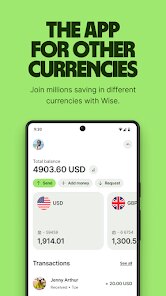
Wise, formerly known as TransferWise, is a financial services app focused on international money transfers and multi-currency banking. Basically, it's the app you grab when you need to send money to another country without getting ripped off by hidden exchange rate markups. The whole pitch is about real mid-market rates and transparent fees, which sounds great on paper. After downloading it from Google Play or the App Store—it shows over 10 million installs and is free to download—the first thing you notice is how clean the sign-up is. No forced registration with a credit card upfront; you can just tap around and see how much a transfer would cost before committing. That first impression is pretty reassuring, like they're not trying to trap you into anything.
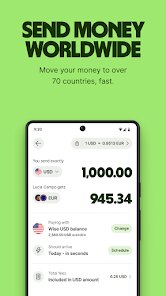
Once you actually start using it, the hands-on experience is surprisingly smooth. The interface is minimal but not boring—everything is laid out in a logical order. You pick the currencies, enter the amount, and it instantly shows you the exact amount the recipient gets and the fee. No surprises. The onboarding walks you through verifying your identity, which is standard for any financial app, but it only took a couple of minutes. A small tip: use the rate alert feature if you're not in a rush, because it notifies you when the exchange rate hits your target. In daily use, moving money from my US account to a Euro account took less than a day most times, which is faster than my traditional bank's three to five business days. One confusing bit was the "balance" feature if you hold multiple currencies—it took me a minute to realize each currency has its own account details, and you can receive money like a local in that country.
After a few weeks, I'd say this app is a lifesaver for freelancers who get paid in dollars but live in Europe, or for anyone with family abroad. If you rarely send money internationally, your standard bank might be fine. What makes it stand out is the transparency—no "we use a competitive rate" nonsense. Similar apps like Revolut also offer transfers, but they sometimes cap the amount for free transfers or hide fees in the exchange rate. I kept it installed because of the multi-currency account feature, which lets me hold and manage money in several currencies without converting immediately. The only reason I'd uninstall is if my bank suddenly offered the same rate, which seems unlikely. Overall, it's a solid tool for a specific need.
features
- 💵 Real mid-market exchange rate with no hidden markup. Unlike PayPal, which often adds 3–4% on top of the market rate, Wise shows you the exact rate from Reuters and adds only a small, transparent fee. When I sent $500 to the UK, the fee was like $4.50, and the rate matched exactly what Google showed.
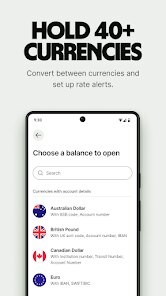
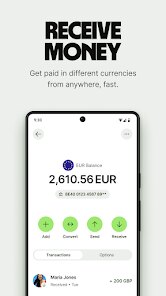
- 🌍 Multi-currency account that gives you local bank details in the US, UK, Europe, Australia, and more. You can receive payments as if you have a local bank account in those countries, which is huge for freelancers. I got a US bank account number even though I live in Spain—payments arrive in minutes, not days.
- 👍 Speed and reliability. Many transfers complete within hours, sometimes seconds if both sender and recipient are in the Wise network. My standard bank transfer to Germany used to take three days; Wise did it in four hours once. Compare that to banks like HSBC, where even within the same country, international wires can take a week.
pros
- 🌟 Transparent pricing that makes budgeting easy. With apps like Xoom or Western Union, you never really know the final amount until after you press "send," because the exchange rate fluctuates. Wise locks the rate for a few minutes, and the upfront fee is crystal clear. I can plan my expenses without guesswork.
- 🌟 Integration with banks and no need for a separate card. Unlike Revolut, which pushes its own debit card and subscription tiers, Wise lets me link directly to my main checking account and initiate transfers without extra plastic. It feels less pushy and more straightforward.
- 🌟 Low holding costs. Holding foreign currency in a traditional bank often incurs monthly fees, but Wise's multi-currency account has no monthly charge, and you only pay for conversions when you actually move money. That beats most competitor offerings.
cons
- ⚠️ Customer support can be slow during high volume. When a transfer got delayed due to a compliance check, I waited almost 24 hours for a reply via in-app chat. Compared to PayPal, which has 24/7 phone support for urgent issues, Wise's support feels a bit thin.
- ⚠️ No physical branches or cash deposits. If you ever need to deposit cash into your account, you're out of luck. Traditional banks like Bank of America let you walk in and deposit foreign currency, but Wise is 100% digital. That's a limitation for older users who prefer in-person banking.
- ⚠️ Interest rates on balances are negligible. While apps like Revolut offer savings "vaults" with interest on held currencies, Wise gives zero interest on your multi-currency balances. If you're sitting on a big amount, you're losing money to inflation compared to a high-yield savings account.
Articles
![]()
Guide
How to Update Google Play Store on Android 2026
![]()
Guide
How to Download Older Versions of Android Apps
![]()
Guide
How to Download Apps Without Google Play Store
![]()
Guide
What Is an APK File for Android?
If you use an Android phone, you may have seen the term APK while searching for apps or games online. Some websites offer an APK download instead of a Google Play install button. Some users also mention APK files when talking about apps that are not available in their region, older app versions, or Android games downloaded outside the Play Store.
![]()
Guide
How to Install Games from Google Play for Beginners
Installing games on an Android phone is usually simple, but for beginners, the process can still feel confusing at first. You may not know where to search, which button to tap, whether the game is safe, or why Google Play sometimes asks for account settings, storage access, or payment information. If you are using an Android phone for the first time, learning how to install games from Google Play is one of the easiest ways to get started.
![]()
Guide
How Useful Gemini Is for Everyday Questions and Quick Tasks
emini feels different from many AI apps because it is not only trying to be a chatbot. After using it for everyday questions, quick writing, image understanding, and planning, I think its biggest strength is convenience.
![]()
Guide
What to Know Before Downloading APKs
For many Android users, downloading an APK is a common way to install apps and games. Sometimes an app is not available in a certain country.
![]()
Guide
ChatGPT Review: Is It Still the Best AI App in 2026?
![]()
Guide
Seedance 2.0 vs Sora: The Future of AI Video Generation
The AI video race has intensified dramatically over the past two years. Platforms like Sora from OpenAI and Luma Dream Machine pushed the boundaries of text-to-video realism. Yet, despite their impressive outputs, most tools still operate as probabilistic generators—you describe a scene, and the model interprets it. Control remains limited. With the February 2026 release of Seedance 2.0, developed by ByteDance, the paradigm shifted. Internally known as Jimeng 2.0, Seedance does not position itself as just another video model. It positions itself as an AI Director. Rather than guessing what you want, Seedance 2.0 allows you to direct what happens. This distinction defines everything that follows.









Recommended Apps
![]()
Home Design 3D
Anuman4.2
![]()
Truth or Dare Game - Party App
Chouic4.8
![]()
Photo Collage Maker
Scoompa4.7![]()
Learn to Draw Flower
Creative APPS4.2![]()
FIFA World Cup 2026™
FIFA2.8![]()
Mirror Plus: Mirror with Light
Digitalchemy, LLC4.4![]()
Meitu- Photo Editor & AI Art
Meitu (China) Limited4.5![]()
Perplexity - Ask Anything
PerplexityAI4.7![]()
GhostTube SLS Camera Alternate
GhostTube4![]()
Boom Chip Blast: 2-Player
Black Pyramid 3D Games Studio0![]()
Healthy Benefits+
Solutran, Inc.4.5![]()
Deepcheck AI Search Assistant
rohe.ai4![]()
Idol Prank Video Call & Chat
LightCode Solutions4![]()
Face Shape - Pretty Scale
GlintTec Apps3.9![]()
Plant App - Plant Identifier
ScaleUp4.6











































