

Pandora - Music & Podcasts

100,000,000+
Installs
Pandora
Developer
-
Entertainment
Category
-
Rated for 12+
Content Rating
-
pandora-support@pandora.com
Developer Email
-
http://www.pandora.com/privacy
Privacy Policy
Screenshots
editor reviews
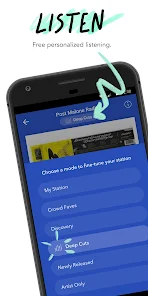
Pandora is a music streaming and podcast app that's been around for ages, originally famous for its “Music Genome Project”—basically, a system that builds custom radio stations based on songs or artists you like. When you first download and install it from Google Play or the App Store, you don't even need to register to start listening; you can jump right into a station and skip tracks for free, which feels refreshingly straightforward compared to apps that hit you with a paywall or a sign-up form before you hear a note. That first impression is pretty clean: a simple search bar at the top, some suggested stations, and a play button that gets you music instantly. Free tier includes ads, which pop up every few songs, but it's not overly aggressive. You can upgrade to Pandora Plus or Premium for offline listening and on-demand play, but a lot of casual listeners stick with the free version just fine.
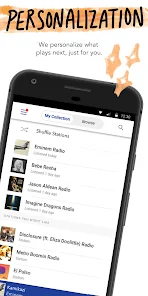
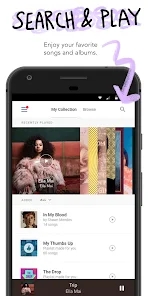
After using it for a while, the hands-on experience is where Pandora really shines for laid-back listening. You start by typing in a song or artist—say, “Dua Lipa”—and the app builds a station around that sound, mixing in similar tracks from other artists. The interface is simple: thumbs-up or thumbs-down buttons to fine-tune what plays next, plus a “skip” button that you can use up to six times per hour on the free plan. Over time, the app actually learns your taste surprisingly well, and the “My Collection” tab lets you save stations or podcasts you like. Podcasts are integrated in a separate tab, so you don't mix them up with music. A practical tip: use the “Sleep Timer” when falling asleep to music—it shuts off after a set time, which saves battery and data. The only slightly clunky moment is when you want to replay a specific song—on the free tier, you can't, and the app sometimes skips to a new track before you've decided if you liked it.
After living with Pandora for a few weeks, I think it's best for people who want a chill, “set it and forget it” music experience—someone who doesn't want to hunt for the perfect playlist or curate their own library. It's noticeably different from Spotify or Apple Music because it doesn't let you pick specific songs on demand unless you pay, but the radio-style discovery is actually more organic and less overwhelming. You might keep it installed if you're a commuter or background listener who just needs good music recommendations without decision fatigue. But if you're someone who needs full control over what plays next, or if you already pay for YouTube Music, this can feel too restrictive and you'll probably uninstall it after the novelty fades.
features
- 🎵 Personalized Radio Stations – Pandora's core feature is the automated radio station based on a song or artist. It uses the Music Genome Project to analyze melody, harmony, and rhythm, so a station for “The Beatles” might also play similar-sounding bands like “The Kinks.” Spotify's similar feature, “Song Radio,” feels less precise and often throws in random tracks that don't fit the mood as well.
- 🔁 Thumbs-Up/Down Learning – You train the app by simply giving a thumbs-up or down on each track. Over just a few days, the station adapts noticeably. In contrast, Apple Music's “Love” button feels less responsive, and its recommendations stay broader and less personalized after the same amount of use.
- 📻 Podcast Integration – Pandora mixes podcasts into the same interface without disrupting your music sessions. You can switch between “Music” and “Podcasts” tabs easily, and the app suggests podcast episodes based on your listening history. In comparison, Spotify shoehorns podcasts into the same main feed, which can be annoying if you only want music.
- 💰 Free Experience Is Generous – On the free tier, you can create unlimited stations and skip up to six times per hour, while many similar apps, like iHeartRadio, limit your skips more aggressively or force you into a single station. The ad load is also lighter than most free streaming services.
pros
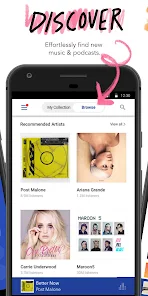
- 🎶 Strong Music Discovery – Pandora excels at introducing you to new songs and artists that actually fit your taste. When you start a station for “Adele,” you'll likely hear similar vocal-driven artists like “Birdy” or “Sia,” whereas Spotify's Discover Weekly occasionally drops in total curveballs that miss the mark.
- 📱 Low Data Usage – The audio bitrate on Pandora's free tier is optimized for streaming without hogging your mobile data. You can listen for hours without hitting your cap, while apps like Tidal or even YouTube Music are more data-hungry, especially when you're on a limited plan.
- 🚫 No Social Distractions – Pandora keeps things simple: you don't have to follow friends, share playlists, or see what others are listening to. This is a welcome change from Spotify's social features, which can feel intrusive if you just want to zone out to music.
cons
- ❌ No On-Demand Playback on Free Tier – On Pandora's free version, you can't pick and play a specific song when you want; you have to rely on the radio station and hope it plays. In contrast, Spotify's free tier allows limited on-demand listening for specific albums or playlists, which offers more control.
- ⏱️ Session Time Limit – The free tier has a daily listening limit of about 8 hours, after which the app stops playing music until you manually restart it. Apple Music's free trial period doesn't have this kind of cap, making it feel less restrictive for long listening sessions.
- 📉 Music Library Size – Pandora's catalog is noticeably smaller than Spotify or Apple Music. You might search for a niche live recording or a lesser-known indie band and find nothing, while those tracks are readily available on other services.
- 🔄 Forced Track Skipping – On the free plan, after a thumb-down or skip, the app automatically plays a new track. But you can't undo a thumbs-down immediately, and sometimes you accidentally skip a song you wanted to hear again later—a problem that YouTube Music's “Liked” list handles much more gracefully.
Articles
![]()
Guide
How to Update Google Play Store on Android 2026
![]()
Guide
How to Download Older Versions of Android Apps
![]()
Guide
How to Download Apps Without Google Play Store
![]()
Guide
What Is an APK File for Android?
If you use an Android phone, you may have seen the term APK while searching for apps or games online. Some websites offer an APK download instead of a Google Play install button. Some users also mention APK files when talking about apps that are not available in their region, older app versions, or Android games downloaded outside the Play Store.
![]()
Guide
How to Install Games from Google Play for Beginners
Installing games on an Android phone is usually simple, but for beginners, the process can still feel confusing at first. You may not know where to search, which button to tap, whether the game is safe, or why Google Play sometimes asks for account settings, storage access, or payment information. If you are using an Android phone for the first time, learning how to install games from Google Play is one of the easiest ways to get started.
![]()
Guide
How Useful Gemini Is for Everyday Questions and Quick Tasks
emini feels different from many AI apps because it is not only trying to be a chatbot. After using it for everyday questions, quick writing, image understanding, and planning, I think its biggest strength is convenience.
![]()
Guide
What to Know Before Downloading APKs
For many Android users, downloading an APK is a common way to install apps and games. Sometimes an app is not available in a certain country.
![]()
Guide
ChatGPT Review: Is It Still the Best AI App in 2026?
![]()
Guide
Seedance 2.0 vs Sora: The Future of AI Video Generation
The AI video race has intensified dramatically over the past two years. Platforms like Sora from OpenAI and Luma Dream Machine pushed the boundaries of text-to-video realism. Yet, despite their impressive outputs, most tools still operate as probabilistic generators—you describe a scene, and the model interprets it. Control remains limited. With the February 2026 release of Seedance 2.0, developed by ByteDance, the paradigm shifted. Internally known as Jimeng 2.0, Seedance does not position itself as just another video model. It positions itself as an AI Director. Rather than guessing what you want, Seedance 2.0 allows you to direct what happens. This distinction defines everything that follows.









Recommended Apps
![]()
Home Design 3D
Anuman4.2
![]()
Truth or Dare Game - Party App
Chouic4.8
![]()
Photo Collage Maker
Scoompa4.7![]()
Learn to Draw Flower
Creative APPS4.2![]()
FIFA World Cup 2026™
FIFA2.8![]()
Mirror Plus: Mirror with Light
Digitalchemy, LLC4.4![]()
Meitu- Photo Editor & AI Art
Meitu (China) Limited4.5![]()
Perplexity - Ask Anything
PerplexityAI4.7![]()
GhostTube SLS Camera Alternate
GhostTube4![]()
Boom Chip Blast: 2-Player
Black Pyramid 3D Games Studio0![]()
Healthy Benefits+
Solutran, Inc.4.5![]()
Deepcheck AI Search Assistant
rohe.ai4![]()
Idol Prank Video Call & Chat
LightCode Solutions4![]()
Face Shape - Pretty Scale
GlintTec Apps3.9![]()
Plant App - Plant Identifier
ScaleUp4.6











































