

Google Home

500,000,000+
Installs
Google LLC
Developer
-
Lifestyle
Category
-
Rated for 3+
Content Rating
-
apps-help@google.com
Developer Email
-
https://policies.google.com/privacy
Privacy Policy
Screenshots
editor reviews
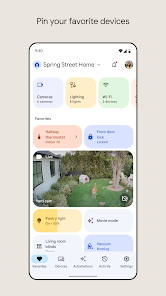
Google Home is basically your command center for controlling all the smart gadgets around the house. It's not just an app; it's the glue that makes lights, speakers, thermostats, and cameras talk to each other. After you pick it up from Google Play or the App Store—it's free to download and has over 100 million installs—you set it up in a few minutes by signing in with your Google account. The first time you open it, you're greeted with a clean, bright interface showing your most-used devices right at the top. What struck me immediately was how simple it looked, almost too simple, but that's the point. You can start tweaking your smart home without scratching your head over complex menus.
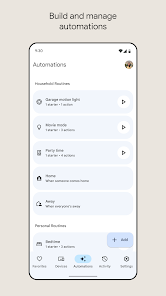
Once you're inside, the real fun begins. The app automatically scans for nearby devices like Google Nest speakers or compatible smart plugs, and adding them is just a matter of tapping a few buttons. I remember setting up a new light bulb: the app walked me through scanning a QR code on the box, connecting to Wi-Fi, and naming the room. It felt smooth, though I did hit a moment of confusion when the bulb didn't show up right away—turns out I needed to hold the power button for five seconds. Daily use revolves around the "Home" tab, where you can see all devices grouped by room. You can tap a light to dim it or hold down a button to create a routine, like "Good morning" that turns on the coffee maker and raises the blinds. A small tip: pin your favorites to the top so you don't scroll endlessly.
After a few weeks, I've grown to appreciate how this app ties everything together. It's fantastic for anyone who's already all-in on Google services or has a handful of Nest gadgets. If you're someone who just wants a single smart bulb and nothing else, you might find it overkill—the app really shines when you have a whole ecosystem to control. Compared to something like Amazon's Alexa app, Google Home feels more focused on visual control rather than voice commands alone. I've kept it installed because it makes my morning routine effortless, but I could see someone uninstalling it if they prefer a simpler, standalone solution for each device. The app isn't flashy, but it does its job quietly and reliably.
features
- 🔄 Seamless Google Integration: The app syncs instantly with your Google account, so your calendar, reminders, and YouTube Music playlists show up without any extra setup. For comparison, Amazon Alexa requires more manual linking for similar features.
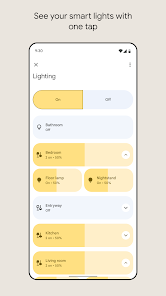
- 📱 Room-Based Device Management: You can group devices by rooms (like "Living Room" or "Kitchen") and control them all at once. This beats the Nest app, which doesn't offer such granular grouping.
- 🎛️ Custom Routines: You can create automations like "Movie Night" that dim lights and lower blinds with one tap. Alexa has routines too, but Google Home's interface for building them is much more intuitive.
pros
- 💡 Clear Visual Interface: The app's layout is very straightforward compared to the cluttered feel of the SmartThings app. I never feel lost when finding a device.
- 🔊 Excellent Speaker Controls: Adjusting volume, EQ presets, and multi-room audio for Nest speakers is dead simple. Apple HomeKit can do this too, but only with specific gear.
- 📉 Minimal Setup Friction: Adding new devices often takes under a minute, while some competitors like Tuya require endless pairing steps.
cons
- ⚠️ Dependency on Stable Wi-Fi: The app becomes nearly useless if your internet flickers. Amazon Alexa can handle some offline commands, but Google Home just blanks out.
- 🐌 Slow Response Times: Occasionally, toggling a switch takes a few seconds to register. Eve's app is noticeably snappier with Thread-compatible devices.
- 🔒 Limited Third-Party Support: Some brands like Wyze cameras don't integrate well. Samsung SmartThings has a wider compatibility list out of the box.
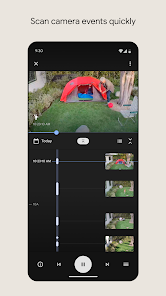
- 🔄 Clunky Nest Camera Feeds: Live views from Nest cams often buffer or fail to load, whereas the Ring app streams much more reliably.
Articles
![]()
Guide
How to Update Google Play Store on Android 2026
![]()
Guide
How to Download Older Versions of Android Apps
![]()
Guide
How to Download Apps Without Google Play Store
![]()
Guide
What Is an APK File for Android?
If you use an Android phone, you may have seen the term APK while searching for apps or games online. Some websites offer an APK download instead of a Google Play install button. Some users also mention APK files when talking about apps that are not available in their region, older app versions, or Android games downloaded outside the Play Store.
![]()
Guide
How to Install Games from Google Play for Beginners
Installing games on an Android phone is usually simple, but for beginners, the process can still feel confusing at first. You may not know where to search, which button to tap, whether the game is safe, or why Google Play sometimes asks for account settings, storage access, or payment information. If you are using an Android phone for the first time, learning how to install games from Google Play is one of the easiest ways to get started.
![]()
Guide
How Useful Gemini Is for Everyday Questions and Quick Tasks
emini feels different from many AI apps because it is not only trying to be a chatbot. After using it for everyday questions, quick writing, image understanding, and planning, I think its biggest strength is convenience.
![]()
Guide
What to Know Before Downloading APKs
For many Android users, downloading an APK is a common way to install apps and games. Sometimes an app is not available in a certain country.
![]()
Guide
ChatGPT Review: Is It Still the Best AI App in 2026?
![]()
Guide
Seedance 2.0 vs Sora: The Future of AI Video Generation
The AI video race has intensified dramatically over the past two years. Platforms like Sora from OpenAI and Luma Dream Machine pushed the boundaries of text-to-video realism. Yet, despite their impressive outputs, most tools still operate as probabilistic generators—you describe a scene, and the model interprets it. Control remains limited. With the February 2026 release of Seedance 2.0, developed by ByteDance, the paradigm shifted. Internally known as Jimeng 2.0, Seedance does not position itself as just another video model. It positions itself as an AI Director. Rather than guessing what you want, Seedance 2.0 allows you to direct what happens. This distinction defines everything that follows.









Recommended Apps
![]()
Home Design 3D
Anuman4.2
![]()
Truth or Dare Game - Party App
Chouic4.8
![]()
Photo Collage Maker
Scoompa4.7![]()
Learn to Draw Flower
Creative APPS4.2![]()
FIFA World Cup 2026™
FIFA2.8![]()
Mirror Plus: Mirror with Light
Digitalchemy, LLC4.4![]()
Meitu- Photo Editor & AI Art
Meitu (China) Limited4.5![]()
Perplexity - Ask Anything
PerplexityAI4.7![]()
GhostTube SLS Camera Alternate
GhostTube4![]()
Boom Chip Blast: 2-Player
Black Pyramid 3D Games Studio0![]()
Healthy Benefits+
Solutran, Inc.4.5![]()
Deepcheck AI Search Assistant
rohe.ai4![]()
Idol Prank Video Call & Chat
LightCode Solutions4![]()
Face Shape - Pretty Scale
GlintTec Apps3.9![]()
Plant App - Plant Identifier
ScaleUp4.6












































