

Uber Eats: Food Delivery

100M+
Installs
Uber Technologies, Inc.
Developer
-
Food & Drink
Category
-
Everyone
Content Rating
-
support@uber.com
Developer Email
-
https://www.uber.com/privacy
Privacy Policy
Screenshots


editor reviews
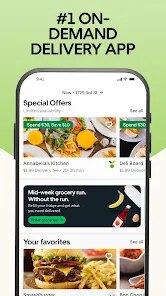
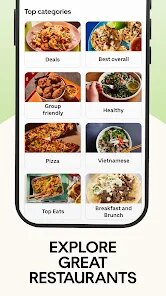
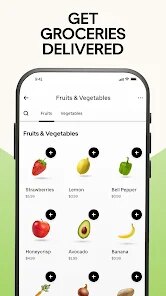
Uber Eats is a food delivery and takeout app from the same team that built the ride-hailing service. You open it up, punch in your address, and scroll through a huge list of local restaurants that will bring food right to your door. It's available on both Google Play and the App Store, and you can download it for free, though you'll need to sign up with an account to place any orders. The first time you launch the app, it feels pretty straightforward, like a digital menu board with some photos and estimated delivery times front and center. Most people download this out of pure laziness or a busy schedule, wanting something hot without leaving the couch.
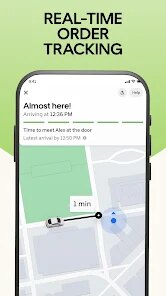
After a few orders, you start to notice how the app actually works day to day. The interface is clean, with your saved addresses and recent orders right there on the home screen. You tap a restaurant, pick your items from a menu that updates prices in real time, and then check out using whatever payment method you have stored. The live tracking map is the most useful part, letting you see exactly when the driver is pulling up, which saves you from hovering by the door. One small tip is to check the promo banners before ordering because there's almost always a code or a deal that drops the service fee. The only real hiccup is when the estimated time jumps around, usually during rush hour, and you end up waiting longer than you expected.
After using Uber Eats for a while, I think it works best for people who want quick variety without thinking too hard. If you just want a pizza or some Chinese food and don't care about spending a bit extra on fees, this app is fine. But if you're on a tight budget or prefer picking up food yourself to save money, you probably don't need it. What sets it apart from something like DoorDash is how integrated it is with Uber's broader system, especially if you already use the ride app. The main reason I keep it installed is the convenience of having one account for both rides and meals, though I have uninstalled it before during periods where I was cooking more at home.
features
- 🍔 The live order tracking is a standout feature. You can watch your driver move on a map from the restaurant to your door, which makes the wait feel less random compared to apps like Grubhub that just give you a static timer.
- 🍔 The "group order" option lets you share a link with friends or coworkers so everyone can add their own items to one cart. This saves the hassle of collecting cash or managing separate deliveries when ordering for a group.
- 🍔 The app also offers "pickup" orders if you want to skip delivery fees entirely. You order ahead, walk to the restaurant, and grab your food without waiting in line, which is a practical middle ground not every competitor pushes as clearly.
pros
- ✅ Broad restaurant selection. Uber Eats has a bigger list of local spots and chain restaurants in most cities compared to Postmates, so you rarely feel stuck with limited choices.
- ✅ Seamless integration with the Uber ride app. If you already use Uber for rides, your payment info and account carry over without extra setup, which DoorDash doesn't offer.
- ✅ Consistent promo deals. The app regularly pushes discounts and free delivery codes, making it easier to offset the high service fees compared to some smaller delivery apps.
cons
- ❌ High fees stack up fast. Between service fees, delivery fees, and tips, a $15 meal can easily become $25. DoorDash sometimes has lower average costs for the same order.
- ❌ Delivery time estimates can be unreliable. The app often pushes the ETA back after you place the order, which is frustrating when you're hungry and planning around it.
- ❌ Limited support for cash payments. Unlike some local delivery apps, Uber Eats heavily favors card or digital payments, which excludes customers who prefer paying with cash on delivery.
Articles
![]()
Guide
How to Update Google Play Store on Android 2026
![]()
Guide
How to Download Older Versions of Android Apps
![]()
Guide
How to Download Apps Without Google Play Store
![]()
Guide
What Is an APK File for Android?
If you use an Android phone, you may have seen the term APK while searching for apps or games online. Some websites offer an APK download instead of a Google Play install button. Some users also mention APK files when talking about apps that are not available in their region, older app versions, or Android games downloaded outside the Play Store.
![]()
Guide
How to Install Games from Google Play for Beginners
Installing games on an Android phone is usually simple, but for beginners, the process can still feel confusing at first. You may not know where to search, which button to tap, whether the game is safe, or why Google Play sometimes asks for account settings, storage access, or payment information. If you are using an Android phone for the first time, learning how to install games from Google Play is one of the easiest ways to get started.
![]()
Guide
How Useful Gemini Is for Everyday Questions and Quick Tasks
emini feels different from many AI apps because it is not only trying to be a chatbot. After using it for everyday questions, quick writing, image understanding, and planning, I think its biggest strength is convenience.
![]()
Guide
What to Know Before Downloading APKs
For many Android users, downloading an APK is a common way to install apps and games. Sometimes an app is not available in a certain country.
![]()
Guide
ChatGPT Review: Is It Still the Best AI App in 2026?
![]()
Guide
Seedance 2.0 vs Sora: The Future of AI Video Generation
The AI video race has intensified dramatically over the past two years. Platforms like Sora from OpenAI and Luma Dream Machine pushed the boundaries of text-to-video realism. Yet, despite their impressive outputs, most tools still operate as probabilistic generators—you describe a scene, and the model interprets it. Control remains limited. With the February 2026 release of Seedance 2.0, developed by ByteDance, the paradigm shifted. Internally known as Jimeng 2.0, Seedance does not position itself as just another video model. It positions itself as an AI Director. Rather than guessing what you want, Seedance 2.0 allows you to direct what happens. This distinction defines everything that follows.









Recommended Apps
![]()
Home Design 3D
Anuman4.2
![]()
Truth or Dare Game - Party App
Chouic4.8
![]()
Photo Collage Maker
Scoompa4.7![]()
Learn to Draw Flower
Creative APPS4.2![]()
FIFA World Cup 2026™
FIFA2.8![]()
Mirror Plus: Mirror with Light
Digitalchemy, LLC4.4![]()
Meitu- Photo Editor & AI Art
Meitu (China) Limited4.5![]()
Perplexity - Ask Anything
PerplexityAI4.7![]()
GhostTube SLS Camera Alternate
GhostTube4![]()
Boom Chip Blast: 2-Player
Black Pyramid 3D Games Studio0![]()
Healthy Benefits+
Solutran, Inc.4.5![]()
Deepcheck AI Search Assistant
rohe.ai4![]()
Idol Prank Video Call & Chat
LightCode Solutions4![]()
Face Shape - Pretty Scale
GlintTec Apps3.9![]()
Plant App - Plant Identifier
ScaleUp4.6












































