

Google Maps

10,000,000,000+
Installs
Google LLC
Developer
-
Travel & Local
Category
-
Rated for 3+
Content Rating
-
apps-help@google.com
Developer Email
-
http://www.google.com/policies/privacy
Privacy Policy
Screenshots
editor reviews
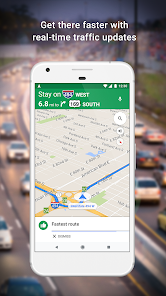
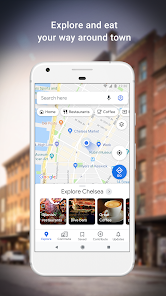
Google Maps is a navigation and mapping app developed by Google LLC that has become an essential tool for millions of people worldwide. It's primarily a location-based service, but it goes way beyond just showing you a map. You can use it to get turn-by-turn directions for driving, walking, biking, or public transit, check real-time traffic conditions, explore local businesses with reviews, and even see what a place looks like from the inside using Street View. I downloaded it from Google Play and the App Store because, honestly, who hasn't? It's already pre-installed on many Android phones, but I installed it fresh on my iPhone. The first impression after launching it is that it's clean and familiar, with a search bar at the top and a map dominating the screen. The interface feels polished, and the app is free to download, though you'll encounter occasional ads for businesses. There's no mandatory registration to start using it, but signing in with a Google account unlocks features like saving your home and work addresses and syncing your search history across devices. The install count is astronomical, and it's consistently ranked as one of the most downloaded apps on both platforms.
After using Google Maps for a while, the hands-on experience is mostly smooth, with a few minor hiccups. The interface is intuitive: you tap the search bar, type in a destination, and the app instantly suggests routes based on current traffic. The onboarding is straightforward, and you don't need a tutorial to get around. A typical day for me involves opening the app to check the quickest route to work, and the live traffic updates are a lifesaver when there's an accident on the highway. I also use it to discover new restaurants, reading user reviews to decide where to eat. One tiny frustration is that the voice navigation can occasionally lag or get confused on complex intersections, but it rarely leads to a wrong turn. A practical tip I learned is to download offline maps for areas with poor signal, which is great for road trips. The app also integrates with other Google services, like sending directions from my laptop to my phone, which feels seamless. There are some confusing moments when the app suggests a route that seems less efficient, but you can easily tap on alternative routes to compare.
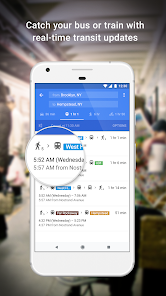
After sticking with Google Maps for a few months, my personal judgment is that it's a solid all-rounder, but it's not perfect. I think people who travel frequently or live in busy cities will absolutely love it, especially the real-time public transit info and traffic rerouting. On the other hand, someone who just needs a basic map and doesn't care about reviews or satellite view might find it overkill. What sets it apart from similar apps like Apple Maps is the depth of user data, like Photos of businesses and updated road closures, but Apple Maps has a cleaner interface for simple navigation. I keep it installed because of the offline maps and Street View, but I sometimes uninstall it temporarily on my phone to save space, only to download it again for a trip. Overall, it's hard to beat for what it offers, even if the constant requests for reviews can get a bit annoying.
features
- 🌍 Real-time traffic updates and route optimization. Google Maps excels at adjusting your path based on live traffic conditions, rerouting you around jams. In comparison, Waze also does this well but is more user-driven, whereas Google integrates data from a broader set of sources, making it more reliable for long drives.
- 🧭 Comprehensive transit and walking directions. For public transport users, Google Maps is unmatched. It shows bus schedules, train delays, and even walking routes to stations. Apple Maps has improved here but still lags in global coverage, especially in smaller cities or rural areas.
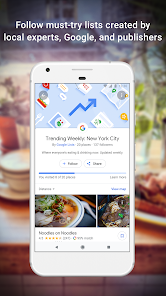
- 📸 User-generated content and reviews. The app leverages a massive community of contributors who upload photos, write reviews, and report mistakes. This is an outstanding feature that competitors like HERE WeGo lack, as they rely on professional data alone. This makes Google Maps more dynamic and trustworthy for exploring new places.
pros
- 🌟 Street View is a game-changer. You can virtually walk through a neighborhood before visiting, which is far more immersive than the static maps in Apple Maps or Waze. It helps you recognize landmarks and avoid confusion.
- 🌟 Offline maps work like a charm. You download a large area and all directions are stored locally, saving data and working without signal. Other apps like Maps.me do this, but Google's implementation is more integrated with search results and business info.
- 🌟 Integration with the Google ecosystem. The app syncs across devices, so you can send directions from your desktop to your phone. This seamless connection is something Apple Maps does within its own walled garden, but Google works across platforms.
cons
- 🔥 Battery drain is noticeable. Google Maps consumes a lot of power, especially with screen-on navigation. Apps like Waze are also heavy, but Apple Maps is noticeably gentler on battery life, making it a better choice for long trips without a charger.
- 🔥 Offline mode has limitations. You can't get real-time traffic or alternate routes when offline, which defeats some of the app's core benefits. HERE WeGo provides better offline functionality, including offline public transit info and full navigation.
- 🔥 Privacy concerns are real. Google tracks your location history for personalization, which can feel intrusive. Apple Maps emphasizes privacy by keeping data on-device, so if you are privacy-conscious, Google Maps may feel too invasive.
Articles
![]()
Guide
How to Update Google Play Store on Android 2026
![]()
Guide
How to Download Older Versions of Android Apps
![]()
Guide
How to Download Apps Without Google Play Store
![]()
Guide
What Is an APK File for Android?
If you use an Android phone, you may have seen the term APK while searching for apps or games online. Some websites offer an APK download instead of a Google Play install button. Some users also mention APK files when talking about apps that are not available in their region, older app versions, or Android games downloaded outside the Play Store.
![]()
Guide
How to Install Games from Google Play for Beginners
Installing games on an Android phone is usually simple, but for beginners, the process can still feel confusing at first. You may not know where to search, which button to tap, whether the game is safe, or why Google Play sometimes asks for account settings, storage access, or payment information. If you are using an Android phone for the first time, learning how to install games from Google Play is one of the easiest ways to get started.
![]()
Guide
How Useful Gemini Is for Everyday Questions and Quick Tasks
emini feels different from many AI apps because it is not only trying to be a chatbot. After using it for everyday questions, quick writing, image understanding, and planning, I think its biggest strength is convenience.
![]()
Guide
What to Know Before Downloading APKs
For many Android users, downloading an APK is a common way to install apps and games. Sometimes an app is not available in a certain country.
![]()
Guide
ChatGPT Review: Is It Still the Best AI App in 2026?
![]()
Guide
Seedance 2.0 vs Sora: The Future of AI Video Generation
The AI video race has intensified dramatically over the past two years. Platforms like Sora from OpenAI and Luma Dream Machine pushed the boundaries of text-to-video realism. Yet, despite their impressive outputs, most tools still operate as probabilistic generators—you describe a scene, and the model interprets it. Control remains limited. With the February 2026 release of Seedance 2.0, developed by ByteDance, the paradigm shifted. Internally known as Jimeng 2.0, Seedance does not position itself as just another video model. It positions itself as an AI Director. Rather than guessing what you want, Seedance 2.0 allows you to direct what happens. This distinction defines everything that follows.









Recommended Apps
![]()
Home Design 3D
Anuman4.2
![]()
Truth or Dare Game - Party App
Chouic4.8
![]()
Photo Collage Maker
Scoompa4.7![]()
Learn to Draw Flower
Creative APPS4.2![]()
FIFA World Cup 2026™
FIFA2.8![]()
Mirror Plus: Mirror with Light
Digitalchemy, LLC4.4![]()
Meitu- Photo Editor & AI Art
Meitu (China) Limited4.5![]()
Perplexity - Ask Anything
PerplexityAI4.7![]()
GhostTube SLS Camera Alternate
GhostTube4![]()
Boom Chip Blast: 2-Player
Black Pyramid 3D Games Studio0![]()
Healthy Benefits+
Solutran, Inc.4.5![]()
Deepcheck AI Search Assistant
rohe.ai4![]()
Idol Prank Video Call & Chat
LightCode Solutions4![]()
Face Shape - Pretty Scale
GlintTec Apps3.9![]()
Plant App - Plant Identifier
ScaleUp4.6












































