

Amazon Fire TV

10,000,000+
Installs
Amazon Mobile LLC
Developer
-
Productivity
Category
-
Rated for 3+
Content Rating
-
feedback-amazon-app-android@amazon.com
Developer Email
-
http://www.amazon.com/gp/help/customer/display.html/?nodeId=468496
Privacy Policy
Screenshots
editor reviews
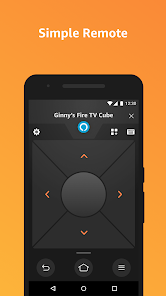
Amazon Fire TV is a streaming media player and operating system developed by Amazon Mobile LLC, sitting squarely in the media streaming and smart TV interface category. It's designed for users who want to access services like Netflix, Prime Video, Hulu, Disney+, YouTube, and HBO Max directly on their television, along with live TV apps like Sling TV and YouTube TV. After downloading the Fire TV app on my phone, I realized it's primarily a remote control tool, not a standalone video player. The app itself is free on Google Play and the App Store, with install counts easily in the tens of millions. There is no registration required within the app itself, but you do need to link it to a Fire TV device on the same WiFi network. My first impression after opening the app was a bit underwhelming - it's essentially just a black interface with a directional pad and a handful of buttons. There are no in-app purchases or ads, which is nice, but the app also feels very limited if you don't already own a Fire TV device.
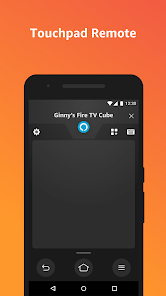
After pairing it with my Fire TV Stick, the app became much more useful. The interface is clean and straightforward: a large touchpad area for navigation, plus buttons for home, back, menu, and playback controls. The onboarding process involves scanning for devices on your network, which took about ten seconds before my Fire TV appeared. In daily use, I mainly use it for typing - the on-screen keyboard on the TV is painfully slow, but the app lets me type on my phone's keyboard, which is much faster. The voice search feature, powered by Alexa, works really well for finding content without scrolling. There are a few confusing moments though, like accidentally swiping on the touchpad when I meant to tap, which sends the cursor flying. A practical tip: the app remembers your device even after closing, so you don't need to re-pair each time. Overall, the experience is smooth and responsive, with almost no lag between pressing a button on my phone and seeing the action on screen.
After a few weeks of use, I have mixed feelings. The app is brilliant for anyone who uses a Fire TV device regularly, especially if you hate using the physical remote for typing or searching. It's also helpful if you tend to misplace the remote. That said, if you have an Apple TV or Roku instead, this app is completely useless. Compared to the official remote apps for Apple TV or Roku, the Fire TV app feels more basic - it lacks features like a channel guide or keyboard shortcuts for specific services. The biggest difference is the Alexa voice integration, which sets it apart from Roku's remote app. I might keep it installed because typing alone is worth the storage, but I could see uninstalling it if I switched to a universal remote. It's a solid companion tool, but nothing revolutionary.
features
- 🔍 The outstanding feature of Amazon Fire TV is its deep integration with Alexa voice search, allowing you to find movies, shows, or apps by simply speaking into your phone - something Roku's official remote app lacks entirely. For example, saying 'find action movies' instantly brings up results.
- 🖱️ It includes a touchpad mode for gesture-based navigation, which feels smoother for browsing than using a physical remote's D-pad. In comparison, the Roku app relies entirely on directional taps, so the Fire TV app gives you a more fluid, smartphone-like control experience.
- 📱 The keyboard input feature is a lifesaver - when you need to search for a specific title or enter login credentials, typing on your phone is far faster than pecking on the TV screen. Neither the Roku nor Apple TV remote apps handle this input as intuitively.
- 🔗 It remembers paired devices across sessions, so you don't have to re-pair each time you open the app, making it more convenient for daily use than some competitors that require a fresh connection.
pros
- 🎧 The Amazon Fire TV app offers private listening: you can plug headphones into your phone and the audio plays through them instead of the TV speakers, a feature that the official Roku remote app completely lacks unless you use a separate accessory.
- 🎮 It provides a dedicated gaming controller mode for Fire TV's GameFly and other gaming services, giving it an edge over the Apple TV Remote app, which has no gaming-related controls at all.
- 📺 The app supports multi-device switching without re-pairing, so if you have a Fire TV in two rooms, you can switch between them with a single tap - more seamless than the Roku app, which makes you scan for devices each time.
cons
- 🔋 The app drains your phone battery noticeably faster than expected, even when you're not actively using it - a problem the Roku remote app doesn't have, as it shuts down connections more aggressively.
- 🖥️ You cannot navigate while the Fire TV is in screensaver mode without waking it first, which is an annoying extra step that the Apple TV Remote app handles automatically with a simple tap.
- 🔔 There are no push notifications for system updates or reminders for free content, whereas the Roku app alerts you about channel updates and new releases, giving it a more communicative edge.
- 👎 The app lacks support for third-party services like Spotify or Pandora music control on the Fire TV, while the Roku app can directly manage playback for these apps from your phone.
Articles
![]()
Guide
How to Update Google Play Store on Android 2026
![]()
Guide
How to Download Older Versions of Android Apps
![]()
Guide
How to Download Apps Without Google Play Store
![]()
Guide
What Is an APK File for Android?
If you use an Android phone, you may have seen the term APK while searching for apps or games online. Some websites offer an APK download instead of a Google Play install button. Some users also mention APK files when talking about apps that are not available in their region, older app versions, or Android games downloaded outside the Play Store.
![]()
Guide
How to Install Games from Google Play for Beginners
Installing games on an Android phone is usually simple, but for beginners, the process can still feel confusing at first. You may not know where to search, which button to tap, whether the game is safe, or why Google Play sometimes asks for account settings, storage access, or payment information. If you are using an Android phone for the first time, learning how to install games from Google Play is one of the easiest ways to get started.
![]()
Guide
How Useful Gemini Is for Everyday Questions and Quick Tasks
emini feels different from many AI apps because it is not only trying to be a chatbot. After using it for everyday questions, quick writing, image understanding, and planning, I think its biggest strength is convenience.
![]()
Guide
What to Know Before Downloading APKs
For many Android users, downloading an APK is a common way to install apps and games. Sometimes an app is not available in a certain country.
![]()
Guide
ChatGPT Review: Is It Still the Best AI App in 2026?
![]()
Guide
Seedance 2.0 vs Sora: The Future of AI Video Generation
The AI video race has intensified dramatically over the past two years. Platforms like Sora from OpenAI and Luma Dream Machine pushed the boundaries of text-to-video realism. Yet, despite their impressive outputs, most tools still operate as probabilistic generators—you describe a scene, and the model interprets it. Control remains limited. With the February 2026 release of Seedance 2.0, developed by ByteDance, the paradigm shifted. Internally known as Jimeng 2.0, Seedance does not position itself as just another video model. It positions itself as an AI Director. Rather than guessing what you want, Seedance 2.0 allows you to direct what happens. This distinction defines everything that follows.









Recommended Apps
![]()
Home Design 3D
Anuman4.2
![]()
Truth or Dare Game - Party App
Chouic4.8
![]()
Photo Collage Maker
Scoompa4.7![]()
Learn to Draw Flower
Creative APPS4.2![]()
FIFA World Cup 2026™
FIFA2.8![]()
Mirror Plus: Mirror with Light
Digitalchemy, LLC4.4![]()
Meitu- Photo Editor & AI Art
Meitu (China) Limited4.5![]()
Perplexity - Ask Anything
PerplexityAI4.7![]()
GhostTube SLS Camera Alternate
GhostTube4![]()
Boom Chip Blast: 2-Player
Black Pyramid 3D Games Studio0![]()
Healthy Benefits+
Solutran, Inc.4.5![]()
Deepcheck AI Search Assistant
rohe.ai4![]()
Idol Prank Video Call & Chat
LightCode Solutions4![]()
Face Shape - Pretty Scale
GlintTec Apps3.9![]()
Plant App - Plant Identifier
ScaleUp4.6











































