

Amazon Alexa

100,000,000+
Installs
Amazon Mobile LLC
Developer
-
Lifestyle
Category
-
Rated for 3+
Content Rating
-
echo-support@amazon.com
Developer Email
-
https://www.amazon.com/gp/help/customer/display.html?nodeId=201909010
Privacy Policy
Screenshots

editor reviews
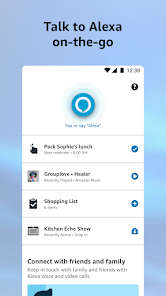
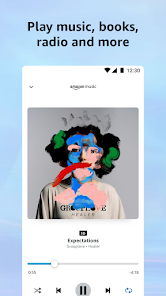
Amazon Alexa is a voice assistant app developed by Amazon Mobile LLC, designed to bring the functionality of the Alexa ecosystem to your smartphone. It's essentially the mobile companion for Amazon's smart speakers, but it also works as a standalone app. You can use it to set timers, check the weather, control smart home devices like lights and thermostats, create shopping lists, play music from services like Spotify or Amazon Music, and even ask random trivia questions. For a normal user, the main draw is the convenience of having a hands-free helper that syncs across all your Amazon devices. The first time you launch the app, it asks you to sign into your Amazon account, which is straightforward if you already shop there. The initial screen is clean, with a colorful circle at the bottom that glows when you tap it to speak. I noticed it has over 100 million downloads on Google Play, and it's free to download, though some features like premium music streaming require separate subscriptions. There are no forced ads, but you might see suggestions for Alexa Skills or Amazon services.
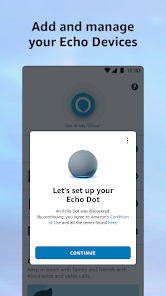
After logging in, the actual hands-on experience is pretty smooth. The main interface has a few tabs at the bottom: Home, Communicate, Devices, Play, and More. For daily use, I usually tap the glowing button to say, "Alexa, add milk to my shopping list," and it instantly pops up on my phone and Echo speaker. The onboarding walks you through linking your first smart home device, which took me about two minutes to pair a smart plug. One confusing moment was finding how to change the wake word from "Alexa" to "Echo" or "Computer" – it's tucked under Settings > Device Settings > Wake Word. A practical tip: if you're in a quiet room, you can just type your questions by tapping the keyboard icon next to the button, which avoids waking up others. For common steps, like setting a timer, you say, "Alexa, set timer 10 minutes," and a pop-up appears with the countdown. The app also has a "Routines" section where you can automate actions, like turning off lights when you say "Goodnight." Overall, navigating feels intuitive, but the sheer number of settings can overwhelm new users.
After using the Amazon Alexa app for a while, my personal judgment is that it's a powerful tool for anyone already invested in Amazon's ecosystem, but it falls flat if you aren't. I use it daily for quick timers and controlling my smart bulbs, and the voice recognition is surprisingly accurate even with background noise. Someone who loves automating their home, like setting a morning routine that turns on the coffee maker and reads the news, would find this indispensable. On the other hand, if you don't own any Alexa-powered devices or use Amazon services, the app feels redundant – you could just use Google Assistant or Siri for basic tasks. What sets it apart from similar apps like Google Home is the tight integration with Amazon Shopping, like reordering household items by voice. I keep it installed because it syncs with my Echo Dot, but I could see someone uninstalling it if they don't have smart home gadgets, since the app alone isn't as useful without hardware. Compared to Google Home, Alexa offers more third-party Skills, which adds flexibility, but it's less polished for non-Amazon users.
features
- 🐶 Hands-free voice commands let you control tasks like setting alarms or playing music without touching your phone, which beats competitors like Google Assistant for sheer Skill library depth.
- 🐶 Smart home hub integration works with thousands of devices from brands like Philips Hue and TP-Link, making it more versatile than Apple HomeKit for device compatibility.
- 🐶 Routines and Hunches automate daily tasks, like turning off lights when you leave, which is smarter than Samsung SmartThings for learning your habits.
- 🐶 Amazon Shopping features let you reorder products or add to your cart by voice, a unique perk that Google Home lacks in its app.
pros
- 👍 Cross-device sync is a standout – your shopping lists and timers appear on your Echo speaker and phone automatically, which feels seamless compared to Google Home where lists can get siloed.
- 👍 The Skill ecosystem is massive, with over 100,000 third-party Skills for everything from meditation to pizza ordering, far outstripping Apple's limited HomeKit options.
- 👍 Voice profile recognition lets it distinguish between family members' voices for personalized responses, a feature that's more refined than what Siri offers in HomePod.
cons
- 👎 Heavy reliance on Amazon services means you need an Amazon account to even start, whereas Google Home works with any Google account without extra ecosystem pressure.
- 👎 The app can feel bloated with promotions for Amazon products like Fire TV or Kindle, which distracts from core voice assistant tasks compared to the cleaner interface of Google Home.
- 👎 Offline functionality is almost nonexistent – if your internet goes down, Alexa stops responding, while some local commands on Google Home can still work without a connection.
Articles
![]()
Guide
How to Update Google Play Store on Android 2026
![]()
Guide
How to Download Older Versions of Android Apps
![]()
Guide
How to Download Apps Without Google Play Store
![]()
Guide
What Is an APK File for Android?
If you use an Android phone, you may have seen the term APK while searching for apps or games online. Some websites offer an APK download instead of a Google Play install button. Some users also mention APK files when talking about apps that are not available in their region, older app versions, or Android games downloaded outside the Play Store.
![]()
Guide
How to Install Games from Google Play for Beginners
Installing games on an Android phone is usually simple, but for beginners, the process can still feel confusing at first. You may not know where to search, which button to tap, whether the game is safe, or why Google Play sometimes asks for account settings, storage access, or payment information. If you are using an Android phone for the first time, learning how to install games from Google Play is one of the easiest ways to get started.
![]()
Guide
How Useful Gemini Is for Everyday Questions and Quick Tasks
emini feels different from many AI apps because it is not only trying to be a chatbot. After using it for everyday questions, quick writing, image understanding, and planning, I think its biggest strength is convenience.
![]()
Guide
What to Know Before Downloading APKs
For many Android users, downloading an APK is a common way to install apps and games. Sometimes an app is not available in a certain country.
![]()
Guide
ChatGPT Review: Is It Still the Best AI App in 2026?
![]()
Guide
Seedance 2.0 vs Sora: The Future of AI Video Generation
The AI video race has intensified dramatically over the past two years. Platforms like Sora from OpenAI and Luma Dream Machine pushed the boundaries of text-to-video realism. Yet, despite their impressive outputs, most tools still operate as probabilistic generators—you describe a scene, and the model interprets it. Control remains limited. With the February 2026 release of Seedance 2.0, developed by ByteDance, the paradigm shifted. Internally known as Jimeng 2.0, Seedance does not position itself as just another video model. It positions itself as an AI Director. Rather than guessing what you want, Seedance 2.0 allows you to direct what happens. This distinction defines everything that follows.









Recommended Apps
![]()
Home Design 3D
Anuman4.2
![]()
Truth or Dare Game - Party App
Chouic4.8
![]()
Photo Collage Maker
Scoompa4.7![]()
Learn to Draw Flower
Creative APPS4.2![]()
FIFA World Cup 2026™
FIFA2.8![]()
Mirror Plus: Mirror with Light
Digitalchemy, LLC4.4![]()
Meitu- Photo Editor & AI Art
Meitu (China) Limited4.5![]()
Perplexity - Ask Anything
PerplexityAI4.7![]()
GhostTube SLS Camera Alternate
GhostTube4![]()
Boom Chip Blast: 2-Player
Black Pyramid 3D Games Studio0![]()
Healthy Benefits+
Solutran, Inc.4.5![]()
Deepcheck AI Search Assistant
rohe.ai4![]()
Idol Prank Video Call & Chat
LightCode Solutions4![]()
Face Shape - Pretty Scale
GlintTec Apps3.9![]()
Plant App - Plant Identifier
ScaleUp4.6












































