

ASMR Keyboard: Speed Escape

100K+
Installs
Hutan
Developer
-
Aciton
Category
-
Everyone
Content Rating
-
hutan@se7engamestudio.com
Developer Email
-
https://docs.google.com/document/d/1uw-Z-k_bjtMugjgqcVXjUWWRPwLqy2Z682zh0t14HAo/edit?usp=sharing
Privacy Policy
Screenshots

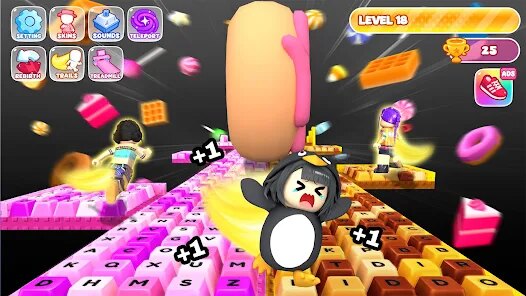




editor reviews
Alright, let's talk about ASMR Keyboard: Speed Escape. This is a wild mix of typing speed, rhythm games, and an escape room puzzle, all wrapped up in a surprisingly satisfying audio package. It's a mobile-first experience, which is exactly where I've been spending most of my time with it on Android. It's not a pure mobile game, though; I've seen it pop up on PC via Steam and even on consoles like the Switch, which is great for cross-platform players. The game first launched on the Google Play Store and App Store a little while back, and it's been steadily climbing the charts. I think it has over a million installs now, which is no small feat for an indie title. The base game is free to download and play, but there are in-app purchases. You can grab some cosmetic keycap themes or skip a level's hint timer if you're really stuck, and those usually range from a couple of bucks to maybe ten dollars for the big bundles. There are also some optional in-app ads you can watch to get a free power-up, but they're not intrusive, which I appreciate.
Getting into how you actually play this thing is where it gets fun. The core loop is simple: you're locked in a room, and to escape, you have to type out the on-screen phrases that are the "keys" to unlocking the door. But here's the twist - every keystroke you make produces an ASMR-style sound, like mechanical clicks, soft brushes, or even water droplets, depending on the theme you've unlocked. The better your accuracy and speed, the more efficiently you "unlock" the door, and the more satisfying the audio feedback becomes. The best part is the puzzle integration; it's not just about typing fast, but knowing what to type. Some phrases are riddles, some are anagrams, and some are just fast bursts that test your WPM. My favorite part is the "Flow State" mode, where the phrases string together seamlessly, and the sounds layer on top of each other. It genuinely feels like you're playing a musical instrument while under pressure. It's a bizarre but addictive combination that keeps me coming back for "just one more run."
Compared to other typing games out there, like the classic Typing of the Dead or the more laid-back Epistory, ASMR Keyboard: Speed Escape is a whole different beast. Those games focus on pure mechanics and story, but this one nails the tactile and auditory experience in a way that others just don't. The visual feedback on your phone screen is great, but the sound design is the real star. It's more relaxed than Typing of the Dead but way more interactive than a simple typing test app. I recommend this game because it turns a mundane skill into a therapeutic and thrilling challenge. It's perfect for those times on the bus when you want to zone out, but also for when you want to actively sharpen your reflexes. It's a unique hybrid that I think every gamer should at least try once, even just to see if the ASMR angle works for them like it did for me.
features
- Adaptive Soundscapes 🔉 - Unlike games like ZType which just have basic laser sounds, this game changes the audio based on the room you're in. You might get a tropical escape with chirping birds overlaid on your keypresses, or a spooky basement where each clack echoes ominously. It keeps the game fresh even after hours of play.
- Puzzle Logic Integration 🧩 - You aren't just typing nonsense. The words are clues, anagrams, or even riddles that you need to solve to know the right order to type. It adds a layer of mental gymnastics that a game like Typer Shark simply doesn't have, forcing you to think and type simultaneously.
- Haptic Feedback on Mobile 📱 - This is where Android really shines. The game uses your phone's vibration motor to simulate the physical click of a mechanical keyboard. On PC or Switch, you miss this, but on a good Android phone, this syncs perfectly with the audio for an incredibly immersive feel that you just can't get elsewhere.
pros
- Nail-biting Tension ⏱️ - The escape room timer is a genius addition. It doesn't just punish slow typing; it adds a visual "airlock" that slowly closes if you stall. This creates a pressure I haven't felt since the old typing tutor games, but it's way more elegantly executed than the pure chaos of The Typing of the Dead. It makes every second count.
- Massive Replayability 🔄 - There are dozens of themed rooms and daily challenge modes that shuffle the text. This is a huge win over games like Epistory, which is a beautiful one-and-done story. Here, I'm constantly chasing a new high score or trying to unlock a new sound pack, making it a great long-term app to keep on my phone.
- No Punishing Paywalls 💸 - While there are in-app purchases for cosmetic keycaps, the entire story mode is completely free. You won't hit a brick wall that forces you to pay to continue, which is rare in mobile games on Google Play. You can grind for the premium currency just by playing well, which is a fair trade in my book.
cons
- Battery Drain 🔋 - On Android, this game absolutely munches through battery life. The combination of constant audio processing and haptic feedback means you can't play for more than an hour without needing a charge. It's not a dealbreaker, but it's something I have to plan around, unlike with a simpler app like KeyBlaze.
- Repeated Phrases 🗣️ - After about 20 hours, I started to see the same set of quotes and phrases pop up again. While the sound themes change, the base text pool feels a bit limited. This is something that games like Typer Shark avoided by having procedurally generated word lists, and I wish this had that feature.
- Occasional Audio Glitches 🔊 - I've had a few instances on my Pixel where the ASMR track would stutter or drop out completely if I was typing super fast. It's rare, but it completely breaks the immersion when it happens. It's a more frequent issue on the mobile version than on the PC Steam release, which feels more polished in that regard.
Articles
![]()
Guide
How to Update Google Play Store on Android 2026
![]()
Guide
How to Download Older Versions of Android Apps
![]()
Guide
How to Download Apps Without Google Play Store
![]()
Guide
What Is an APK File for Android?
If you use an Android phone, you may have seen the term APK while searching for apps or games online. Some websites offer an APK download instead of a Google Play install button. Some users also mention APK files when talking about apps that are not available in their region, older app versions, or Android games downloaded outside the Play Store.
![]()
Guide
How to Install Games from Google Play for Beginners
Installing games on an Android phone is usually simple, but for beginners, the process can still feel confusing at first. You may not know where to search, which button to tap, whether the game is safe, or why Google Play sometimes asks for account settings, storage access, or payment information. If you are using an Android phone for the first time, learning how to install games from Google Play is one of the easiest ways to get started.
![]()
Guide
How Useful Gemini Is for Everyday Questions and Quick Tasks
emini feels different from many AI apps because it is not only trying to be a chatbot. After using it for everyday questions, quick writing, image understanding, and planning, I think its biggest strength is convenience.
![]()
Guide
What to Know Before Downloading APKs
For many Android users, downloading an APK is a common way to install apps and games. Sometimes an app is not available in a certain country.
![]()
Guide
ChatGPT Review: Is It Still the Best AI App in 2026?
![]()
Guide
Seedance 2.0 vs Sora: The Future of AI Video Generation
The AI video race has intensified dramatically over the past two years. Platforms like Sora from OpenAI and Luma Dream Machine pushed the boundaries of text-to-video realism. Yet, despite their impressive outputs, most tools still operate as probabilistic generators—you describe a scene, and the model interprets it. Control remains limited. With the February 2026 release of Seedance 2.0, developed by ByteDance, the paradigm shifted. Internally known as Jimeng 2.0, Seedance does not position itself as just another video model. It positions itself as an AI Director. Rather than guessing what you want, Seedance 2.0 allows you to direct what happens. This distinction defines everything that follows.









Recommended Apps
![]()
My Supermarket Simulator 3D®
Game District LLC3.9

![]()
Fortnite
Epic Games, Inc4![]()
Poppy Playtime Chapter 3
Mob Entertainment4.2![]()
Diamond Painting ASMR Coloring
CrazyLabs LTD4.5![]()
Real Bus Simulator : Bus Games
Solo Studio Inc3.2![]()
Sprunki All Phases Beat Maker
Gotstar Studio0![]()
Looper!
Kwalee (Ltd)4.2![]()
Gugu Gaga Penguin: Mini Games
Kids Games LLC3![]()
KPop Demon Hunter Wallpaper
Highlights Devloper0![]()
Count Masters: Stickman Games
Freeplay Inc4.6![]()
Scary Teacher 3D
Z & K Games4.3![]()
Papa's Wingeria HD
Flipline Studios4.6![]()
Who's Your Daddy?!
Evil Tortilla Games Incorporated2.7![]()
AFK Arena
LilithGames4.6![]()
Hungry Balls
HYPERCELL4.6












































