

Domino's Pizza USA

10,000,000+
Installs
Domino's Pizza LLC
Developer
-
Food & Drink
Category
-
Rated for 3+
Content Rating
-
androidsupport@dominos.com
Developer Email
-
https://order.dominos.com/en/pages/content/content.jsp?page=privacy
Privacy Policy
Screenshots


editor reviews
So, Domino's Pizza USA. It's exactly what it sounds like – the official app from the Domino's chain for ordering food. You download it from the App Store or Google Play, and it's free to install. I think it's been downloaded over ten million times, which makes sense given how big Domino's is. The main point is to order pizza, wings, sides, and desserts for delivery or carryout. When you first launch it, you're hit with a big, colorful menu and a "Start an Order" button. It feels very commercial and straightforward, like a digital menu board. You don't need to sign up to browse, but you'll have to create an account or log in when you actually check out. The first impression is that it's polished but also pretty aggressive with the deals and coupons right there on the home screen.
Using the app daily is pretty simple. You pick your store location first, which is a smart step because it shows you that store's specific menu and deals. Then you build your pizza. The interface lets you choose the size, crust, sauce, and toppings in a linear flow. It's not the most exciting design, but it gets the job done. The pizza tracker is the coolest part – once you place the order, it shows a live status bar from "Order Placed" all the way to "Out for Delivery." One small tip: the app saves your recent orders, so reordering your usual pizza takes about 20 seconds. Sometimes the app feels a bit clunky when you're scrolling through the long list of toppings, and occasionally the "Add to Cart" button lags for a second, which is a bit annoying.
After using it for a while, I think it's a solid choice for people who already like Domino's pizza. The app makes the ordering process faster than calling, especially with saved favorites and the pizza tracker. But if you don't love Domino's specific taste or you prefer a more premium pizza, this app won't change your mind. Compared to something like Papa John's app, Domino's feels more focused on speed and deals rather than a sleek, high-end experience. The pizza tracker is something Papa John's also has, but Domino's version feels a bit more accurate and satisfying to watch. I keep it installed because I order from Domino's maybe once a month, so it's handy. But someone who rarely eats fast-food pizza might uninstall it after a single use and just order through a browser instead.
features
- 🍕 Pizza Tracker: This is the standout feature. You get a real-time status showing when your pizza is being prepped, baked, boxed, and delivered. It feels like tracking a package, and it builds anticipation. Other apps like Papa John's have this too, but Domino's version updates more smoothly and feels less gimmicky.
- 🍕 Easy Reorder: The app stores your entire order history. So if you're a regular, you can just tap "Reorder" and your usual large pepperoni with extra cheese is on its way. This makes it much faster than competing apps where you have to rebuild your pizza from scratch each time.
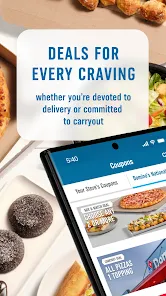
- 🍕 Deals Hub: The app bundles all current coupons and promotions into one clear section. You can see the "Mix & Match" deals or local store specials without hunting online. Some other apps bury their deals in clunky menus, but Domino's puts them front and center, which saves you money without the hassle.
- 🍕 Order Builder: The interface guides you step-by-step through choosing crust, sauce, cheese, and toppings. It's not flashy, but it prevents mistakes. You can see your pizza visually update as you add toppings, which is a small touch that helps you avoid ordering something you don't actually want.
pros
- 🔹 Speed of Service: The app is built for getting your order done fast. I can have a pizza ordered in under a minute using saved favorites. Papa John's app feels slower with more taps needed to reach checkout.
- 🔹 Tracker Accuracy: The Domino's tracker seems more reliable than what I've seen in the Pizza Hut app. It updates more frequently and rarely skips steps, so you always know roughly when your food will arrive.
- 🔹 Coupon Clarity: Unlike some other chains where you have to dig through emails or websites for codes, Domino's app shows every current deal directly. No mystery codes – you just tap and apply.
- 🔹 Consistent Performance: The app rarely crashes or freezes during ordering. Some competitors have had moments where the app lags when adding toppings, but Domino's generally stays smooth.
cons
- 🔻 Limited Customization Display: The visual pizza builder only updates for major toppings, not for extras like drizzles or seasonings. Papa John's app shows a more detailed preview, so you know exactly what you're getting.
- 🔻 Store Location Issues: If you travel and open the app, it sometimes defaults to your old location. You have to manually change the store, which adds a step. The Pizza Hut app does this better by detecting your current location more reliably.
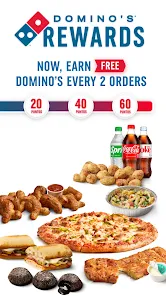
- 🔻 No Real Loyalty Program: Domino's doesn't have a points-based rewards system like some competitors. You just get occasional coupon offers, but it feels less rewarding than apps that give you free items after a certain number of purchases.
- 🔻 Clunky Navigation: The bottom menu bar can be confusing. You sometimes tap "Order" when you meant to check "Deals," and it takes you to a different screen. The flow isn't as intuitive as it could be for new users.
Articles
![]()
Guide
How to Update Google Play Store on Android 2026
![]()
Guide
How to Download Older Versions of Android Apps
![]()
Guide
How to Download Apps Without Google Play Store
![]()
Guide
What Is an APK File for Android?
If you use an Android phone, you may have seen the term APK while searching for apps or games online. Some websites offer an APK download instead of a Google Play install button. Some users also mention APK files when talking about apps that are not available in their region, older app versions, or Android games downloaded outside the Play Store.
![]()
Guide
How to Install Games from Google Play for Beginners
Installing games on an Android phone is usually simple, but for beginners, the process can still feel confusing at first. You may not know where to search, which button to tap, whether the game is safe, or why Google Play sometimes asks for account settings, storage access, or payment information. If you are using an Android phone for the first time, learning how to install games from Google Play is one of the easiest ways to get started.
![]()
Guide
How Useful Gemini Is for Everyday Questions and Quick Tasks
emini feels different from many AI apps because it is not only trying to be a chatbot. After using it for everyday questions, quick writing, image understanding, and planning, I think its biggest strength is convenience.
![]()
Guide
What to Know Before Downloading APKs
For many Android users, downloading an APK is a common way to install apps and games. Sometimes an app is not available in a certain country.
![]()
Guide
ChatGPT Review: Is It Still the Best AI App in 2026?
![]()
Guide
Seedance 2.0 vs Sora: The Future of AI Video Generation
The AI video race has intensified dramatically over the past two years. Platforms like Sora from OpenAI and Luma Dream Machine pushed the boundaries of text-to-video realism. Yet, despite their impressive outputs, most tools still operate as probabilistic generators—you describe a scene, and the model interprets it. Control remains limited. With the February 2026 release of Seedance 2.0, developed by ByteDance, the paradigm shifted. Internally known as Jimeng 2.0, Seedance does not position itself as just another video model. It positions itself as an AI Director. Rather than guessing what you want, Seedance 2.0 allows you to direct what happens. This distinction defines everything that follows.









Recommended Apps
![]()
Home Design 3D
Anuman4.2
![]()
Truth or Dare Game - Party App
Chouic4.8
![]()
Photo Collage Maker
Scoompa4.7![]()
Learn to Draw Flower
Creative APPS4.2![]()
FIFA World Cup 2026™
FIFA2.8![]()
Mirror Plus: Mirror with Light
Digitalchemy, LLC4.4![]()
Meitu- Photo Editor & AI Art
Meitu (China) Limited4.5![]()
Perplexity - Ask Anything
PerplexityAI4.7![]()
GhostTube SLS Camera Alternate
GhostTube4![]()
Boom Chip Blast: 2-Player
Black Pyramid 3D Games Studio0![]()
Healthy Benefits+
Solutran, Inc.4.5![]()
Deepcheck AI Search Assistant
rohe.ai4![]()
Idol Prank Video Call & Chat
LightCode Solutions4![]()
Face Shape - Pretty Scale
GlintTec Apps3.9![]()
Plant App - Plant Identifier
ScaleUp4.6












































