

PayPal - Send, Shop, Manage

100,000,000+
Installs
PayPal Mobile
Developer
-
Finance
Category
-
Rated for 3+
Content Rating
-
+18882211161
Developer Email
-
https://www.paypal.com/webapps/mpp/ua/privacy-full
Privacy Policy
Screenshots
editor reviews
PayPal – Send, Shop, Manage is a mobile finance app that lets you handle money transfers, online shopping payments, and account management right from your phone. You can send cash to friends, pay at millions of online stores without typing card details every time, or just keep an eye on your balance and transaction history. For anyone who already has a PayPal account, downloading and installing this from Google Play or the App Store feels like a no-brainer since it's free and typically comes with around 100 million-plus installs on Android alone. When you first open the app after installation, you are prompted to log in with your existing credentials or sign up if you're new. That initial launch screen looks clean and straightforward, with the familiar PayPal blue logo and a simple layout that doesn't overwhelm you with clutter. The first impression is that this is a polished, well-established tool that most people have heard of, so you trust it immediately.
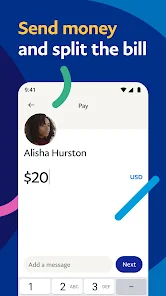
Once you get into the actual hands-on experience, the interface feels pretty intuitive. After logging in, you land on the home screen showing your current balance right at the top. To send money, you just tap the "Send" button, then type in a phone number or email address, enter the amount, and hit send – it's practically a two-step process. Shopping online is just as smooth: you link your PayPal account as a payment method at checkout in stores like eBay or Etsy, and the app auto-fills without much hassle. One slightly confusing moment I noticed is when switching between personal and business accounts if you have both – the app sometimes gets slow or needs a manual refresh. Onboarding for new users includes a short tutorial about security features like fingerprint or face unlock, which is nice. A practical tip: turn on instant notifications for every transaction, so you never miss a suspicious charge.
After using PayPal for a while, I think it's great for anyone who frequently shops online or sends money to family and friends, especially across different countries where bank transfers can be a pain. But honestly, if you only use local payment methods like Venmo or Cash App in the US, you might not see the added value. What makes it stand out from similar apps like Google Pay or Apple Pay is its far-reaching international coverage and the fact that it acts as a middleman for buyers and sellers, offering purchase protection. I'd probably keep it installed because it's so widely accepted, but I could see myself uninstalling it if I rarely do cross-border transactions. It's a reliable workhorse, just not flashy.
features
- 🔑 Buyer Protection: If an item never arrives or looks completely wrong, PayPal steps in to help you get a refund. Competitors like Google Pay or Apple Cash don't offer this same formal dispute process, so it is the main reason to stick with PayPal for online shopping.
- 📦 One-Click Checkout at Thousands of Stores: You don't need to type in card details every time. Zelle mostly works for bank-to-bank transfers, but it lacks this broad merchant integration, which makes PayPal way more convenient for everyday purchases.
- 🌍 International Money Transfers: Sending cash to someone in another country is simple, with options to choose the currency and rate. Venmo only works within the US, so if you have overseas contacts, this is a total lifesaver.
- 🛡️ Fraud Monitoring and Alerts: The app scans transactions in real time and sends notifications for any unusual activity. Cash App has some security, but PayPal's track record of resolving fraud claims is stronger overall.
pros
- 🔒 Strong Security and Buyer Protection: The dispute and refund system is miles ahead of Cash App or Zelle. If a purchase goes wrong, you actually get your money back most of the time.
- 🌐 Global Reach and Multi-Currency Support: You can transact in 25 currencies, transfer money to 200+ countries, and hold balances in different currencies. Google Pay is region-locked, so PayPal wins for international users.
- 🏛️ Established Trust and Wide Acceptance: Almost every online store, from eBay to small independent sites, accepts PayPal. Even if other apps offer similar features, none have the same level of merchant integration worldwide.
cons
- ⌛ Slow Customer Support: Getting help with a frozen account or a disputed transaction often means waiting days for email replies. Venmo has faster in-app chat support, which can be way less stressful.
- 💸 High Fees for Instant Transfers: Moving money instantly to your bank costs 1.75% of the amount, while Cash App only charges 1.5% or sometimes less. This makes PayPal feel a bit expensive for quick cashouts.
- 🧩 Confusing Dual Accounts: Having separate personal and business logins inside the same app is messy and causes accidental logouts. Zelle just uses your normal bank login, which is simpler and cleaner.
- 🏦 Account Freezes Without Warning: There are plenty of stories where PayPal suddenly limits access for weeks without clear reason. Google Pay rarely blocks accounts like that, so PayPal feels less reliable for holding large sums.
Articles
![]()
Guide
How to Update Google Play Store on Android 2026
![]()
Guide
How to Download Older Versions of Android Apps
![]()
Guide
How to Download Apps Without Google Play Store
![]()
Guide
What Is an APK File for Android?
If you use an Android phone, you may have seen the term APK while searching for apps or games online. Some websites offer an APK download instead of a Google Play install button. Some users also mention APK files when talking about apps that are not available in their region, older app versions, or Android games downloaded outside the Play Store.
![]()
Guide
How to Install Games from Google Play for Beginners
Installing games on an Android phone is usually simple, but for beginners, the process can still feel confusing at first. You may not know where to search, which button to tap, whether the game is safe, or why Google Play sometimes asks for account settings, storage access, or payment information. If you are using an Android phone for the first time, learning how to install games from Google Play is one of the easiest ways to get started.
![]()
Guide
How Useful Gemini Is for Everyday Questions and Quick Tasks
emini feels different from many AI apps because it is not only trying to be a chatbot. After using it for everyday questions, quick writing, image understanding, and planning, I think its biggest strength is convenience.
![]()
Guide
What to Know Before Downloading APKs
For many Android users, downloading an APK is a common way to install apps and games. Sometimes an app is not available in a certain country.
![]()
Guide
ChatGPT Review: Is It Still the Best AI App in 2026?
![]()
Guide
Seedance 2.0 vs Sora: The Future of AI Video Generation
The AI video race has intensified dramatically over the past two years. Platforms like Sora from OpenAI and Luma Dream Machine pushed the boundaries of text-to-video realism. Yet, despite their impressive outputs, most tools still operate as probabilistic generators—you describe a scene, and the model interprets it. Control remains limited. With the February 2026 release of Seedance 2.0, developed by ByteDance, the paradigm shifted. Internally known as Jimeng 2.0, Seedance does not position itself as just another video model. It positions itself as an AI Director. Rather than guessing what you want, Seedance 2.0 allows you to direct what happens. This distinction defines everything that follows.









Recommended Apps
![]()
Home Design 3D
Anuman4.2
![]()
Truth or Dare Game - Party App
Chouic4.8
![]()
Photo Collage Maker
Scoompa4.7![]()
Learn to Draw Flower
Creative APPS4.2![]()
FIFA World Cup 2026™
FIFA2.8![]()
Mirror Plus: Mirror with Light
Digitalchemy, LLC4.4![]()
Meitu- Photo Editor & AI Art
Meitu (China) Limited4.5![]()
Perplexity - Ask Anything
PerplexityAI4.7![]()
GhostTube SLS Camera Alternate
GhostTube4![]()
Boom Chip Blast: 2-Player
Black Pyramid 3D Games Studio0![]()
Healthy Benefits+
Solutran, Inc.4.5![]()
Deepcheck AI Search Assistant
rohe.ai4![]()
Idol Prank Video Call & Chat
LightCode Solutions4![]()
Face Shape - Pretty Scale
GlintTec Apps3.9![]()
Plant App - Plant Identifier
ScaleUp4.6












































