

Google Chat

10,000,000+
Installs
Google LLC
Developer
-
Business
Category
-
Rated for 3+
Content Rating
-
apps-help@google.com
Developer Email
-
http://www.google.com/policies/privacy
Privacy Policy
Screenshots
editor reviews
Google Chat is Google's take on a team messaging app, kind of like a mix between a standard texting app and a more structured workplace tool like Slack. It's built right into the Google ecosystem, so if you're already using Gmail or Google Workspace, you'll see it sitting there in the sidebar. For a regular person, you'd download it from Google Play or the App Store to chat with friends or groups, but its real power comes through when you use it with a work or school account. The first time you open it, the interface looks clean and familiar if you've used any Google product before, though the initial setup can feel a bit bare if you're expecting it to be like WhatsApp or iMessage. It's free to download and install, with over 500 million installs on Android, but you don't need to register separately since it syncs with your Google account. There are no annoying ads popping up, but there are in-app purchases for things like extra storage.
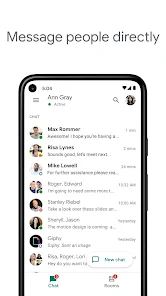
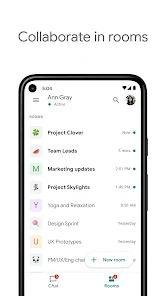
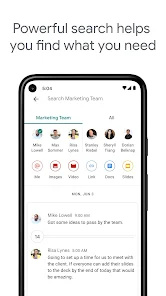
After using it for a while, the actual hands-on experience is pretty straightforward. The main screen shows your chats on the left, and you tap into a conversation to start typing. One thing I noticed is that the onboarding doesn't really guide you through features like rooms or bots, so you might wonder where everything is at first. A common flow would be sending a direct message, then creating a group chat for a project or family plan. The interface feels smooth on both mobile and desktop, but switching between spaces (like rooms for different topics) can feel a bit clunky because the layout crowds everything into one list. A small tip is to use the search bar upfront to find old messages, because scrolling through history is tedious otherwise.
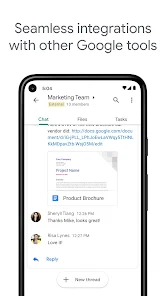
After sticking with Google Chat for a bit, my take is that it's best for people who are already deep into Google's world, like if you use Gmail for everything or have a Workspace account for work. It's not something I'd choose over something like Telegram or Signal for personal use, because those apps feel faster and more polished for casual chatting. What makes it different is how it ties into Google Drive and Docs, so sharing files and collaborating feels seamless. I could see someone keeping it installed if they need to stay connected with a team that uses it, but for pure social messaging, it's easy to ignore and eventually uninstall because the notification system can be a bit messy and the app sometimes feels like an afterthought compared to Google's other tools.
features
- 🗂️ Google Chat organizes conversations into "rooms," which are like dedicated spaces for specific topics or projects, similar to Discord's channels but with tighter integration into Google Drive and Docs for sharing files on the fly.
- 🗂️ Its direct messaging feature feels clean and simple, but it lacks the end-to-end encryption found in Signal, so sensitive chats might worry privacy-conscious users who prefer that extra layer.
- 🗂️ The standout feature is how bots can automate tasks, like pulling up calendar events or kicking off Google Meet calls, which gives it an edge over WhatsApp for productivity-focused users.
pros
- ➕ Deep Google integration makes it a breeze to share Docs or Sheets without leaving the chat, something Slack can't do without plug-ins.
- ➕ It's completely free with no ads, unlike Microsoft Teams which pushes paid plans for full features.
- ➕ The search function across all chats is solid, outshining Telegram's clunkier directory for finding old messages quickly.
cons
- ➖ No end-to-end encryption by default, so it feels less secure than Signal for private conversations.
- ➖ The mobile app can lag compared to Discord's snappy performance, especially with large group chats.
- ➖ Notification settings are confusing, often missing messages unless you dig into the Gmail tab, which Slack handles more reliably.
Articles
![]()
Guide
How to Update Google Play Store on Android 2026
![]()
Guide
How to Download Older Versions of Android Apps
![]()
Guide
How to Download Apps Without Google Play Store
![]()
Guide
What Is an APK File for Android?
If you use an Android phone, you may have seen the term APK while searching for apps or games online. Some websites offer an APK download instead of a Google Play install button. Some users also mention APK files when talking about apps that are not available in their region, older app versions, or Android games downloaded outside the Play Store.
![]()
Guide
How to Install Games from Google Play for Beginners
Installing games on an Android phone is usually simple, but for beginners, the process can still feel confusing at first. You may not know where to search, which button to tap, whether the game is safe, or why Google Play sometimes asks for account settings, storage access, or payment information. If you are using an Android phone for the first time, learning how to install games from Google Play is one of the easiest ways to get started.
![]()
Guide
How Useful Gemini Is for Everyday Questions and Quick Tasks
emini feels different from many AI apps because it is not only trying to be a chatbot. After using it for everyday questions, quick writing, image understanding, and planning, I think its biggest strength is convenience.
![]()
Guide
What to Know Before Downloading APKs
For many Android users, downloading an APK is a common way to install apps and games. Sometimes an app is not available in a certain country.
![]()
Guide
ChatGPT Review: Is It Still the Best AI App in 2026?
![]()
Guide
Seedance 2.0 vs Sora: The Future of AI Video Generation
The AI video race has intensified dramatically over the past two years. Platforms like Sora from OpenAI and Luma Dream Machine pushed the boundaries of text-to-video realism. Yet, despite their impressive outputs, most tools still operate as probabilistic generators—you describe a scene, and the model interprets it. Control remains limited. With the February 2026 release of Seedance 2.0, developed by ByteDance, the paradigm shifted. Internally known as Jimeng 2.0, Seedance does not position itself as just another video model. It positions itself as an AI Director. Rather than guessing what you want, Seedance 2.0 allows you to direct what happens. This distinction defines everything that follows.









Recommended Apps
![]()
Home Design 3D
Anuman4.2
![]()
Truth or Dare Game - Party App
Chouic4.8
![]()
Photo Collage Maker
Scoompa4.7![]()
Learn to Draw Flower
Creative APPS4.2![]()
FIFA World Cup 2026™
FIFA2.8![]()
Mirror Plus: Mirror with Light
Digitalchemy, LLC4.4![]()
Meitu- Photo Editor & AI Art
Meitu (China) Limited4.5![]()
Perplexity - Ask Anything
PerplexityAI4.7![]()
GhostTube SLS Camera Alternate
GhostTube4![]()
Boom Chip Blast: 2-Player
Black Pyramid 3D Games Studio0![]()
Healthy Benefits+
Solutran, Inc.4.5![]()
Deepcheck AI Search Assistant
rohe.ai4![]()
Idol Prank Video Call & Chat
LightCode Solutions4![]()
Face Shape - Pretty Scale
GlintTec Apps3.9![]()
Plant App - Plant Identifier
ScaleUp4.6












































