

Spotify: Music and Podcasts

1,000,000,000+
Installs
Spotify AB
Developer
-
Entertainment
Category
-
Rated for 12+
Content Rating
-
support@spotify.com
Developer Email
-
https://www.spotify.com/legal/privacy-policy/
Privacy Policy
Screenshots
editor reviews
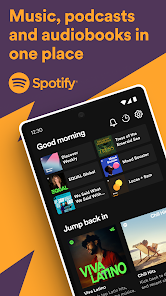
I finally caved and downloaded Spotify after hearing a friend rave about their curated playlists nonstop. It's a music and podcast streaming app, one of those you install on your phone to get away from buying individual tracks on iTunes or dealing with messy MP3 files. The basic idea is you search for a song, an artist, or a show, and it plays right there. On Google Play, it's one of the most installed apps ever, sitting around a billion downloads, and you can grab it for free. My first impression after launching it was a bit overwhelming, honestly. It pushes a free tier with ads, and you can either jump right in or get hit with a prompt to try their Premium plan. I poked around for a bit, and the home screen was stuffed with suggested playlists based on nothing since I hadn't told it what I like yet. It felt like walking into a massive record store with no map.
After signing up with my Google account—pretty painless, no credit card needed for the free version—I started actually using it. The interface is dark green and black, which feels modern but took me a minute to get used to. The first thing I did was search for an artist I've been into lately, and the results popped up instantly. You can tap on a song to preview it or save it to your library with a heart icon. What I found less intuitive was creating a playlist: you have to hit the three dots on a track and select “Add to Playlist,” rather than just dragging it somewhere. During daily use, I mostly explore the “Discover Weekly” mix, which shows up every Monday and actually learns my taste after a few weeks of listening. One small tip I stumbled on: you can download songs for offline listening if you pay for Premium, but on the free version, you just get shuffles with ad breaks every couple of songs. Navigating back to a previous podcast episode felt clunky too, since the “Your Episodes” section hides under the Library tab.
After sticking with it for a couple of months, here's my honest take. I think anyone who loves music discovery or listening to podcasts on the go will get a lot out of this app, especially the free tier if you don't mind occasional ads. The sheer catalog size is hard to beat—pretty much everything I search for is there, from obscure indie bands to mainstream hits. But if you're the type who hates being interrupted by commercials or wants full control over playback (like picking a specific track on an album), the free version will frustrate you fast. Compared to something like Apple Music, Spotify feels more social, with shareable playlists and collaborative lists for parties, but Apple Music has better audio quality for audiophiles. I almost uninstalled it after a week because the ads felt relentless, but the “Daily Mix” playlists kept me hooked. In the end, I kept it because the algorithm nailed my preferences, something other streaming apps haven't done as well for me personally. It's not perfect, but it's become my default audio app.
features
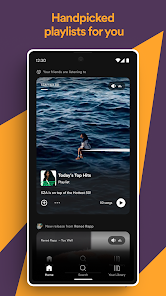
- 📱 Curated Playlists Stand Out – Spotify's “Discover Weekly” and “Release Radar” playlists are way smarter than what I've seen on Tidal. For example, Tidal's recommendations often feel generic, while Spotify picked up on my niche indie rock taste within days. It updates every Monday, giving me fresh finds without any effort.
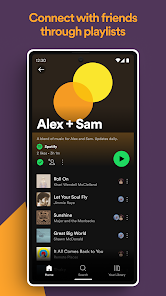
- 📱 Social Sharing Built-in – You can link your account to Instagram and share what you're listening to as a story. Compared to Deezer, which has a clunkier sharing option, Spotify lets friends follow your public playlists or see your “Blend,” a merged playlist that combines tastes. It turns listening into a group activity.
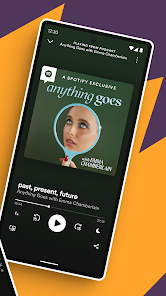
- 📱 Podcast Integration Done Right – Unlike Apple Podcasts, which requires a separate app, Spotify puts music and podcasts in one place. The interface lets you switch between a music library and podcast episodes seamlessly, and the “That's What I Said” recommendations actually match my listening history. It saves me from jumping between two apps.
pros
- ✅ Massive Catalog – Spotify has over 100 million tracks, which beats Apple Music's library in my experience. I've never hit a dead end searching for a song, even less common remixes or live versions that other services lack.
- ✅ Free Tier Usability – You can listen to almost everything without paying, just with ad interruptions. Pandora's free version feels more restrictive, making you skip radio-style stations, while Spotify lets you pick exact songs and playlists for free.
- ✅ Cross-Platform Sync – I can start a playlist on my phone, then pick it up on my laptop or Amazon Echo without missing a beat. Amazon Music often fails to sync between devices smoothly, but Spotify keeps up consistently.
cons
- ❌ Ad Frequency on Free Plan – The ads pop up every 3-4 songs, sometimes for 30 seconds each, which feels excessive. YouTube Music's free version has shorter or skippable ads, making it less annoying for casual listening.
- ❌ No Lossless Audio Without HiFi – For a paid service, Spotify's audio quality caps at 320 kbps, while Apple Music offers lossless streaming at no extra cost. Audiophiles definitely notice the difference on good headphones.
- ❌ Confusing Navigation for Podcasts – Finding a specific episode in a long-running show takes too many taps. Pocket Casts has a cleaner interface for podcast management, with better search and chronological sorting, whereas Spotify buries older episodes.
Articles
![]()
Guide
How to Update Google Play Store on Android 2026
![]()
Guide
How to Download Older Versions of Android Apps
![]()
Guide
How to Download Apps Without Google Play Store
![]()
Guide
What Is an APK File for Android?
If you use an Android phone, you may have seen the term APK while searching for apps or games online. Some websites offer an APK download instead of a Google Play install button. Some users also mention APK files when talking about apps that are not available in their region, older app versions, or Android games downloaded outside the Play Store.
![]()
Guide
How to Install Games from Google Play for Beginners
Installing games on an Android phone is usually simple, but for beginners, the process can still feel confusing at first. You may not know where to search, which button to tap, whether the game is safe, or why Google Play sometimes asks for account settings, storage access, or payment information. If you are using an Android phone for the first time, learning how to install games from Google Play is one of the easiest ways to get started.
![]()
Guide
How Useful Gemini Is for Everyday Questions and Quick Tasks
emini feels different from many AI apps because it is not only trying to be a chatbot. After using it for everyday questions, quick writing, image understanding, and planning, I think its biggest strength is convenience.
![]()
Guide
What to Know Before Downloading APKs
For many Android users, downloading an APK is a common way to install apps and games. Sometimes an app is not available in a certain country.
![]()
Guide
ChatGPT Review: Is It Still the Best AI App in 2026?
![]()
Guide
Seedance 2.0 vs Sora: The Future of AI Video Generation
The AI video race has intensified dramatically over the past two years. Platforms like Sora from OpenAI and Luma Dream Machine pushed the boundaries of text-to-video realism. Yet, despite their impressive outputs, most tools still operate as probabilistic generators—you describe a scene, and the model interprets it. Control remains limited. With the February 2026 release of Seedance 2.0, developed by ByteDance, the paradigm shifted. Internally known as Jimeng 2.0, Seedance does not position itself as just another video model. It positions itself as an AI Director. Rather than guessing what you want, Seedance 2.0 allows you to direct what happens. This distinction defines everything that follows.









Recommended Apps
![]()
Home Design 3D
Anuman4.2
![]()
Truth or Dare Game - Party App
Chouic4.8
![]()
Photo Collage Maker
Scoompa4.7![]()
Learn to Draw Flower
Creative APPS4.2![]()
FIFA World Cup 2026™
FIFA2.8![]()
Mirror Plus: Mirror with Light
Digitalchemy, LLC4.4![]()
Meitu- Photo Editor & AI Art
Meitu (China) Limited4.5![]()
Perplexity - Ask Anything
PerplexityAI4.7![]()
GhostTube SLS Camera Alternate
GhostTube4![]()
Boom Chip Blast: 2-Player
Black Pyramid 3D Games Studio0![]()
Healthy Benefits+
Solutran, Inc.4.5![]()
Deepcheck AI Search Assistant
rohe.ai4![]()
Idol Prank Video Call & Chat
LightCode Solutions4![]()
Face Shape - Pretty Scale
GlintTec Apps3.9![]()
Plant App - Plant Identifier
ScaleUp4.6












































