

CapCut - Video Editor

1B+
Installs
Bytedance Pte. Ltd.
Developer
-
Video Players & Editors
Category
-
Teen
Content Rating
-
capcut.support@bytedance.com
Developer Email
-
https://sf16-draftcdn-sg.ibytedtos.com/obj/ies-hotsoon-draft-sg/capcut/via_clause_privacy_policy_en.html
Privacy Policy
Screenshots
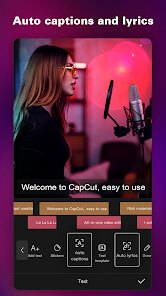
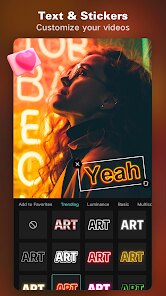
editor reviews
CapCut is a video editing app from Bytedance, the same folks behind TikTok, which definitely explains a lot about its design choices. It's basically a full-featured mobile video editor that handles everything from quick trims to more complex layering and effects. You usually end up downloading it because you want to make something that looks a bit more polished than what your phone's default gallery can do, or because you want to recreate a specific trend you saw online. First impression after launching is honestly pretty solid; you're not hit with a wall of premium upsells immediately. It just throws you right into a project screen and asks you to pick a video. The layout feels modern, with dark tones and big icons, and it's clear they put effort into making it feel fast. On Google Play, it's been downloaded over a billion times, which is wild, and it is free to download and use, though there are optional in-app purchases for pro features.
Once you start actually cutting, the experience is pretty smooth. You tap to import a clip, and the timeline sits at the bottom, just like on a desktop app but simplified for your thumb. The onboarding is practically non-existent, which might be a shock if you're used to apps that walk you through everything, but it works because the main actions are pretty intuitive. A common workflow would be cutting a clip by dragging the edges, adding a background track from their massive music library, and then taping on a transition. The app doesn't stutter much even with 4K footage, which is a big plus. A small practical tip: if you want to align clips perfectly, zoom in on the timeline with a pinch gesture. The only confusing part can be the layers menu sometimes it's not super obvious that you can drag effects onto specific parts of a clip rather than the whole thing.
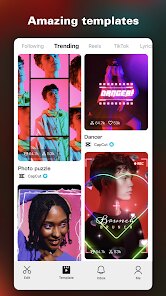
After using CapCut for a while, my take is that it's an amazing starter tool but maybe not for someone who needs advanced color grading or audio keyframing. People who love making short-form videos for social media will probably keep it installed forever because it's geared precisely for those formats. The biggest difference from similar apps like InShot is that CapCut feels more "TikTok-native" you have direct access to trending templates and sounds, which you can literally paste your clips into and get a finished video in seconds. Someone who needs precise audio control or complex masking might uninstall it later in favor of something like LumaFusion. It sits in a funny spot where it's powerful enough for a casual influencer but a bit limiting for a pro filmmaker. I personally keep it around mostly for those viral templates, honestly.
features
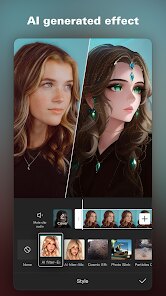
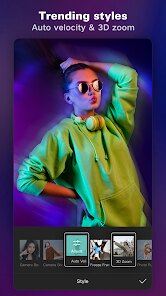
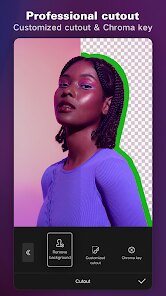
- ✂️ Text-to-Speech & Caption Generation: This is CapCut's killer feature. You can type out text and get a perfectly timed, natural-sounding voiceover in a few seconds. Also, the automatic caption generator is leagues ahead of apps like InShot, especially for recognizing different languages and syncing them to the spoken words. You just pick a voice style, and it's done. No manual placement needed. 🎵 Massive Trending Sound Library: The music library is directly connected to TikTok's trend database. So you are not just getting random stock music; you are actually getting the sounds people are using in popular challenges and memes right now. This is something KineMaster doesn't really offer you have to source those sounds yourself, which is a pain. 📐 Curve Speed Tool: CapCut's speed control is more sophisticated than most mobile editors. You can create custom speed ramps by plotting points on a curve, rather than just speeding up or slowing down a whole clip. This is essential for those dramatic slow-mo entrances that go viral. You cannot do this directly in an app like VLLO without a lot of manual cutting. 🖼️ Auto Cutout for Portraits: The AI-powered cutout tool is surprisingly accurate. You just tap on a person in a video, and it isolates them without a green screen. The algorithm is trained on faces, so it handles hair and moving people better than the standard chroma key found in PowerDirector.
pros
- 🕹️ Entirely Free Core Editor: Unlike InShot, which locks basic exports behind a watermark unless you pay, CapCut gives you the full timeline, transitions, and effects for free. You only pay for specific pro templates or effects. This makes it way more accessible for beginners. 🔗 Direct TikTok Publishing: The integration with TikTok is seamless. You can export directly to TikTok without even saving the video to your gallery first. And the app recognizes if you are copying a certain trend and offers to auto-fill the settings. No other editor does this as cleanly. 🧠 Smart Tools for Audio: The "Remove Noise" and "Volume Envelope" features are outstanding. Other apps like YouCut have basic noise removal, but CapCut's algorithm can clean up loud background wind or hum without making the person's voice sound robotic.
cons
- 🐌 Lack of Advanced Keyframes: For motion graphics enthusiasts, the keyframe system is too basic. In apps like LumaFusion, you can animate position, scale, rotation, and opacity independently with custom easing curves. CapCut offers linear keyframes only, making complex animations look jerky. 💾 Export Quality Compression: Even when set to "4K, 60fps", the exported file is heavily compressed compared to the original. PowerDirector offers a "high quality" export codec that retains more data. This is a deal-breaker for people who want to submit videos to competitions or print them. 🔒 No Multi-Platform Cloud Project: You cannot start a project on your phone and finish it on an iPad. The project files are local. InShot offers cloud sync now, and KineMaster has "Cloud Projects" that allow cross-device collaboration. CapCut's ecosystem is still fragmented. 🎬 Limited Multi-Cam Support: If you record a podcast or interview with multiple cameras, CapCut cannot automatically sync them by audio waveform. You have to manually line them up. This is a feature available in Adobe Premiere Rush and even some mobile editors like VN Video Editor.
Articles
![]()
Guide
How to Update Google Play Store on Android 2026
![]()
Guide
How to Download Older Versions of Android Apps
![]()
Guide
How to Download Apps Without Google Play Store
![]()
Guide
What Is an APK File for Android?
If you use an Android phone, you may have seen the term APK while searching for apps or games online. Some websites offer an APK download instead of a Google Play install button. Some users also mention APK files when talking about apps that are not available in their region, older app versions, or Android games downloaded outside the Play Store.
![]()
Guide
How to Install Games from Google Play for Beginners
Installing games on an Android phone is usually simple, but for beginners, the process can still feel confusing at first. You may not know where to search, which button to tap, whether the game is safe, or why Google Play sometimes asks for account settings, storage access, or payment information. If you are using an Android phone for the first time, learning how to install games from Google Play is one of the easiest ways to get started.
![]()
Guide
How Useful Gemini Is for Everyday Questions and Quick Tasks
emini feels different from many AI apps because it is not only trying to be a chatbot. After using it for everyday questions, quick writing, image understanding, and planning, I think its biggest strength is convenience.
![]()
Guide
What to Know Before Downloading APKs
For many Android users, downloading an APK is a common way to install apps and games. Sometimes an app is not available in a certain country.
![]()
Guide
ChatGPT Review: Is It Still the Best AI App in 2026?
![]()
Guide
Seedance 2.0 vs Sora: The Future of AI Video Generation
The AI video race has intensified dramatically over the past two years. Platforms like Sora from OpenAI and Luma Dream Machine pushed the boundaries of text-to-video realism. Yet, despite their impressive outputs, most tools still operate as probabilistic generators—you describe a scene, and the model interprets it. Control remains limited. With the February 2026 release of Seedance 2.0, developed by ByteDance, the paradigm shifted. Internally known as Jimeng 2.0, Seedance does not position itself as just another video model. It positions itself as an AI Director. Rather than guessing what you want, Seedance 2.0 allows you to direct what happens. This distinction defines everything that follows.









Recommended Apps
![]()
Home Design 3D
Anuman4.2
![]()
Truth or Dare Game - Party App
Chouic4.8
![]()
Photo Collage Maker
Scoompa4.7![]()
Learn to Draw Flower
Creative APPS4.2![]()
FIFA World Cup 2026™
FIFA2.8![]()
Mirror Plus: Mirror with Light
Digitalchemy, LLC4.4![]()
Meitu- Photo Editor & AI Art
Meitu (China) Limited4.5![]()
Perplexity - Ask Anything
PerplexityAI4.7![]()
GhostTube SLS Camera Alternate
GhostTube4![]()
Boom Chip Blast: 2-Player
Black Pyramid 3D Games Studio0![]()
Healthy Benefits+
Solutran, Inc.4.5![]()
Deepcheck AI Search Assistant
rohe.ai4![]()
Idol Prank Video Call & Chat
LightCode Solutions4![]()
Face Shape - Pretty Scale
GlintTec Apps3.9![]()
Plant App - Plant Identifier
ScaleUp4.6











































