
MultiCraft — Build and Mine!

50M+
Installs
MultiCraft Studio OÜ
Developer
-
Simulation
Category
-
Rated for 3+
Content Rating
-
support@multicraft.world
Developer Email
-
https://multicraft.world/privacy
Privacy Policy
Screenshots
editor reviews
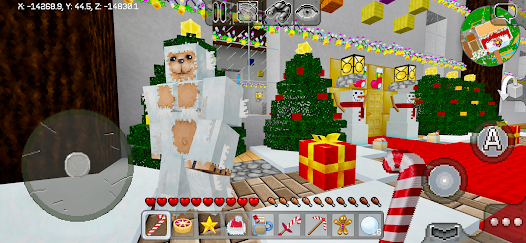
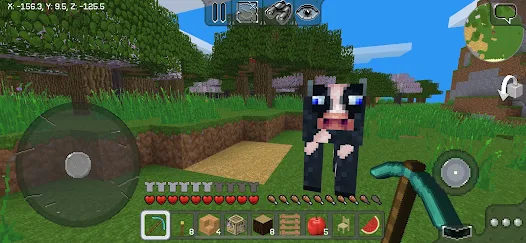
MultiCraft — Build and Mine! is a sandbox survival game that wears its inspiration on its sleeve, and honestly, that's not a bad thing if you're looking for a familiar experience on the go. It's a pure mobile game, available directly for download on Google Play for Android and the App Store for iOS. You won't find this on Steam, Xbox, or Switch; it's designed specifically for touchscreen play. The game first launched back in 2016 and has been updated steadily since then. On the Google Play store alone, it has racked up over 10 million installs, which shows there's a solid community of mobile builders. The real kicker here is that it's completely free to download and play—no forced ads, no energy systems, and no premium currency that stops you from crafting a diamond pickaxe. There are optional in-app purchases, mostly for cosmetic texture packs or removing a tiny banner ad at the bottom of the screen. These typically range from $0.99 to $2.99, which is a far cry from the monetization hell of many free-to-play titles. So, if you've got an Android or iOS device and want a block-building game without spending a dime upfront, this is an easy install.
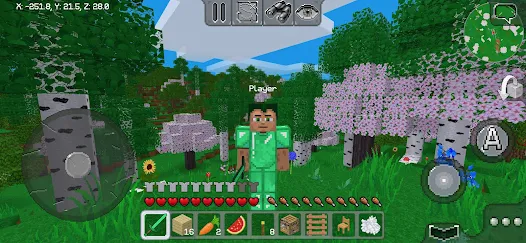
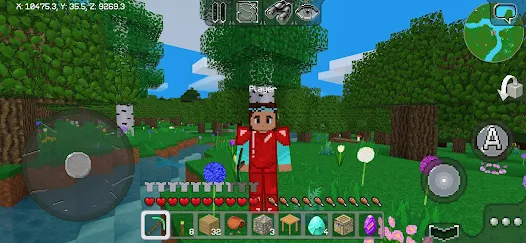
The core gameplay loop will feel instantly familiar to anyone who has ever played a block-based sandbox game. You smash blocks, collect resources like wood, stone, and iron, then use them to craft tools, weapons, and structures. The best part of MultiCraft is just how well it performs on a mid-range phone. I've been playing this on an older Android device, and the framerate stays smooth even when I'm digging deep into the earth. My favorite part is the sheer scope of the world. The game generates massive, endless maps to explore, with biomes ranging from snowy tundras to scorching deserts. I love just loading up the app on my afternoon commute to get lost in a new cave system or to build a ridiculous castle tower. It scratches that same itch as the big-name block game, but without needing a beefy laptop or console to do it. The crafting system is deep enough to keep you busy for hours, and there are even basic survival mechanics like hunger and enemies that spawn at night, which adds a nice layer of tension.
Compared to the juggernaut of the genre, the most popular block game that shall not be named, MultiCraft obviously lacks the polish, modding community, and cross-platform support. However, that's not really the point. On mobile, direct competitors like Block Craft 3D or Survivalcraft tend to lean harder into either microtransactions or a clunkier interface. What makes MultiCraft stand out is its no-nonsense approach. It's a genuine sandbox survival game that doesn't try to nickel and dime you every five minutes. I've tried other similar apps on Google Play, and many of them either crash frequently or have ads that play every time you open your inventory. That's not the case here. If you want a free, stable, and surprisingly deep building and mining experience for your Android phone, I recommend giving this a download. It's not going to reinvent the wheel, but it does exactly what it promises—build and mine on your phone, anywhere you are.
features
- 🎮 True Sandbox Freedom: Unlike many mobile clones that force you into a linear tutorial, MultiCraft drops you into a procedurally generated world with zero restrictions. You can explore, build, or fight on your own terms, which feels authentic compared to games like Block Craft 3D that often gate content behind levels.
- ⚙️ Smooth Touch Controls: The specific control layout is optimized for mobile screens. Buttons are placed where your thumbs naturally rest, and the pick block feature works perfectly. I've found it far more responsive than Survivalcraft, which has a more complex but clunkier interface for crafting on Android.
- 💰 Zero-Pay Monetization: This is the standout feature. You can download the app and play for hundreds of hours without ever spending a cent. There are no "speed up" timers, no paid loot boxes, and no annoying pop-ups. This is incredibly rare among sandbox games on Google Play.
pros
- ✅ Genuinely Free Experience 🆓: The biggest strength is that it's a full game without an upfront cost or predatory paywalls. You can build a massive base and craft the best gear entirely through gameplay. This is a breath of fresh air compared to many top sandbox apps that make you wait or pay for basic resources.
- ✅ Stable Performance on Low-End Phones 📱: The game runs smoothly on older Android devices that struggle with other 3D games. I've tested it on a four-year-old phone, and it maintains a solid framerate even with complex builds. The blocky graphics are intentionally simple to ensure broad device support.
- ✅ Depth Without Complexity 🧩: While it's not as deep as the PC-based block game, MultiCraft offers a satisfying progression from punching wood to crafting diamond gear. There's a clear path and a good variety of enemies and ores to discover. It strikes a perfect balance for a mobile session.
cons
- ❌ No Cross-Platform Multiplayer 🌐: You can only play this game with other players on mobile devices. There's no way to join servers with friends on PC or console, which limits the social aspect significantly compared to the main block game.
- ❌ Basic Visuals and Audio 🔊: The pixel art style is functional but not impressive. The textures look dated even by mobile standards, and the sound effects are very basic. Games like Block Craft 3D have more vibrant, colorful graphics that may appeal to a younger audience more.
- ❌ No Mod Support 🧱: Unlike its main competitor on PC, there is zero support for mods or custom texture packs beyond the paid official ones. You cannot change the core mechanics or add new items, which limits long-term replayability for some players.
Articles
![]()
Guide
How to Update Google Play Store on Android 2026
![]()
Guide
How to Download Older Versions of Android Apps
![]()
Guide
How to Download Apps Without Google Play Store
![]()
Guide
What Is an APK File for Android?
If you use an Android phone, you may have seen the term APK while searching for apps or games online. Some websites offer an APK download instead of a Google Play install button. Some users also mention APK files when talking about apps that are not available in their region, older app versions, or Android games downloaded outside the Play Store.
![]()
Guide
How to Install Games from Google Play for Beginners
Installing games on an Android phone is usually simple, but for beginners, the process can still feel confusing at first. You may not know where to search, which button to tap, whether the game is safe, or why Google Play sometimes asks for account settings, storage access, or payment information. If you are using an Android phone for the first time, learning how to install games from Google Play is one of the easiest ways to get started.
![]()
Guide
How Useful Gemini Is for Everyday Questions and Quick Tasks
emini feels different from many AI apps because it is not only trying to be a chatbot. After using it for everyday questions, quick writing, image understanding, and planning, I think its biggest strength is convenience.
![]()
Guide
What to Know Before Downloading APKs
For many Android users, downloading an APK is a common way to install apps and games. Sometimes an app is not available in a certain country.
![]()
Guide
ChatGPT Review: Is It Still the Best AI App in 2026?
![]()
Guide
Seedance 2.0 vs Sora: The Future of AI Video Generation
The AI video race has intensified dramatically over the past two years. Platforms like Sora from OpenAI and Luma Dream Machine pushed the boundaries of text-to-video realism. Yet, despite their impressive outputs, most tools still operate as probabilistic generators—you describe a scene, and the model interprets it. Control remains limited. With the February 2026 release of Seedance 2.0, developed by ByteDance, the paradigm shifted. Internally known as Jimeng 2.0, Seedance does not position itself as just another video model. It positions itself as an AI Director. Rather than guessing what you want, Seedance 2.0 allows you to direct what happens. This distinction defines everything that follows.









Recommended Apps
![]()
My Supermarket Simulator 3D®
Game District LLC3.9

![]()
Fortnite
Epic Games, Inc4![]()
Poppy Playtime Chapter 3
Mob Entertainment4.2![]()
Diamond Painting ASMR Coloring
CrazyLabs LTD4.5![]()
Real Bus Simulator : Bus Games
Solo Studio Inc3.2![]()
Sprunki All Phases Beat Maker
Gotstar Studio0![]()
Looper!
Kwalee (Ltd)4.2![]()
Gugu Gaga Penguin: Mini Games
Kids Games LLC3![]()
KPop Demon Hunter Wallpaper
Highlights Devloper0![]()
Count Masters: Stickman Games
Freeplay Inc4.6![]()
Scary Teacher 3D
Z & K Games4.3![]()
Papa's Wingeria HD
Flipline Studios4.6![]()
Who's Your Daddy?!
Evil Tortilla Games Incorporated2.7![]()
AFK Arena
LilithGames4.6![]()
Hungry Balls
HYPERCELL4.6












































