

Duolingo: Language & Chess

500M+
Installs
Duolingo
Developer
-
Education
Category
-
Everyone
Content Rating
-
super-support@duolingo.com
Developer Email
-
https://www.duolingo.com/privacy
Privacy Policy
Screenshots
editor reviews
So, Duolingo is this app that's supposed to teach you languages through little bite-sized lessons that feel almost like a game. It's a free app on both Google Play and the App Store, which is probably why so many people have downloaded it—over 500 million installs, I think I read somewhere. You don't really need to register to start playing around, but if you want to save your progress, you do have to make an account. When you first open it up, you get this cheerful green owl mascot named Duo that immediately starts pushing you to start a lesson, and the whole thing feels really bright and friendly. A lot of folks, including myself, just downloaded it because it was free and we thought, “Hey, maybe I'll finally learn some Spanish or French without sitting in a boring class.” The first impression is definitely that it's trying to keep you engaged with little animations and sounds, which is nice, but also a bit overwhelming at first because there's a ton of features like leagues and goals popping up.
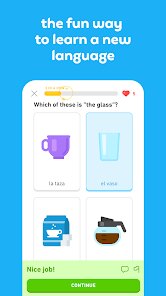
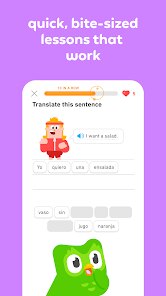
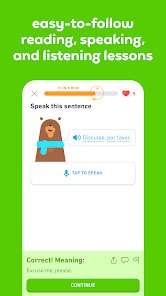
After using it for a while, you really start to notice how the app guides you step by step. When you open it, you're on a home screen that looks like a path or a skill tree, and you tap on a unit to start a lesson. Each lesson is made up of different exercises—like translating sentences, matching words to pictures, or speaking into your phone's microphone. The interface is clean and pretty straightforward; you just tap or type your answers. Honestly, some moments feel really smooth, like when you get a streak of correct answers and hear that cheerful sound effect. But other times, it can be a little confusing, especially when the app asks you to translate something weirdly, like “The cat eats the school,” which just feels off. A practical tip I picked up is to use the “practice” button on the side to review old words, because if you don't, it'll keep throwing them at you in new lessons anyway. Overall, the daily usage is pretty simple: you pick a language, do a few lessons for maybe 5 or 10 minutes, and then the app gives you a reminder to come back the next day.
After sticking with Duolingo for a few months, I think it's a decent tool if you want to pick up basic vocabulary or get a feel for a language without any pressure. The app keeps you coming back with those daily streaks and leaderboards, which is clever, but it's not really going to make you fluent. People who enjoy short, game-like tasks might love it, but if you actually need to hold a conversation or understand grammar deeply, you'll definitely need something else, like a proper class or a more structured app like Babbel. What sets Duolingo apart from other apps is how much it tries to make learning fun and social, but that also means it can feel a bit shallow. I personally kept it installed because it's a good way to kill time on the bus, but I can totally see someone uninstalling it after a week if they don't like the constant notifications or if they feel like they're not really learning much. It's a mixed bag—great for casual learners, but not the best for serious progress.
features
- 📚 Duolingo uses a game-like skill tree with points and levels, while Babbel mostly uses structured courses that feel more like a textbook. The main standout here is how Duolingo constantly rewards you with badges and lingots, which makes you feel like you're playing a game instead of studying. Babbel doesn't really have that same playful vibe, so it's easier to stay motivated with Duolingo if you get bored quickly.
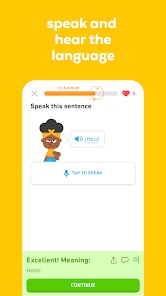
- 🗣️ The speech recognition feature in Duolingo is handy for pronunciation practice, but it's not as precise as in apps like Rosetta Stone, which has more advanced voice technology. Still, Duolingo's version is free, so it's a nice bonus for casual learners who just want to check if they sound okay without paying for a premium app.
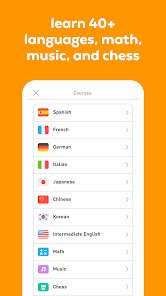
- 📱 Duolingo has a huge library of languages including niche ones like High Valyrian or Navajo, which is way more than what you get in Busuu or Memrise, which focus on more common languages. That's a big plus for people who want to try something weird or fun, even if the courses for those languages are shorter and less developed than the Spanish or French ones.
pros
- 💪 Duolingo is completely free to use with no paywalls for basic lessons, unlike apps like Babbel that require a subscription after a short trial. This is a huge strength for anyone who doesn't want to spend money to just try out a language, and it's probably why so many people keep it installed for a long time.
- 🎯 The streak system is really smart—it forces you to come back every day to keep your streak alive, which is something apps like Memrise don't really emphasize. This makes it easier to build a daily habit, even if you're only studying for a few minutes.
- 🌐 Duolingo has a social element with clubs and leaderboards, which is fun for competing with friends or strangers, while Rosetta Stone and other apps are much more isolated and solo-focused. It adds a bit of fun pressure that keeps you engaged.
cons
- 💔 Duolingo's grammar explanations are almost nonexistent, compared to Babbel which explains rules more thoroughly. This makes it frustrating when you hit a lesson and have no idea why a sentence is structured a certain way, and you have to guess or look things up online.
- ⏳ The repetition can get annoying—after a while, you're drilling the same old words and phrases, but in Busuu, the content feels more varied and practical, like real-life conversations. Duolingo's lessons often feel like they're stuck on simple topics.
- 🎥 The app relies too much on in-app purchases and ads if you don't pay for Super Duolingo, which is a turnoff compared to apps like Drops, which have a cleaner free experience. The constant pop-ups to upgrade can ruin the flow of learning.
Articles
![]()
Guide
How to Update Google Play Store on Android 2026
![]()
Guide
How to Download Older Versions of Android Apps
![]()
Guide
How to Download Apps Without Google Play Store
![]()
Guide
What Is an APK File for Android?
If you use an Android phone, you may have seen the term APK while searching for apps or games online. Some websites offer an APK download instead of a Google Play install button. Some users also mention APK files when talking about apps that are not available in their region, older app versions, or Android games downloaded outside the Play Store.
![]()
Guide
How to Install Games from Google Play for Beginners
Installing games on an Android phone is usually simple, but for beginners, the process can still feel confusing at first. You may not know where to search, which button to tap, whether the game is safe, or why Google Play sometimes asks for account settings, storage access, or payment information. If you are using an Android phone for the first time, learning how to install games from Google Play is one of the easiest ways to get started.
![]()
Guide
How Useful Gemini Is for Everyday Questions and Quick Tasks
emini feels different from many AI apps because it is not only trying to be a chatbot. After using it for everyday questions, quick writing, image understanding, and planning, I think its biggest strength is convenience.
![]()
Guide
What to Know Before Downloading APKs
For many Android users, downloading an APK is a common way to install apps and games. Sometimes an app is not available in a certain country.
![]()
Guide
ChatGPT Review: Is It Still the Best AI App in 2026?
![]()
Guide
Seedance 2.0 vs Sora: The Future of AI Video Generation
The AI video race has intensified dramatically over the past two years. Platforms like Sora from OpenAI and Luma Dream Machine pushed the boundaries of text-to-video realism. Yet, despite their impressive outputs, most tools still operate as probabilistic generators—you describe a scene, and the model interprets it. Control remains limited. With the February 2026 release of Seedance 2.0, developed by ByteDance, the paradigm shifted. Internally known as Jimeng 2.0, Seedance does not position itself as just another video model. It positions itself as an AI Director. Rather than guessing what you want, Seedance 2.0 allows you to direct what happens. This distinction defines everything that follows.









Recommended Apps
![]()
Home Design 3D
Anuman4.2
![]()
Truth or Dare Game - Party App
Chouic4.8
![]()
Photo Collage Maker
Scoompa4.7![]()
Learn to Draw Flower
Creative APPS4.2![]()
FIFA World Cup 2026™
FIFA2.8![]()
Mirror Plus: Mirror with Light
Digitalchemy, LLC4.4![]()
Meitu- Photo Editor & AI Art
Meitu (China) Limited4.5![]()
Perplexity - Ask Anything
PerplexityAI4.7![]()
GhostTube SLS Camera Alternate
GhostTube4![]()
Boom Chip Blast: 2-Player
Black Pyramid 3D Games Studio0![]()
Healthy Benefits+
Solutran, Inc.4.5![]()
Deepcheck AI Search Assistant
rohe.ai4![]()
Idol Prank Video Call & Chat
LightCode Solutions4![]()
Face Shape - Pretty Scale
GlintTec Apps3.9![]()
Plant App - Plant Identifier
ScaleUp4.6











































