
Cat Tiles: Cute Piano Game

10M+
Installs
WingsMob
Developer
-
Music
Category
-
Everyone
Content Rating
-
wingsmob@outlook.com
Developer Email
-
https://sites.google.com/view/wingsmob/privacy-policy-2
Privacy Policy
Screenshots
editor reviews
So, I've been sinking a fair bit of time into Cat Tiles: Cute Piano Game lately, and honestly, it's become my go-to for killing time on the train. It's what a lot of us call a "tap tiles" or rhythm game—pure and simple—but with a super cute cat aesthetic that sets it apart. I'm playing it on my android phone, and it's available on the Google Play store. As far as I can tell, it's a mobile-only app; you won't find it on Steam or your Xbox or Switch, which makes sense given its casual, touch-screen-first design. It first launched back in 2017, so it's been around for a while, and it's racked up over 50 million installs on Google Play alone, which is wild. The best part? It's completely free to download and install, and you can play for hours without spending a dime. There are in-game purchases, of course—mostly for unlocking more song packs or removing ads—but they're not pushy, and a typical purchase is like $1.99 or $4.99. There are also those optional in-app ads you can watch for extra lives, which is pretty standard.
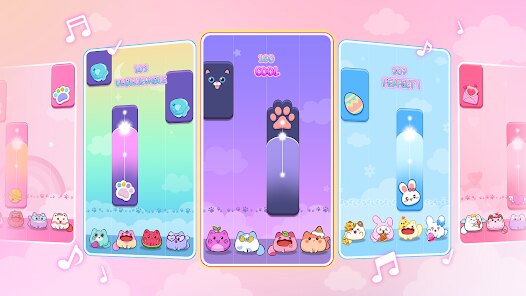
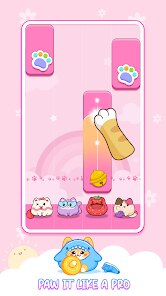
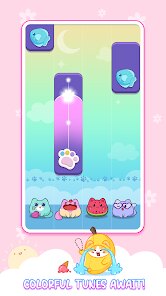
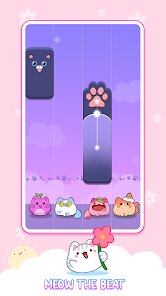
Playing this game is dead simple. You just tap on the black tiles as they scroll down the screen, following the beat of popular songs. But what makes it addictive is the "cute piano" twist: every tile you tap plays a corresponding piano note, so you're actually composing a melody as you go. The best part, for me, is the sheer variety of music. They have everything from classical piano pieces to current pop hits, and the difficulty ramps up smoothly from super chill to "my thumbs are on fire" intense. My personal favorite aspect is the "Cat Mode" where your taps leave little paw prints or make the cat on screen dance; it's just charming enough to keep me coming back after a frustrating failed round. It's that perfect balance of relaxation and challenge that makes you say "one more try."
I've played a ton of these rhythm games before, like the original Piano Tiles 2 or even Magic Tiles 3. And while those are solid, Cat Tiles feels more polished to me. It doesn't have the aggressive ad spam of some other free titles, and the graphics are cleaner—no cluttered menus or cheap-looking effects. The music library is also more diverse; where other apps might focus only on classical or EDM, this one offers a nice mix. I'd recommend it over the others because of the "cute piano" hook and the general vibe. It's not trying to be a hardcore simulation; it's just fun. If you're looking for something to play while waiting for your coffee or winding down at night, and you happen to own an android device, this is a solid choice. It respects your time, doesn't beg for money, and the cat on the title screen is just adorable.
features
- 🎵 Real Piano Sound ✅ Unlike many rhythm games that just play pre-recorded tracks, Cat Tiles makes each tap produce a distinct piano note. This turns every song into a little performance and makes you feel like you're actually playing an instrument, not just hitting targets. Compare that to Beat Blade, where you're just swiping to a beat; this feels more hands-on.
- 🐱 Adorable Cat Character ❤️ The game features a cute little cat that reacts to your gameplay—it dances, bounces, or looks sad when you miss. It adds a layer of personality that games like Piano Tiles 2 lack. It's a small touch, but it makes the experience feel more alive and less sterile.
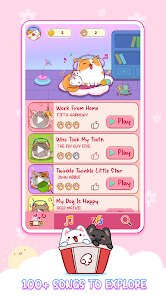
- 📱 Huge Music Library 🎶 It comes packed with hundreds of songs, from classical piano covers to modern pop charts. Most competing apps lock songs behind paywalls or require grinding, but here, you unlock a ton just by playing. It's a great value for a free android app.
- 🎮 Simple Controls, Hard Mastery 🎯 The core mechanic is just tapping black tiles, but the speed and patterns get really complex in higher levels. It's easy to pick up but tough to put down, similar to the Magic Tiles series, but with smoother touch response on modern phones.
pros
- 👍 Stress-Free & Polished UI 🧘 The interface is clean, with no cluttered ads or pop-ups interrupting your flow. In games like Tiles Hop, I'm constantly bombarded with offers, but here it feels respectful. You just pick a song and play.
- 👍 Offline Play Support 📴 You can download songs and play without an internet connection. That's a huge plus for commutes or when you're traveling. Most similar games, like Piano Fire, require a constant connection to play the full library.
- 👍 Regular Content Updates 🔄 The developers keep adding new songs, including seasonal hits and fan requests. It keeps the game feeling fresh even after months of play. Other apps often abandon updates after launch.
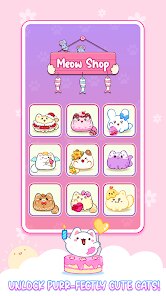
- 👍 No Forced Currency Grind 💰 You earn coins at a fair pace by playing, and you can unlock premium songs or cosmetics without spending real money. Games like Pink Tiles or Pop Tiles are much grindier in comparison.
cons
- 👎 Repetitive Song Structure 🔁 After a while, many songs follow the same tap pattern—fast taps in the middle, slow ones on the ends. It can feel a bit formulaic compared to Piano Tiles 2 which had more dynamic, note-by-note compositions. You start recognizing the "formula" of how they mapped the rhythm.
- 👎 Ads Between Songs 📺 While not aggressive, you do get a short ad after every two or three songs unless you buy the ad-removal pack. Apps like Magic Tiles 3 handle this better by offering longer play sessions without interruption in exchange for one ad at the start.
- 👎 Limited Song Selection for Some Genres 🚫 If you're into heavy metal, EDM drops, or non-piano instrumentals, you're out of luck. The entire library is piano covers or piano-centric tracks. It's much narrower than something like Beatstar which offers original recordings from a wide range of artists.
- 👎 No Multiplayer or Social Features 🧑🤝🧑 There's no way to compete against friends or see global leaderboards in real time. Many players, myself included, enjoy that competitive edge found in Piano Tiles 2 or Zion where you can challenge others. Here, it's strictly solo.
Articles
![]()
Guide
How to Update Google Play Store on Android 2026
![]()
Guide
How to Download Older Versions of Android Apps
![]()
Guide
How to Download Apps Without Google Play Store
![]()
Guide
What Is an APK File for Android?
If you use an Android phone, you may have seen the term APK while searching for apps or games online. Some websites offer an APK download instead of a Google Play install button. Some users also mention APK files when talking about apps that are not available in their region, older app versions, or Android games downloaded outside the Play Store.
![]()
Guide
How to Install Games from Google Play for Beginners
Installing games on an Android phone is usually simple, but for beginners, the process can still feel confusing at first. You may not know where to search, which button to tap, whether the game is safe, or why Google Play sometimes asks for account settings, storage access, or payment information. If you are using an Android phone for the first time, learning how to install games from Google Play is one of the easiest ways to get started.
![]()
Guide
How Useful Gemini Is for Everyday Questions and Quick Tasks
emini feels different from many AI apps because it is not only trying to be a chatbot. After using it for everyday questions, quick writing, image understanding, and planning, I think its biggest strength is convenience.
![]()
Guide
What to Know Before Downloading APKs
For many Android users, downloading an APK is a common way to install apps and games. Sometimes an app is not available in a certain country.
![]()
Guide
ChatGPT Review: Is It Still the Best AI App in 2026?
![]()
Guide
Seedance 2.0 vs Sora: The Future of AI Video Generation
The AI video race has intensified dramatically over the past two years. Platforms like Sora from OpenAI and Luma Dream Machine pushed the boundaries of text-to-video realism. Yet, despite their impressive outputs, most tools still operate as probabilistic generators—you describe a scene, and the model interprets it. Control remains limited. With the February 2026 release of Seedance 2.0, developed by ByteDance, the paradigm shifted. Internally known as Jimeng 2.0, Seedance does not position itself as just another video model. It positions itself as an AI Director. Rather than guessing what you want, Seedance 2.0 allows you to direct what happens. This distinction defines everything that follows.









Recommended Apps
![]()
My Supermarket Simulator 3D®
Game District LLC3.9

![]()
Fortnite
Epic Games, Inc4![]()
Poppy Playtime Chapter 3
Mob Entertainment4.2![]()
Diamond Painting ASMR Coloring
CrazyLabs LTD4.5![]()
Real Bus Simulator : Bus Games
Solo Studio Inc3.2![]()
Sprunki All Phases Beat Maker
Gotstar Studio0![]()
Looper!
Kwalee (Ltd)4.2![]()
Gugu Gaga Penguin: Mini Games
Kids Games LLC3![]()
KPop Demon Hunter Wallpaper
Highlights Devloper0![]()
Count Masters: Stickman Games
Freeplay Inc4.6![]()
Scary Teacher 3D
Z & K Games4.3![]()
Papa's Wingeria HD
Flipline Studios4.6![]()
Who's Your Daddy?!
Evil Tortilla Games Incorporated2.7![]()
AFK Arena
LilithGames4.6![]()
Hungry Balls
HYPERCELL4.6












































