

Google Chrome: Fast & Secure

10,000,000,000+
Installs
Google LLC
Developer
-
Social
Category
-
Rated for 3+
Content Rating
-
apps-help@google.com
Developer Email
-
http://www.google.com/chrome/intl/en/privacy.html
Privacy Policy
Screenshots
editor reviews
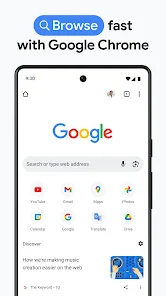
I've been using Google Chrome as my go-to browser for years now, ever since I first installed it from the Google Play Store on my old Android phone. It's made by Google LLC, and like most people, I grabbed it because it's free and syncs with everything Google—your bookmarks, passwords, and open tabs follow you from your laptop to your phone. When you first launch it, it feels fast and clean, with a white address bar at the top and quick access to recently visited sites. You don't need to sign up or pay anything, though there are no in-app purchases either; it's just a straightforward browser. It's been downloaded over 10 billion times, so clearly a lot of folks trust it for everyday browsing.
After using it daily, the experience is pretty smooth. The interface is simple: a search bar that doubles as a URL box, plus a grid of your most-visited pages on the start screen. Switching between tabs is easy, either by tapping the number next to the address bar or swiping across the top. The Incognito mode is handy for private searches, but it always gives a small warning that your activity isn't fully hidden from your ISP or employer. I like that Chrome uses data compression in Lite mode to save on mobile data, which comes in handy when I'm commuting. One small downside: with many tabs open, the phone heats up a bit, but closing unused ones fixes that quickly.
Honestly, Chrome is perfect for anyone deep in Google's ecosystem—like if you use Gmail, Google Drive, or YouTube all the time. But if privacy is a big concern, you might prefer Firefox Focus or DuckDuckGo, which block more trackers by default. What sets Chrome apart is its sheer integration: your passwords and history sync instantly between devices without extra steps. I've kept it installed on my phone and laptop for years because of this convenience, even though I know it's a bit of a battery hog at times. For most users, it's a solid daily driver, but I can see power users switching to Brave or Edge for better performance.
features
- 🏆 One standout feature is the cross-platform sync. When I type a URL on my laptop, I can open the same page on my phone within seconds. It's seamless, especially compared to Apple's Safari, which only syncs across Apple devices.
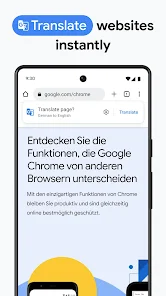
- 🏆 The built-in translation is another winner. While Samsung Internet requires a separate plugin, Chrome automatically translates foreign-language webpages with one tap. I used this last week reading a Japanese recipe site, and it was flawless.
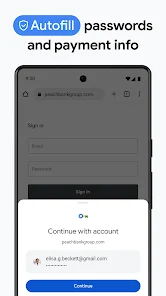
- 🏆 I appreciate the password manager built into Chrome. It saves and auto-fills logins across apps and websites, which is much more convenient than Firefox for Android, where the password feature feels less integrated.
pros
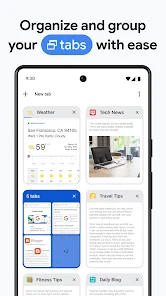
- ➕ Chrome's tab management is excellent—you can group tabs by color and labels, making it easy to organize research. Opera Touch doesn't offer this level of organization.
- ➕ It handles heavy web apps like Google Docs or YouTube smoothly. On my mid-range phone, Safari on iOS tends to stutter with similar tasks.
- ➕ Chrome saves data by compressing pages in Lite mode. This helped me avoid hitting my mobile cap last month, something I didn't get with Vivaldi browser.
cons
- ➖ Chrome eats up battery faster than most rivals. In a day of heavy use, it drained 20% more than Firefox Focus on my phone.
- ➖ Privacy is a weak point. Unlike Brave, which automatically blocks trackers and ads, Chrome requires manual settings or extensions to reduce tracking.
- ➖ It's a resource hog on older devices. When I tested it on a friend's 2019 phone, it lagged noticeably, while DuckDuckGo ran fine with 10+ tabs open.
Articles
![]()
Guide
How to Update Google Play Store on Android 2026
![]()
Guide
How to Download Older Versions of Android Apps
![]()
Guide
How to Download Apps Without Google Play Store
![]()
Guide
What Is an APK File for Android?
If you use an Android phone, you may have seen the term APK while searching for apps or games online. Some websites offer an APK download instead of a Google Play install button. Some users also mention APK files when talking about apps that are not available in their region, older app versions, or Android games downloaded outside the Play Store.
![]()
Guide
How to Install Games from Google Play for Beginners
Installing games on an Android phone is usually simple, but for beginners, the process can still feel confusing at first. You may not know where to search, which button to tap, whether the game is safe, or why Google Play sometimes asks for account settings, storage access, or payment information. If you are using an Android phone for the first time, learning how to install games from Google Play is one of the easiest ways to get started.
![]()
Guide
How Useful Gemini Is for Everyday Questions and Quick Tasks
emini feels different from many AI apps because it is not only trying to be a chatbot. After using it for everyday questions, quick writing, image understanding, and planning, I think its biggest strength is convenience.
![]()
Guide
What to Know Before Downloading APKs
For many Android users, downloading an APK is a common way to install apps and games. Sometimes an app is not available in a certain country.
![]()
Guide
ChatGPT Review: Is It Still the Best AI App in 2026?
![]()
Guide
Seedance 2.0 vs Sora: The Future of AI Video Generation
The AI video race has intensified dramatically over the past two years. Platforms like Sora from OpenAI and Luma Dream Machine pushed the boundaries of text-to-video realism. Yet, despite their impressive outputs, most tools still operate as probabilistic generators—you describe a scene, and the model interprets it. Control remains limited. With the February 2026 release of Seedance 2.0, developed by ByteDance, the paradigm shifted. Internally known as Jimeng 2.0, Seedance does not position itself as just another video model. It positions itself as an AI Director. Rather than guessing what you want, Seedance 2.0 allows you to direct what happens. This distinction defines everything that follows.









Recommended Apps
![]()
Home Design 3D
Anuman4.2
![]()
Truth or Dare Game - Party App
Chouic4.8
![]()
Photo Collage Maker
Scoompa4.7![]()
Learn to Draw Flower
Creative APPS4.2![]()
FIFA World Cup 2026™
FIFA2.8![]()
Mirror Plus: Mirror with Light
Digitalchemy, LLC4.4![]()
Meitu- Photo Editor & AI Art
Meitu (China) Limited4.5![]()
Perplexity - Ask Anything
PerplexityAI4.7![]()
GhostTube SLS Camera Alternate
GhostTube4![]()
Boom Chip Blast: 2-Player
Black Pyramid 3D Games Studio0![]()
Healthy Benefits+
Solutran, Inc.4.5![]()
Deepcheck AI Search Assistant
rohe.ai4![]()
Idol Prank Video Call & Chat
LightCode Solutions4![]()
Face Shape - Pretty Scale
GlintTec Apps3.9![]()
Plant App - Plant Identifier
ScaleUp4.6











































