


500,000,000+
Installs
Pinterest
Developer
-
Video Players & Editors
Category
-
Rated for 12+
Content Rating
-
help@pinterest.com
Developer Email
-
https://policy.pinterest.com/privacy-policy
Privacy Policy
Screenshots


editor reviews
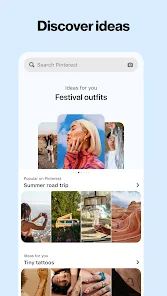
Pinterest is a visual discovery and bookmarking app, a kind of hybrid between a mood board tool and an image-based search engine. Most people use it to find and save ideas for things like home decor, fashion, recipes, or travel, and it functions as a massive digital catalog. A normal user would download it from the App Store or Google Play, and it's free to install with no upfront cost, though it does have some in-app purchases for promoted content or ad-free experiences. The first impression after opening Pinterest is pretty overwhelming. The grid of images, called Pins, is huge and never ending, and it feels like you stumbled into a never-ending library of pretty pictures and tutorials. It's slightly chaotic because there's no clear structure at first.
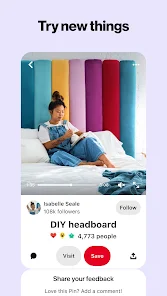
After you sign up, which you can do with your email, Google, or Apple account, the real experience begins. The interface is clean but busy, with a search bar at the top and a feed that immediately tries to figure out what you like. The main action is pinning: you click on an image, see a larger version, and decide if you want to save it to a board. The onboarding is smooth, and it quickly suggests categories like “Home” or “Outfits,” so you can start building a collection right away. In daily use, you'd browse your feed, search for specific topics like “minimalist kitchen ideas,” and then save the best results to themed boards. A practical tip is to use the camera search feature, which lets you take a photo of something you saw in real life, like a lamp, and Pinterest will show you similar items. It works surprisingly well. The app is generally smooth, but the feed can feel repetitive if you don't constantly refine your interests.
After using Pinterest for a while, I'd say it's a solid app for people who love visual planning, like someone redecorating their house or planning a wedding. It's less useful for someone who wants a quick distraction or a social network, because it's more about saving than sharing. Compared to similar apps like Instagram, which focuses on sharing moments, Pinterest is purely about saving what you think is beautiful or useful. It feels like a digital scrapbook rather than a social feed. People who enjoy collecting and organizing will keep it installed, but those who hate clutter might uninstall it after a few months. The app has a unique strength in its image recognition, but it also feels insistent on pushing shopping links, which can get annoying. Overall, it's a helpful tool for specific projects, not a daily driver for most people.
features
- 📌 Visual Search Tool: Unlike Google Lens, which is general-purpose, Pinterest's camera search laser focuses on aesthetic categories like home decor or fashion. You snap a picture of a pillow or a dress, and it surfaces nearly identical or highly similar Pins from its massive catalog. This feels more curated than a generic image search.
- 📌 Board Organization: You can create multiple boards with nested sections, similar to how you'd use folders in Notion but strictly visual. Each Pin lives in a specific board, making it easy to revisit ideas later. This beats Instagram's saved collections tool, which feels more cluttered and less intentional.
- 📤 Social Discovery via Pins: While not a true social network, Pinterest uses a community-driven method. You see what others have pinned and shared, so you can follow specific creators or boards. This is different from Google Images, which is purely algorithmic and doesn't let you follow someone's taste.
pros
- ✅ Massive Visual Database: The scale is incredible. You can find Pins for almost any creative need, from knitting patterns to wedding themes. Apps like Houzz are more niche, focusing only on home renovation, so Pinterest wins for variety and breadth of content.
- ✅ Ad Integration is Subtle: Compared to Instagram or TikTok, where sponsored posts aggressively interrupt your feed, Pinterest's promoted Pins blend in more naturally as another visual idea. They don't feel as intrusive, which makes the browsing experience smoother.
- ✅ Cross-Platform Sync: You can access your boards on a desktop browser or your phone app, and the data syncs seamlessly. Tools like Milanote also sync, but they are less intuitive for quick visual saves and require a steeper learning curve.
cons
- ❌ Cluttered Feed After Initial Setup: The algorithm takes a long time to learn your taste. For the first few weeks, you might still see home decor when you're looking for outfit ideas. In contrast, Instagram's Explore page adapts faster once you start engaging.
- ❌ Limited Editing Tools: You can't easily adjust Pins like in a dedicated mood-board app such as Canva. If you want to resize or overlay text on an image, you have to export it elsewhere, which is an extra step that feels unnecessary.
- ❌ Over-Reliance on Shopping Links: Many Pins are just product ads disguised as ideas. Apps like We Heart It focus more on pure inspiration without the constant push to buy something, which feels more genuine for casual browsing.
Articles
![]()
Guide
How to Update Google Play Store on Android 2026
![]()
Guide
How to Download Older Versions of Android Apps
![]()
Guide
How to Download Apps Without Google Play Store
![]()
Guide
What Is an APK File for Android?
If you use an Android phone, you may have seen the term APK while searching for apps or games online. Some websites offer an APK download instead of a Google Play install button. Some users also mention APK files when talking about apps that are not available in their region, older app versions, or Android games downloaded outside the Play Store.
![]()
Guide
How to Install Games from Google Play for Beginners
Installing games on an Android phone is usually simple, but for beginners, the process can still feel confusing at first. You may not know where to search, which button to tap, whether the game is safe, or why Google Play sometimes asks for account settings, storage access, or payment information. If you are using an Android phone for the first time, learning how to install games from Google Play is one of the easiest ways to get started.
![]()
Guide
How Useful Gemini Is for Everyday Questions and Quick Tasks
emini feels different from many AI apps because it is not only trying to be a chatbot. After using it for everyday questions, quick writing, image understanding, and planning, I think its biggest strength is convenience.
![]()
Guide
What to Know Before Downloading APKs
For many Android users, downloading an APK is a common way to install apps and games. Sometimes an app is not available in a certain country.
![]()
Guide
ChatGPT Review: Is It Still the Best AI App in 2026?
![]()
Guide
Seedance 2.0 vs Sora: The Future of AI Video Generation
The AI video race has intensified dramatically over the past two years. Platforms like Sora from OpenAI and Luma Dream Machine pushed the boundaries of text-to-video realism. Yet, despite their impressive outputs, most tools still operate as probabilistic generators—you describe a scene, and the model interprets it. Control remains limited. With the February 2026 release of Seedance 2.0, developed by ByteDance, the paradigm shifted. Internally known as Jimeng 2.0, Seedance does not position itself as just another video model. It positions itself as an AI Director. Rather than guessing what you want, Seedance 2.0 allows you to direct what happens. This distinction defines everything that follows.









Recommended Apps
![]()
Home Design 3D
Anuman4.2
![]()
Truth or Dare Game - Party App
Chouic4.8
![]()
Photo Collage Maker
Scoompa4.7![]()
Learn to Draw Flower
Creative APPS4.2![]()
FIFA World Cup 2026™
FIFA2.8![]()
Mirror Plus: Mirror with Light
Digitalchemy, LLC4.4![]()
Meitu- Photo Editor & AI Art
Meitu (China) Limited4.5![]()
Perplexity - Ask Anything
PerplexityAI4.7![]()
GhostTube SLS Camera Alternate
GhostTube4![]()
Boom Chip Blast: 2-Player
Black Pyramid 3D Games Studio0![]()
Healthy Benefits+
Solutran, Inc.4.5![]()
Deepcheck AI Search Assistant
rohe.ai4![]()
Idol Prank Video Call & Chat
LightCode Solutions4![]()
Face Shape - Pretty Scale
GlintTec Apps3.9![]()
Plant App - Plant Identifier
ScaleUp4.6












































