

GroupMe

10,000,000+
Installs
GroupMe
Developer
-
Social
Category
-
Rated for 12+
Content Rating
-
support@groupme.com
Developer Email
-
http://groupme.com/privacy
Privacy Policy
Screenshots
editor reviews
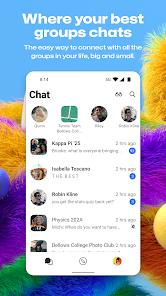
GroupMe is a group messaging app that's pretty much designed for keeping everyone in the loop without forcing them to switch to yet another social platform. It sits somewhere between a standard texting app and a full-on team chat tool like Slack, but it's way more casual. You mainly use it to create massive group chats for things like family reunions, school project teams, or planning a night out with a dozen friends who all have different phones. A lot of people download it because they're sick of those huge SMS threads that break when someone has an Android and someone else has an iPhone. The first time you open it up, the vibe is simple and clean, kind of like a blank whiteboard with a green theme. It doesn't push you to sign up with a ton of details, just a phone number or email, and you're in. With over 10 million downloads on Google Play and being free to download, it feels like a low-commitment tool that respects your time right from the start.
Once you start using GroupMe, the hands-on experience is pretty straightforward. You create a group, give it a name and a custom photo, and then you just share the invite link or add contacts directly. The chat interface is where it shines because it's built for big groups. You get reactions to messages, which is handy when you just want to acknowledge someone's plan without typing "okay." A common flow would be someone posting a photo from a weekend trip, then everyone else spamming emoji reactions and short replies. One small thing I noticed is the "Mute" button is front and center, which is a lifesaver for busy chats. There's also a built-in media gallery that pulls all photos shared in the group into one spot, so you can scroll back through memories without digging through endless text. Onboarding is fast, but if you jump into a chat with 30 people, the notifications can feel overwhelming until you tweak the settings. A practical tip is to use the "Like" button as a quick read receipt instead of typing.
After using GroupMe for a while, I'd say it works best for people who are part of multiple ongoing group plans, like sports teams, clubs, or large friend circles. It's not for someone who needs deep project management tools or file storage. What makes it different from something like WhatsApp or Telegram is how barebones it is, which can be a positive or a negative. You don't get end-to-end encryption by default, and features are minimal, but that also means there's less friction. I could see someone keeping it installed just because almost everyone they know already has it, especially in the US. On the flip side, if you're used to the polish of Signal or even iMessage, the lack of advanced features might make you uninstall it after a while. It's a tool that works when you need it, but it doesn't try to be your whole communication hub.
features
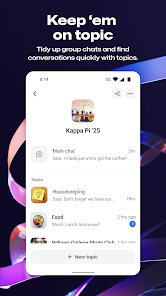
- 🚀 Group Categorization and Media Gallery – GroupMe lets you split your groups into categories like "Family" or "Friends" right in the app, which keeps your inbox tidy. But where it really stands out compared to WhatsApp is the automatic media gallery. Every photo shared in a chat gets saved into a single carousel that you can swipe through. WhatsApp buries those photos in your phone's internal storage, and finding an old one can take ages.
- 🚀 Cross-Platform Simplicity – You can use GroupMe on iOS, Android, and even the web without any hassle. Unlike Telegram, which needs a phone number and sometimes bugs out on linking devices, GroupMe just needs an email or SMS code once, and you're synced everywhere. The desktop version loads fast and mirrors your chats without draining your phone battery.
- 🚀 Custom Emoji Reactions with No Limits – In GroupMe, you can react to any message with a massive library of custom emoji, and there are no weird restrictions. Compare this to iMessage, where reactions only work between Apple users, and even then they're limited to a handful of default taps. GroupMe's system is universal across devices.
pros
- 👍 Huge Group Capacity – You can toss up to 100 people into one chat without hitting a wall. Try that in WhatsApp, and you'll start seeing performance drops or warning messages. GroupMe handles the chaos smoothly.
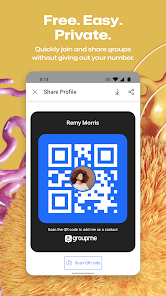
- 👍 No Phone Number Exposure – Unlike iMessage or WhatsApp, where people can see your real number unless you mess with privacy settings, GroupMe works with a username and profile. It's a nice layer of privacy for larger groups.
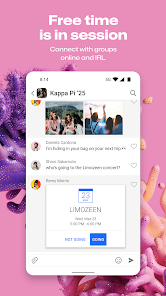
- 👍 Event Planning Tools – The built-in "Events" feature lets you set dates and track RSVPs inside the chat. Facebook Messenger has something like this, but it's buried and clunky. GroupMe keeps it simple and always visible at the top of the group.
cons
- 👎 No End-to-End Encryption – This is a big one for privacy. While WhatsApp and Signal encrypt every message by default, GroupMe sends everything in plain text. If you're sharing sensitive info, you're better off elsewhere.
- 👎 Search Feature is Awful – Finding a specific message or file in a chat is rough. Telegram and even Slack let you search with filters like date or sender. GroupMe's search is basic and often returns irrelevant results.
- 👎 Media Compression Hurts Quality – When you share a photo, GroupMe compresses it quite a bit. Compare that to iMessage, which sends full-resolution images. If you're sharing important screenshots or photos, they lose detail here.
Articles
![]()
Guide
How to Update Google Play Store on Android 2026
![]()
Guide
How to Download Older Versions of Android Apps
![]()
Guide
How to Download Apps Without Google Play Store
![]()
Guide
What Is an APK File for Android?
If you use an Android phone, you may have seen the term APK while searching for apps or games online. Some websites offer an APK download instead of a Google Play install button. Some users also mention APK files when talking about apps that are not available in their region, older app versions, or Android games downloaded outside the Play Store.
![]()
Guide
How to Install Games from Google Play for Beginners
Installing games on an Android phone is usually simple, but for beginners, the process can still feel confusing at first. You may not know where to search, which button to tap, whether the game is safe, or why Google Play sometimes asks for account settings, storage access, or payment information. If you are using an Android phone for the first time, learning how to install games from Google Play is one of the easiest ways to get started.
![]()
Guide
How Useful Gemini Is for Everyday Questions and Quick Tasks
emini feels different from many AI apps because it is not only trying to be a chatbot. After using it for everyday questions, quick writing, image understanding, and planning, I think its biggest strength is convenience.
![]()
Guide
What to Know Before Downloading APKs
For many Android users, downloading an APK is a common way to install apps and games. Sometimes an app is not available in a certain country.
![]()
Guide
ChatGPT Review: Is It Still the Best AI App in 2026?
![]()
Guide
Seedance 2.0 vs Sora: The Future of AI Video Generation
The AI video race has intensified dramatically over the past two years. Platforms like Sora from OpenAI and Luma Dream Machine pushed the boundaries of text-to-video realism. Yet, despite their impressive outputs, most tools still operate as probabilistic generators—you describe a scene, and the model interprets it. Control remains limited. With the February 2026 release of Seedance 2.0, developed by ByteDance, the paradigm shifted. Internally known as Jimeng 2.0, Seedance does not position itself as just another video model. It positions itself as an AI Director. Rather than guessing what you want, Seedance 2.0 allows you to direct what happens. This distinction defines everything that follows.









Recommended Apps
![]()
Home Design 3D
Anuman4.2
![]()
Truth or Dare Game - Party App
Chouic4.8
![]()
Photo Collage Maker
Scoompa4.7![]()
Learn to Draw Flower
Creative APPS4.2![]()
FIFA World Cup 2026™
FIFA2.8![]()
Mirror Plus: Mirror with Light
Digitalchemy, LLC4.4![]()
Meitu- Photo Editor & AI Art
Meitu (China) Limited4.5![]()
Perplexity - Ask Anything
PerplexityAI4.7![]()
GhostTube SLS Camera Alternate
GhostTube4![]()
Boom Chip Blast: 2-Player
Black Pyramid 3D Games Studio0![]()
Healthy Benefits+
Solutran, Inc.4.5![]()
Deepcheck AI Search Assistant
rohe.ai4![]()
Idol Prank Video Call & Chat
LightCode Solutions4![]()
Face Shape - Pretty Scale
GlintTec Apps3.9![]()
Plant App - Plant Identifier
ScaleUp4.6











































