

Ford™

10M+
Installs
Ford Motor Co.
Developer
-
Lifestyle
Category
-
Everyone
Content Rating
-
fordpass@ford.com
Developer Email
-
https://www.fordpass.com/fordpassprivacy
Privacy Policy
Screenshots



editor reviews
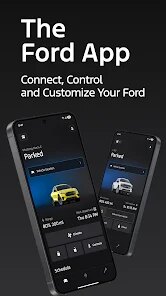
Ford™ is the official mobile application developed by Ford Motor Co., designed to connect vehicle owners with their cars through a smartphone interface. Available for download on Google Play and the App Store, the app offers a range of remote services including lock/unlock functions, vehicle status checks, and trip planning features. It is free to download and install, though some features like remote start require an active subscription after an initial trial period. The app integrates with Ford's connectivity modules found in newer models, providing a direct digital link between the driver and their vehicle.
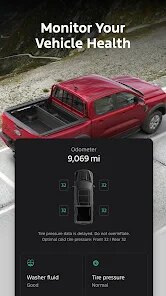
After installing the app and creating an account, users are prompted to pair their vehicle through either a QR code scan or manual VIN entry. The dashboard presents a clean overview showing fuel level, tire pressure, oil life, and other vital metrics at a glance. One feature I found particularly useful is the remote climate control, which lets you set the cabin temperature before entering the car on hot or cold days. The app also handles scheduling maintenance appointments and viewing recall information, though navigating to these sections required a couple of extra taps than I expected.
Compared to similar apps from other automakers like Toyota's connected services or GM's myChevrolet, the Ford app takes a more minimalist approach to information display. While Toyota's app tends to pack the home screen with dealer promotions, Ford keeps the focus on vehicle data and primary controls. The app also stands apart in how it handles multiple vehicle profiles, allowing owners of several Fords to switch between them without fully logging out. Some manufacturers restrict this to the primary account holder, which can be inconvenient for households sharing vehicles.
features
- The remote vehicle locator works reliably in crowded parking lots, showing the car's position on a map along with distance and direction. It feels responsive, but the map took a moment to load fully when using it in an area with weak cellular reception.
- Ford Pass points program runs seamlessly within the app, rewarding users for service visits and purchases. I found the point redemption process straightforward, though the available rewards could be more diverse beyond just dealership credit.
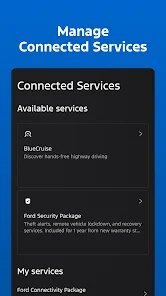
- Unlike some competitor apps that require monthly subscriptions for basic features, Ford offers core functions like remote unlock and health check without recurring fees. However, the advanced features worth paying for, such as remote start, are priced competitively compared to GM's OnStar plans.
pros
- Saves time by checking tire pressure and fluid levels without walking to the garage, especially useful before long trips.
- Remote climate control lets one precondition the cabin during extreme weather, making commutes more comfortable from the start.
- Simplifies scheduling dealer service appointments directly through the app, reducing phone calls and follow-up reminders.
cons
- Occasional notification delays when changing vehicle status remotely, with the app sometimes showing a door unlocked state minutes after it was secured.
- Premium features required a paid subscription after a limited trial, which may not appeal to owners who prefer one-time purchases.
- Setup process could be confusing for users less comfortable with technology, especially during the initial pairing step where connection drops are common.
Articles
![]()
Guide
How to Update Google Play Store on Android 2026
![]()
Guide
How to Download Older Versions of Android Apps
![]()
Guide
How to Download Apps Without Google Play Store
![]()
Guide
What Is an APK File for Android?
If you use an Android phone, you may have seen the term APK while searching for apps or games online. Some websites offer an APK download instead of a Google Play install button. Some users also mention APK files when talking about apps that are not available in their region, older app versions, or Android games downloaded outside the Play Store.
![]()
Guide
How to Install Games from Google Play for Beginners
Installing games on an Android phone is usually simple, but for beginners, the process can still feel confusing at first. You may not know where to search, which button to tap, whether the game is safe, or why Google Play sometimes asks for account settings, storage access, or payment information. If you are using an Android phone for the first time, learning how to install games from Google Play is one of the easiest ways to get started.
![]()
Guide
How Useful Gemini Is for Everyday Questions and Quick Tasks
emini feels different from many AI apps because it is not only trying to be a chatbot. After using it for everyday questions, quick writing, image understanding, and planning, I think its biggest strength is convenience.
![]()
Guide
What to Know Before Downloading APKs
For many Android users, downloading an APK is a common way to install apps and games. Sometimes an app is not available in a certain country.
![]()
Guide
ChatGPT Review: Is It Still the Best AI App in 2026?
![]()
Guide
Seedance 2.0 vs Sora: The Future of AI Video Generation
The AI video race has intensified dramatically over the past two years. Platforms like Sora from OpenAI and Luma Dream Machine pushed the boundaries of text-to-video realism. Yet, despite their impressive outputs, most tools still operate as probabilistic generators—you describe a scene, and the model interprets it. Control remains limited. With the February 2026 release of Seedance 2.0, developed by ByteDance, the paradigm shifted. Internally known as Jimeng 2.0, Seedance does not position itself as just another video model. It positions itself as an AI Director. Rather than guessing what you want, Seedance 2.0 allows you to direct what happens. This distinction defines everything that follows.









Recommended Apps
![]()
Home Design 3D
Anuman4.2
![]()
Truth or Dare Game - Party App
Chouic4.8
![]()
Photo Collage Maker
Scoompa4.7![]()
Learn to Draw Flower
Creative APPS4.2![]()
FIFA World Cup 2026™
FIFA2.8![]()
Mirror Plus: Mirror with Light
Digitalchemy, LLC4.4![]()
Meitu- Photo Editor & AI Art
Meitu (China) Limited4.5![]()
Perplexity - Ask Anything
PerplexityAI4.7![]()
GhostTube SLS Camera Alternate
GhostTube4![]()
Boom Chip Blast: 2-Player
Black Pyramid 3D Games Studio0![]()
Healthy Benefits+
Solutran, Inc.4.5![]()
Deepcheck AI Search Assistant
rohe.ai4![]()
Idol Prank Video Call & Chat
LightCode Solutions4![]()
Face Shape - Pretty Scale
GlintTec Apps3.9![]()
Plant App - Plant Identifier
ScaleUp4.6











































