


100,000,000+
Installs
WeChat International Pte. Ltd.
Developer
-
Social
Category
-
Rated for 12+
Content Rating
-
support@help.wechat.com
Developer Email
-
https://www.wechat.com/mobile/htdocs/en/privacy_policy.html
Privacy Policy
Screenshots

editor reviews
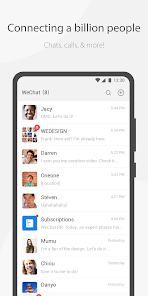
WeChat is a multipurpose messaging and social media app that has become a digital hub for millions of users, especially those connected to China. It started as a simple chat tool but has since grown into a platform where you can text, make voice or video calls, share moments similar to a social feed, and even handle mobile payments or order food. A normal user, like me, might download it mainly because friends or colleagues in China use it exclusively for communication. After launching the app for the first time, the interface feels clean but a bit overwhelming since there are tabs for chats, contacts, and a discovery section filled with mini-programs and games. It is free to download from the App Store or Google Play, and while the install count is massive globally, it also requires a phone number for registration. There are in-app purchases for stickers or services, but no annoying ads pop up during regular use, which makes it feel surprisingly polished.
After spending some time with WeChat, the actual hands-on experience is a mixed bag of convenience and clutter. The onboarding process asks for basic permissions, and once you're in, the chat screen feels familiar to WhatsApp or Messenger, but the extra layers add depth. You can send messages, share images, or make voice calls easily, but the standout moments happen when you explore the 'Discover' tab. That's where the mini-programs live, allowing you to book flights, pay utility bills, or play lightweight games without leaving the app. At first, I stumbled around trying to find the settings for privacy or notifications, but after a week, it became second nature. A practical tip is to use the 'Moments' feature sparingly, because posts from contacts flood the feed quickly, and the app tends to consume battery life if you keep it running in the background. The overall flow is smooth on stable internet, but the lack of a unified search for past conversations annoyed me sometimes.
After using WeChat for a while, I firmly believe it's a necessity for anyone living in or maintaining ties with China, but it's overkill for casual users elsewhere. Someone who loves all-in-one platforms will adore how it replaces separate apps for banking, social media, and communication, but if you just need a simple messenger, apps like Telegram or Signal offer better privacy and less bloat. The key difference is that WeChat is less a tool and more an ecosystem, which makes it invaluable in its core market but confusing outside it. I kept it installed because my contacts there rely on it, but I uninstalled it from my secondary phone because the constant updates and demand for permissions felt intrusive. It does its job well as a communication app, but the integration with services you can't use abroad, like WeChat Pay, limits its appeal beyond specific regions.
features
- 📱 WeChat's mini-programs are its standout feature, letting you access third-party services like ride-hailing, food delivery, and banking directly inside the app. For example, I can order coffee from Starbucks without downloading their app, which saves storage space. In contrast, WhatsApp or iMessage focus purely on messaging and don't offer this level of embedded functionality.
- 📱 The 'Moments' social feed works like a cross between Instagram Stories and a Facebook timeline, allowing you to share photos, links, or updates with your contacts. It feels private because you can control who sees each post, unlike the public nature of Twitter. This makes it ideal for sharing personal life with a close circle without leaving the chat app.
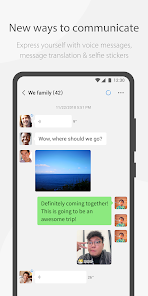
- 📱 Voice and video call quality is solid even on slower networks, with options for group calls up to nine participants. The call stability often beats Skype on low bandwidth, and the integration with chat means you can switch from texting to a call seamlessly. This is a practical advantage over Telegram, which has less robust voice features in some regions.
pros
- 👍 WeChat's strength lies in its all-in-one design, bundling messaging, social media, and payments into one app, while apps like Line or KakaoTalk require separate tools for full financial services. This convenience means I rarely jump between apps for daily tasks.
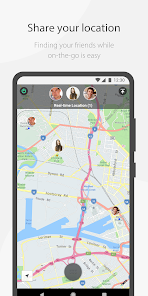
- 👍 The 'Shake' and 'People Nearby' features for discovering new contacts are unique and fun, offering a social discovery angle that WhatsApp lacks entirely. It makes meeting locals or friends in new cities easier without needing a separate networking app.
- 👍 WeChat's official accounts let businesses and creators send updates directly to users, similar to newsletters but integrated into chat. This beats the clutter of email or RSS feeds, giving you curated content without leaving the app.
cons
- 👎 WeChat's privacy is a major weakness, as the app collects extensive data like location and browsing habits, far more than Signal or Telegram. This feeling of being watched makes me hesitant to use it for sensitive conversations.
- 👎 The interface feels cluttered with ads, official account spam, and mini-program promotions that distract from core messaging. In contrast, iMessage remains clean and focused on text, which I prefer for quick chats.
- 👎 WeChat's reliance on a phone number for registration and lack of end-to-end encryption for all chats by default, unlike Signal's full encryption, reduces security. This is a dealbreaker for users who prioritize privacy over convenience.
- 👎 The app is heavy on battery and storage, taking up over 500 MB after regular use, while lightweight messengers like Telegram use less space. I noticed my phone slowing down after keeping it installed for a month on a budget device.
Articles
![]()
Guide
How to Update Google Play Store on Android 2026
![]()
Guide
How to Download Older Versions of Android Apps
![]()
Guide
How to Download Apps Without Google Play Store
![]()
Guide
What Is an APK File for Android?
If you use an Android phone, you may have seen the term APK while searching for apps or games online. Some websites offer an APK download instead of a Google Play install button. Some users also mention APK files when talking about apps that are not available in their region, older app versions, or Android games downloaded outside the Play Store.
![]()
Guide
How to Install Games from Google Play for Beginners
Installing games on an Android phone is usually simple, but for beginners, the process can still feel confusing at first. You may not know where to search, which button to tap, whether the game is safe, or why Google Play sometimes asks for account settings, storage access, or payment information. If you are using an Android phone for the first time, learning how to install games from Google Play is one of the easiest ways to get started.
![]()
Guide
How Useful Gemini Is for Everyday Questions and Quick Tasks
emini feels different from many AI apps because it is not only trying to be a chatbot. After using it for everyday questions, quick writing, image understanding, and planning, I think its biggest strength is convenience.
![]()
Guide
What to Know Before Downloading APKs
For many Android users, downloading an APK is a common way to install apps and games. Sometimes an app is not available in a certain country.
![]()
Guide
ChatGPT Review: Is It Still the Best AI App in 2026?
![]()
Guide
Seedance 2.0 vs Sora: The Future of AI Video Generation
The AI video race has intensified dramatically over the past two years. Platforms like Sora from OpenAI and Luma Dream Machine pushed the boundaries of text-to-video realism. Yet, despite their impressive outputs, most tools still operate as probabilistic generators—you describe a scene, and the model interprets it. Control remains limited. With the February 2026 release of Seedance 2.0, developed by ByteDance, the paradigm shifted. Internally known as Jimeng 2.0, Seedance does not position itself as just another video model. It positions itself as an AI Director. Rather than guessing what you want, Seedance 2.0 allows you to direct what happens. This distinction defines everything that follows.









Recommended Apps
![]()
Home Design 3D
Anuman4.2
![]()
Truth or Dare Game - Party App
Chouic4.8
![]()
Photo Collage Maker
Scoompa4.7![]()
Learn to Draw Flower
Creative APPS4.2![]()
FIFA World Cup 2026™
FIFA2.8![]()
Mirror Plus: Mirror with Light
Digitalchemy, LLC4.4![]()
Meitu- Photo Editor & AI Art
Meitu (China) Limited4.5![]()
Perplexity - Ask Anything
PerplexityAI4.7![]()
GhostTube SLS Camera Alternate
GhostTube4![]()
Boom Chip Blast: 2-Player
Black Pyramid 3D Games Studio0![]()
Healthy Benefits+
Solutran, Inc.4.5![]()
Deepcheck AI Search Assistant
rohe.ai4![]()
Idol Prank Video Call & Chat
LightCode Solutions4![]()
Face Shape - Pretty Scale
GlintTec Apps3.9![]()
Plant App - Plant Identifier
ScaleUp4.6











































