

Ticketmaster-Buy, Sell Tickets

10M+
Installs
Ticketmaster L.L.C.
Developer
-
Entertainment
Category
-
Rated for 3+
Content Rating
-
app@ticketmaster.com
Developer Email
-
https://www.ticketmaster.com/h/privacy.html
Privacy Policy
Screenshots


editor reviews
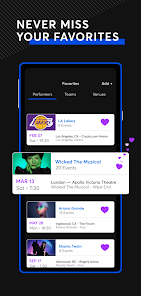
Ticketmaster is essentially the giant of the live event ticketing world. It is a marketplace app where you can browse, buy, and sometimes resell tickets for concerts, sports games, theater shows, and festivals. I downloaded it from the App Store because I needed a ticket for a last-minute basketball game, and honestly, I was just hoping for a smooth checkout process. The first impression after launching the app was a bit overwhelming—there is a lot of information on the home screen, from recommended events to countdown timers for upcoming sales. It feels like a busy airport terminal, but once you get past that initial noise, it is clear the app is built for speed and transaction volume.
Using the app is a mixed bag. The search function works well; you can filter by city, date, and event type. Once you find an event, the interface shows a seat map with color-coded sections and prices. A normal step would be selecting a seat, but here is where it gets tricky—the app often adds dynamic pricing or hidden fees only at the final screen, which can be frustrating. The onboarding process is minimal; you just create an account or log in. For a common task like buying a pair of concert tickets, I found the checkout flow a bit clunky because it keeps pushing add-ons like parking or insurance. On the plus side, the ticket transfer feature is seamless; you can send tickets to friends with a few taps. A practical tip is to save your payment info beforehand to speed things up during high-demand sales.
After spending some time with the app, I have a love-hate relationship with it. It excels for catching big-name events like a Taylor Swift concert or an NBA finals game, but it feels overkill for smaller local shows where something like Eventbrite works just fine. What sets it apart is its sheer inventory—you can find tickets for almost any major event. However, the aggressive fee structure and occasional page crashes during high-traffic drops make me think twice about keeping it installed. I would keep it for resale or last-minute finds, but for planned events, I might look elsewhere. It is a necessary evil for live events, but not a joy to use.
features
- 🎟️ The app's core feature is its massive marketplace for live event tickets, covering everything from concerts to sports. Compared to SeatGeek, Ticketmaster has a much wider inventory, especially for major league games and top-tier artists, but SeatGeek often has a cleaner deal-finding interface.
- 🎟️ Interactive seat maps with real-time pricing. When you click a seat, you see the exact price before fees, which is similar to StubHub. However, Ticketmaster's map is more detailed, showing obstructed views or accessibility options, which is a standout feature for picky buyers.
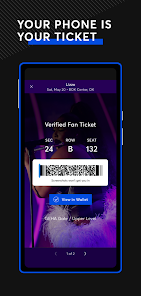
- 🎟️ The ticket resale function is built right in. You can list your tickets instantly after purchase, with the app automatically setting a price floor. This is smoother than Vivid Seats, where you often need to verify details manually. The app also handles transfers seamlessly, making it easy to split tickets among friends.
pros
- ✅ Massive event inventory: You can find tickets for almost any major event, from Broadway shows to NFL games, which beats smaller apps like Gametime that focus on last-minute deals.
- ✅ Official partnerships: Because Ticketmaster is the primary seller for many venues, you get first-access to presales and verified tickets, avoiding the fake ticket scams common on secondary sites like Craigslist.
- ✅ User-friendly transfer system: Sending tickets to someone is fast and reliable, taking just a few taps. This is more convenient than some smaller platforms that require email or QR code downloads.
cons
- ❌ High and hidden fees: The final price often jumps by 20-30% after checkout due to service fees and dynamic pricing. Apps like SeatGeek at least show a clear "score" for deals, while Ticketmaster buries costs.
- ❌ Poor performance during high-demand sales: The app frequently crashes or slows down when popular tickets drop, such as for a Taylor Swift tour. StubHub handles high traffic more reliably in my experience.
- ❌ Cluttered interface with aggressive add-ons: During checkout, the app pushes parking, insurance, and other upsells, which can be annoying. Vivid Seats has a more streamlined, no-nonsense checkout flow.
Articles
![]()
Guide
How to Update Google Play Store on Android 2026
![]()
Guide
How to Download Older Versions of Android Apps
![]()
Guide
How to Download Apps Without Google Play Store
![]()
Guide
What Is an APK File for Android?
If you use an Android phone, you may have seen the term APK while searching for apps or games online. Some websites offer an APK download instead of a Google Play install button. Some users also mention APK files when talking about apps that are not available in their region, older app versions, or Android games downloaded outside the Play Store.
![]()
Guide
How to Install Games from Google Play for Beginners
Installing games on an Android phone is usually simple, but for beginners, the process can still feel confusing at first. You may not know where to search, which button to tap, whether the game is safe, or why Google Play sometimes asks for account settings, storage access, or payment information. If you are using an Android phone for the first time, learning how to install games from Google Play is one of the easiest ways to get started.
![]()
Guide
How Useful Gemini Is for Everyday Questions and Quick Tasks
emini feels different from many AI apps because it is not only trying to be a chatbot. After using it for everyday questions, quick writing, image understanding, and planning, I think its biggest strength is convenience.
![]()
Guide
What to Know Before Downloading APKs
For many Android users, downloading an APK is a common way to install apps and games. Sometimes an app is not available in a certain country.
![]()
Guide
ChatGPT Review: Is It Still the Best AI App in 2026?
![]()
Guide
Seedance 2.0 vs Sora: The Future of AI Video Generation
The AI video race has intensified dramatically over the past two years. Platforms like Sora from OpenAI and Luma Dream Machine pushed the boundaries of text-to-video realism. Yet, despite their impressive outputs, most tools still operate as probabilistic generators—you describe a scene, and the model interprets it. Control remains limited. With the February 2026 release of Seedance 2.0, developed by ByteDance, the paradigm shifted. Internally known as Jimeng 2.0, Seedance does not position itself as just another video model. It positions itself as an AI Director. Rather than guessing what you want, Seedance 2.0 allows you to direct what happens. This distinction defines everything that follows.









Recommended Apps
![]()
Home Design 3D
Anuman4.2
![]()
Truth or Dare Game - Party App
Chouic4.8
![]()
Photo Collage Maker
Scoompa4.7![]()
Learn to Draw Flower
Creative APPS4.2![]()
FIFA World Cup 2026™
FIFA2.8![]()
Mirror Plus: Mirror with Light
Digitalchemy, LLC4.4![]()
Meitu- Photo Editor & AI Art
Meitu (China) Limited4.5![]()
Perplexity - Ask Anything
PerplexityAI4.7![]()
GhostTube SLS Camera Alternate
GhostTube4![]()
Boom Chip Blast: 2-Player
Black Pyramid 3D Games Studio0![]()
Healthy Benefits+
Solutran, Inc.4.5![]()
Deepcheck AI Search Assistant
rohe.ai4![]()
Idol Prank Video Call & Chat
LightCode Solutions4![]()
Face Shape - Pretty Scale
GlintTec Apps3.9![]()
Plant App - Plant Identifier
ScaleUp4.6












































