

Face Shape - Pretty Scale

500K+
Installs
GlintTec Apps
Developer
-
Lifestyle
Category
-
Rated for 3+
Content Rating
-
glinttecapps@gmail.com
Developer Email
-
https://glinttecapps.com
Privacy Policy
Screenshots
editor reviews
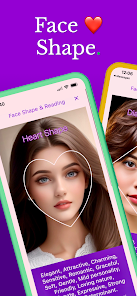
Face Shape - Pretty Scale is a utility app from developer GlintTec Apps that sits in the photo-analysis and beauty-tool category on both Google Play and the App Store. People mainly grab this app to upload a selfie and get an instant readout on their face shape, along with some basic symmetry measurements. After downloading and launching it for the first time, you're hit with that typical permission prompt for camera and photo library access, which is expected for this kind of app. The opening screen feels pretty minimal, almost too bare, and the interface gives off a slightly dated vibe compared to other modern photo apps. It's free to download and install, but right away you notice the ads popping up, which is a bit of a buzzkill. There's no hard registration required, though, so you can literally take a picture or upload one from your gallery within seconds of opening it.
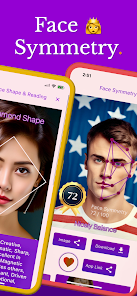
The actual hands-on experience is straightforward but not exactly smooth. You snap a front-facing photo or pick one from your album, then the app asks you to align some dots around your jaw, cheekbones, and forehead. This manual dot-placement step is where things can get a little annoying, because if you don't nail the positioning, the results feel way off. Once you're done setting the points, the app spits out a face shape label like oval, round, heart, or square, plus a symmetry percentage. The daily usage flow is pretty much the same each time: open, snap, adjust dots, get result. I found the symmetry percentage to bounce around wildly depending on lighting and angle, which made me question the reliability. A practical tip is to use a well-lit, straight-on selfie without any weird angles, otherwise the dots map onto your face in a wonky way.
After using Face Shape - Pretty Scale for a bit, my personal judgment is that it's okay for casual curiosity but nothing you'd rely on for anything serious. People who are into makeup tutorials or hairstyle planning might enjoy it, because knowing your face shape helps with those things, but anyone wanting real precision would be better off with a more robust face-analysis tool like FaceApp or even the measuring features in some AR apps. What makes it different from similar apps is that it's laser-focused on face shape and symmetry, without all the extra retouching filters, so it feels more analytical. But honestly, the manual dot alignment and ad interruptions made me want to uninstall it after a few tries. It's not bad for a quick laugh or to settle a debate with friends, but I can see most people deleting it once the novelty wears off.
features
- 📸 Manual Landmark Detection – Unlike FaceApp or Snapchat, which auto-detect facial features instantly, this app forces you to drag dots onto your jawline and cheekbones. It's more hands-on but also more error-prone if you rush the placement.
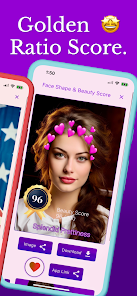
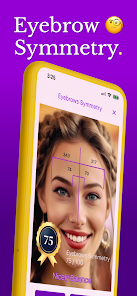
- 📐 Symmetry Scoring System – The app provides a numerical symmetry percentage, which is a standout feature. Apps like Perfect Face give similar metrics, but Face Shape's scoring can vary dramatically with different lighting, making it feel less consistent.
- 🎯 Face Shape Categorization – The app's core promise is categorizing your face into common shapes like oval or square. It's more straightforward than YouCam Makeup, which buries that info under layers of editing tools. Still, the shape labels can feel generic and oversimplified.
pros
- 🟢 No Account Required – Unlike FaceApp's push to sign up or connect social media, Face Shape lets you jump right in. No email, no password, just point and shoot. That's a big plus for privacy-focused users.
- 🟢 Single Purpose Clarity – The app doesn't try to be a full photo editor or social network. Compare that to Snapchat or Instagram, which clutter the experience with filters, stories, and ads. Face Shape is limited, but at least you know what you're getting.
- 🟢 Quick Results – Once you set the dots, the output comes in seconds. Meitu and other beauty apps take longer processing time due to rendering layers of filters, so Face Shape wins on speed for a simple measurement.
cons
- 🔴 Manual Dot Placement – It's tedious compared to FaceApp, which maps your face automatically. You have to be precise, and even then, the app misreads asymmetrical jawlines, giving inconsistent results each try.
- 🔴 Too Many Ads – After every single measurement, a full-screen ad pops up. Apps like Perfect Face have ads too, but Face Shape's frequency feels more aggressive, interrupting the flow and making repeated testing annoying.
- 🔴 Outdated Interface – The UI looks like it's from five years ago with chunky buttons and low-res graphics. Compare that to the sleek, modern design of YouCam Makeup, and Face Shape just feels clunky and less polished.
Articles
![]()
Guide
How to Update Google Play Store on Android 2026
![]()
Guide
How to Download Older Versions of Android Apps
![]()
Guide
How to Download Apps Without Google Play Store
![]()
Guide
What Is an APK File for Android?
If you use an Android phone, you may have seen the term APK while searching for apps or games online. Some websites offer an APK download instead of a Google Play install button. Some users also mention APK files when talking about apps that are not available in their region, older app versions, or Android games downloaded outside the Play Store.
![]()
Guide
How to Install Games from Google Play for Beginners
Installing games on an Android phone is usually simple, but for beginners, the process can still feel confusing at first. You may not know where to search, which button to tap, whether the game is safe, or why Google Play sometimes asks for account settings, storage access, or payment information. If you are using an Android phone for the first time, learning how to install games from Google Play is one of the easiest ways to get started.
![]()
Guide
How Useful Gemini Is for Everyday Questions and Quick Tasks
emini feels different from many AI apps because it is not only trying to be a chatbot. After using it for everyday questions, quick writing, image understanding, and planning, I think its biggest strength is convenience.
![]()
Guide
What to Know Before Downloading APKs
For many Android users, downloading an APK is a common way to install apps and games. Sometimes an app is not available in a certain country.
![]()
Guide
ChatGPT Review: Is It Still the Best AI App in 2026?
![]()
Guide
Seedance 2.0 vs Sora: The Future of AI Video Generation
The AI video race has intensified dramatically over the past two years. Platforms like Sora from OpenAI and Luma Dream Machine pushed the boundaries of text-to-video realism. Yet, despite their impressive outputs, most tools still operate as probabilistic generators—you describe a scene, and the model interprets it. Control remains limited. With the February 2026 release of Seedance 2.0, developed by ByteDance, the paradigm shifted. Internally known as Jimeng 2.0, Seedance does not position itself as just another video model. It positions itself as an AI Director. Rather than guessing what you want, Seedance 2.0 allows you to direct what happens. This distinction defines everything that follows.









Recommended Apps
![]()
Home Design 3D
Anuman4.2
![]()
Truth or Dare Game - Party App
Chouic4.8
![]()
Photo Collage Maker
Scoompa4.7![]()
Learn to Draw Flower
Creative APPS4.2![]()
FIFA World Cup 2026™
FIFA2.8![]()
Mirror Plus: Mirror with Light
Digitalchemy, LLC4.4![]()
Meitu- Photo Editor & AI Art
Meitu (China) Limited4.5![]()
Perplexity - Ask Anything
PerplexityAI4.7![]()
GhostTube SLS Camera Alternate
GhostTube4![]()
Boom Chip Blast: 2-Player
Black Pyramid 3D Games Studio0![]()
Healthy Benefits+
Solutran, Inc.4.5![]()
Deepcheck AI Search Assistant
rohe.ai4![]()
Idol Prank Video Call & Chat
LightCode Solutions4![]()
Face Shape - Pretty Scale
GlintTec Apps3.9![]()
Plant App - Plant Identifier
ScaleUp4.6










































