

Deepcheck AI Search Assistant

50K+
Installs
rohe.ai
Developer
-
Generative AI
Category
-
Everyone
Content Rating
-
+16503040046
Developer Email
-
https://deepcheck.framer.website/privay-policy
Privacy Policy
Screenshots


editor reviews
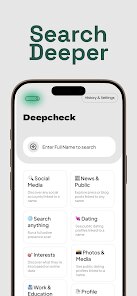
Deepcheck AI Search Assistant is a utility app designed to help users verify information more efficiently. It's basically a research tool that sits somewhere between a standard search engine and a fact-checking service. You'd download it from the Google Play or App Store if you often find yourself buried in links, wondering which ones are trustworthy. After installing and launching it, the first impression is surprisingly clean. There's no clutter or aggressive prompts to sign up, just a straightforward input bar. It feels like someone stripped away all the noise from a typical search interface. You don't need to register to start poking around, which is a nice touch, and while there are in-app purchases for higher usage limits, the free version gives you enough room to decide if it's worth paying for. I noticed it has a decent number of installs, which suggests it's catching on with people who do a lot of online research.
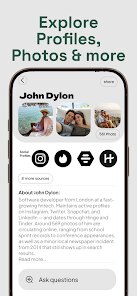
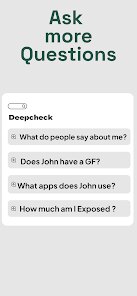
Once you start using it, the workflow is pretty intuitive. You type in a question or paste a piece of text, and instead of just throwing back a list of results, it tries to give you a summarized answer with source citations. The onboarding is minimal, maybe a single screen explaining how to use it, and then you're off. In daily use, the main action is just asking questions or submitting claims for verification. I found it smooth for quick checks, but sometimes it takes a bit longer if the query is obscure. One small tip: be specific with your phrasing. Vague questions return vague answers, which is true for any search tool. The interface is responsive, though I hit a slightly confusing moment when I tried to refine a search. The option to narrow things down isn't super obvious at first, tucked behind a small icon. But after a few tries, it becomes second nature.
After spending some time with it, I'd say this app shines for students, researchers, or anyone tired of sifting through SEO-optimized fluff. If you just need quick weather updates or sports scores, you probably won't keep it installed. What sets Deepcheck apart from something like Google is the focus on source quality over sheer volume. It doesn't just give you links; it tries to reason through the answer. That can feel refreshing when you're trying to verify a controversial claim. But it's not perfect. Sometimes it over-summarizes and misses nuance. Still, I can see why someone might keep it around for those moments when accuracy matters more than speed. It earns a spot on my home screen for now, but I wouldn't be surprised if I uninstall it if I stop doing heavy research.
features
- 🔍 It uses AI to generate concise answers with cited sources, which is more direct than Perplexity AI's approach of showing multiple snippets. Instead of hunting through links, you get a clear verdict with evidence attached.
- ⚡ The app has a dedicated search mode for fact-checking claims. You paste a statement, and it cross-references it against its database. Perplexity can do something similar, but Deepcheck seems tuned for this specific task, cutting down on extra steps.
- 💬 It offers a conversation history feature that lets you revisit past queries without manual bookmarking. Google's search history is messy and cluttered, whereas Deepcheck keeps it organized like a chat log.
- 🎯 Another standout is its minimal ad presence during searches. While Perplexity is also ad-free for now, Deepcheck keeps distractions low even in the free tier, which makes the experience feel more focused.
pros
- 👍 The app excels at reducing information overload. Where Google bombards you with dozens of links, Deepcheck gives a single, reasoned summary. This saves time when you're verifying a quick fact.
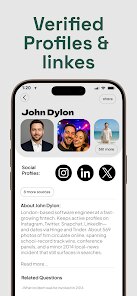
- 👍 Its source citation is clear and clickable. Unlike Perplexity AI, which sometimes hides references behind vague links, Deepcheck labels sources explicitly, so you know exactly where the info came from.
- 👍 The onboarding is refreshingly simple. You can start searching without creating an account, something that sets it apart from tools like Bing Chat which nag you to sign in.
- 👍 It handles multiple languages decently well. I tested it with a Spanish query, and it gave a relevant answer, which isn't always the case with more English-focused AI assistants.
cons
- 👎 The free tier has a strict usage cap. After a handful of searches, you hit a paywall. Perplexity AI offers more queries before requiring payment, which feels more generous.
- 👎 It struggles with real-time information. If you ask about breaking news, the answers are often outdated. Google still wins hands-down for timeliness.
- 👎 The app occasionally gives overly simplified answers. When I asked a complex question about blockchain forks, it glossed over important details. Perplexity lets you dig deeper with follow-ups.
- 👎 There's no offline mode. If you lose internet, the app is useless. Similar tools like Wolfram Alpha at least have a limited offline reference section.
Articles
![]()
Guide
How to Update Google Play Store on Android 2026
![]()
Guide
How to Download Older Versions of Android Apps
![]()
Guide
How to Download Apps Without Google Play Store
![]()
Guide
What Is an APK File for Android?
If you use an Android phone, you may have seen the term APK while searching for apps or games online. Some websites offer an APK download instead of a Google Play install button. Some users also mention APK files when talking about apps that are not available in their region, older app versions, or Android games downloaded outside the Play Store.
![]()
Guide
How to Install Games from Google Play for Beginners
Installing games on an Android phone is usually simple, but for beginners, the process can still feel confusing at first. You may not know where to search, which button to tap, whether the game is safe, or why Google Play sometimes asks for account settings, storage access, or payment information. If you are using an Android phone for the first time, learning how to install games from Google Play is one of the easiest ways to get started.
![]()
Guide
How Useful Gemini Is for Everyday Questions and Quick Tasks
emini feels different from many AI apps because it is not only trying to be a chatbot. After using it for everyday questions, quick writing, image understanding, and planning, I think its biggest strength is convenience.
![]()
Guide
What to Know Before Downloading APKs
For many Android users, downloading an APK is a common way to install apps and games. Sometimes an app is not available in a certain country.
![]()
Guide
ChatGPT Review: Is It Still the Best AI App in 2026?
![]()
Guide
Seedance 2.0 vs Sora: The Future of AI Video Generation
The AI video race has intensified dramatically over the past two years. Platforms like Sora from OpenAI and Luma Dream Machine pushed the boundaries of text-to-video realism. Yet, despite their impressive outputs, most tools still operate as probabilistic generators—you describe a scene, and the model interprets it. Control remains limited. With the February 2026 release of Seedance 2.0, developed by ByteDance, the paradigm shifted. Internally known as Jimeng 2.0, Seedance does not position itself as just another video model. It positions itself as an AI Director. Rather than guessing what you want, Seedance 2.0 allows you to direct what happens. This distinction defines everything that follows.









Recommended Apps
![]()
Home Design 3D
Anuman4.2
![]()
Truth or Dare Game - Party App
Chouic4.8
![]()
Photo Collage Maker
Scoompa4.7![]()
Learn to Draw Flower
Creative APPS4.2![]()
FIFA World Cup 2026™
FIFA2.8![]()
Mirror Plus: Mirror with Light
Digitalchemy, LLC4.4![]()
Meitu- Photo Editor & AI Art
Meitu (China) Limited4.5![]()
Perplexity - Ask Anything
PerplexityAI4.7![]()
GhostTube SLS Camera Alternate
GhostTube4![]()
Boom Chip Blast: 2-Player
Black Pyramid 3D Games Studio0![]()
Healthy Benefits+
Solutran, Inc.4.5![]()
Deepcheck AI Search Assistant
rohe.ai4![]()
Idol Prank Video Call & Chat
LightCode Solutions4![]()
Face Shape - Pretty Scale
GlintTec Apps3.9![]()
Plant App - Plant Identifier
ScaleUp4.6










































