

Photo Collage Maker

50M+
Installs
Scoompa
Developer
-
Video Players & Editors
Category
-
Rated for 3+
Content Rating
-
contact+cm@scoompa.com
Developer Email
-
http://goo.gl/q5z4fP
Privacy Policy
Screenshots
editor reviews
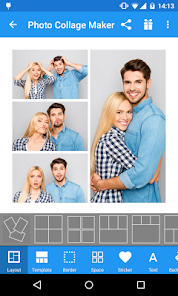
Photo Collage Maker from Scoompa is exactly what it sounds like — a straightforward tool for stitching multiple photos into a single layout. It's one of those utility apps you grab when you want to share a bunch of vacation shots or event pictures without flooding someone's chat with individual uploads. You basically pick your photos, choose a grid or freestyle arrangement, maybe slap on a filter or some text, and export it. I downloaded it out of pure necessity, actually needed something quick after a weekend trip. First impression after launch was decent enough, nothing flashy but also not a total eyesore. The app sits on Google Play with a solid install count in the millions, fully free to download, though you'll run into ads between edits unless you pay for the ad-free version. No mandatory registration, which I appreciated because I just wanted to get a collage done and move on with my day.
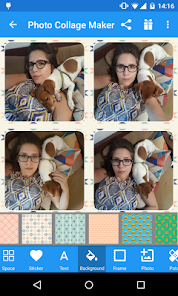
Using it for the first time felt familiar if you've ever touched any photo editing app. The interface shows your gallery immediately, so you pick images, and then it throws you into a layout selection screen. There are preset grids, but also a freestyle mode where you can drag photos around manually — that part was surprisingly smooth. I made a 9-photo collage, and the app handled it without lagging, which impressed me because some other editors start choking past six images. One small thing I liked was the ability to adjust border width and roundness on each frame individually, not just a global slider. The editing flow goes: select layout, adjust spacing, apply a filter if you want, add optional text, then export. Export quality lets you choose between standard and high resolution, which matters if you're planning to print or post somewhere that doesn't compress your work further. Only hiccup I hit was the ad frequency — every time I saved or went back to the main menu, a full-screen ad popped up. Not a dealbreaker, but definitely annoying.
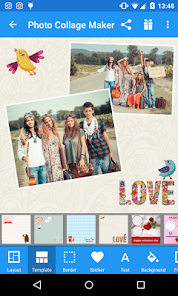
After a few weeks of using it on and off, I'd say it's good for casual collage making, especially if you don't want to mess with complicated layers or masks like you'd have to in Photoshop Express or PicsArt. The simplicity is its main appeal — you're in and out in under two minutes. Someone who posts Instagram stories or Facebook updates regularly would probably keep this installed permanently. On the other hand, if you're someone who needs precise alignment tools or batch editing, you'll outgrow it fast. Compared to Canva or Layout from Instagram, this one gives you more control over spacing and frame shapes, but lacks any real design templates or sticker packs. The ads push me toward uninstalling sometimes, but the lack of a forced watermark balances it out. I'll keep it as a backup but won't claim it's the best in the Play Store.
features
- 🎞️ Advanced frame editing — Unlike Layout from Instagram, where you get a fixed set of grids with zero customization, Photo Collage Maker lets you tweak each frame's border width, corner roundness, and even shadow individually. You can make one photo stand out with a thick border while keeping others slim, something neither Canva nor PicsArt allow without diving into manual layer work.
- 🎞️ High-resolution export without watermark — Most free collage apps either cap export at 1080p or slap a watermark on your final image. This one lets you export up to 4K resolution and keeps it clean, no logo stamped anywhere. That alone puts it ahead of tools like FotoJet or BeFunky's free tiers, which force branding unless you pay up.
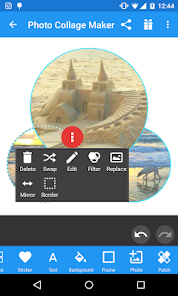
- 🎞️ Freestyle mode with drag-and-drop — The freestyle layout is not just a gimmick. You can place photos anywhere on the canvas, resize them with two-finger pinch, and rotate freely without snapping to a grid. It feels closer to a basic version of Photoshop's free transform than what most mobile collage makers offer, where you're usually locked into preset slots.
- 🎞️ Offline functionality — The app works fully offline after initial download. No account, no internet needed for editing or exporting. That's rare among collage apps these days — even Layout from Instagram requires a connection since it's tied to the platform. Great for editing on flights or in areas with spotty signal.
pros
- 💪 No forced watermark — A lot of free collage apps like PicCollage or FotoJet stamp their brand across your final image unless you pay. This one doesn't, which makes it way more usable for actually sharing photos without feeling cheap.
- 💪 Handles up to 15 photos per collage — Most default layouts top out at 9 images. Scoompa's app lets you cram up to 15 into a single canvas, which is helpful for event recaps or vacation dumps where you want everything in one swipe-friendly graphic.
- 💪 Border customization is granular — Canva gives you preset spacing options, but here you control individual frame borders, including color, width, and rounding. If you want one photo framed like a polaroid and another edge-to-edge, you can do that without workarounds.
cons
- 😒 Frequent full-screen ads — Between saving an edit and returning to the gallery, you're hit with a full-screen ad almost every time. Even for a free app, it feels excessive compared to something like Canva's free tier, which keeps ads to a small banner at the bottom.
- 😒 No sticker packs or clip art — If you're into decorative collages with stickers, text art, or doodles, this app isn't for you. PicsArt and PicCollage offer huge sticker libraries, while this one sticks to barebones frames, filters, and basic text. Feels limited for creative projects.
- 😒 No layer-based editing — You can't overlap photos or adjust opacity like you can in PicsArt or even the free version of Photoshop Express. Everything sits in separate frames, so if you wanted a photo bleeding into another image, you'd have to export and re-edit elsewhere.
- 😒 Export occasionally drops quality — I've had a few exports where the final JPEG looked slightly compressed even at high settings, losing sharpness around edges. Compared to Layout from Instagram, which outputs crisp images consistently, this feels like a hit-or-miss situation depending on how many photos you jam in.
Articles
![]()
Guide
How to Update Google Play Store on Android 2026
![]()
Guide
How to Download Older Versions of Android Apps
![]()
Guide
How to Download Apps Without Google Play Store
![]()
Guide
What Is an APK File for Android?
If you use an Android phone, you may have seen the term APK while searching for apps or games online. Some websites offer an APK download instead of a Google Play install button. Some users also mention APK files when talking about apps that are not available in their region, older app versions, or Android games downloaded outside the Play Store.
![]()
Guide
How to Install Games from Google Play for Beginners
Installing games on an Android phone is usually simple, but for beginners, the process can still feel confusing at first. You may not know where to search, which button to tap, whether the game is safe, or why Google Play sometimes asks for account settings, storage access, or payment information. If you are using an Android phone for the first time, learning how to install games from Google Play is one of the easiest ways to get started.
![]()
Guide
How Useful Gemini Is for Everyday Questions and Quick Tasks
emini feels different from many AI apps because it is not only trying to be a chatbot. After using it for everyday questions, quick writing, image understanding, and planning, I think its biggest strength is convenience.
![]()
Guide
What to Know Before Downloading APKs
For many Android users, downloading an APK is a common way to install apps and games. Sometimes an app is not available in a certain country.
![]()
Guide
ChatGPT Review: Is It Still the Best AI App in 2026?
![]()
Guide
Seedance 2.0 vs Sora: The Future of AI Video Generation
The AI video race has intensified dramatically over the past two years. Platforms like Sora from OpenAI and Luma Dream Machine pushed the boundaries of text-to-video realism. Yet, despite their impressive outputs, most tools still operate as probabilistic generators—you describe a scene, and the model interprets it. Control remains limited. With the February 2026 release of Seedance 2.0, developed by ByteDance, the paradigm shifted. Internally known as Jimeng 2.0, Seedance does not position itself as just another video model. It positions itself as an AI Director. Rather than guessing what you want, Seedance 2.0 allows you to direct what happens. This distinction defines everything that follows.









Recommended Apps
![]()
Home Design 3D
Anuman4.2
![]()
Truth or Dare Game - Party App
Chouic4.8
![]()
Photo Collage Maker
Scoompa4.7![]()
Learn to Draw Flower
Creative APPS4.2![]()
FIFA World Cup 2026™
FIFA2.8![]()
Mirror Plus: Mirror with Light
Digitalchemy, LLC4.4![]()
Meitu- Photo Editor & AI Art
Meitu (China) Limited4.5![]()
Perplexity - Ask Anything
PerplexityAI4.7![]()
GhostTube SLS Camera Alternate
GhostTube4![]()
Boom Chip Blast: 2-Player
Black Pyramid 3D Games Studio0![]()
Healthy Benefits+
Solutran, Inc.4.5![]()
Deepcheck AI Search Assistant
rohe.ai4![]()
Idol Prank Video Call & Chat
LightCode Solutions4![]()
Face Shape - Pretty Scale
GlintTec Apps3.9![]()
Plant App - Plant Identifier
ScaleUp4.6










































